
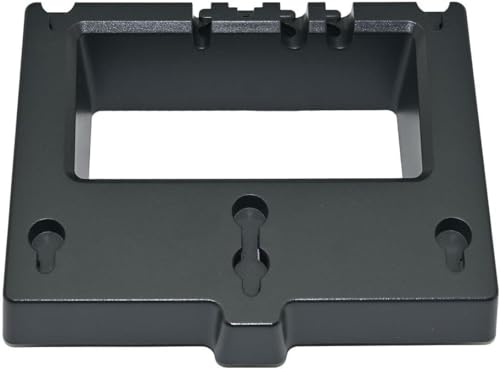
Yealink Wall Mount Bracket for T33G and T34W and MP52
Frequently Asked Questions
First, ensure you have the correct bracket for your phone model (T33G, T34W, or MP52). The bracket typically screws into the wall, and then the phone slides or clips onto the bracket. Check the included instructions for exact steps. If you don't see alignment marks, gently test-fit the phone before tightening wall screws fully.
No, this bracket is designed specifically for the Yealink T33G, T34W, and MP52 IP phones. Using it with other models may result in an insecure fit or damage. For other Yealink phones, look for a bracket labeled for that specific series.
The product description does not specify included hardware. Many Yealink wall mount brackets include screws and wall anchors, but it's best to confirm with your supplier. If not included, you will need standard drywall anchors and screws appropriate for your wall type.
First, double-check that the bracket is fully seated and the mounting tabs are engaged. Ensure the wall anchors are secure and the screws are tight. If the phone itself has a removable stand, verify it was detached before mounting. If the wobble persists, the bracket may not be level or the wall surface may be uneven.
Yes, the bracket is passive and made of plastic, so it does not interfere with PoE or Ethernet connections. Just make sure you leave enough slack in the cable so it isn't stressed when the phone is mounted. A strain relief or cable tie may help keep the cable tidy.
Typically you'll need a drill with a bit matching your wall anchor size, a screwdriver (Phillips or flathead depending on screws), and a level to ensure the bracket is straight. If mounting into drywall, use anchors rated for the weight—the bracket itself is very light, but the phone adds a bit of weight.
Yes, most Yealink wall mount brackets allow you to lift the phone off or slide it up and out. This makes it easy to access ports or move the phone temporarily. However, always check the manual for your specific phone and bracket combination to avoid damaging the clips.
No, this bracket is non-metallic and does not obstruct wireless signals. If your phone uses wireless connectivity, the bracket should have no impact. The only potential concern is if you mount the phone inside a metal enclosure—but the bracket itself is fine.
The bracket is explicitly designed for the Yealink T33G, T34W, and MP52. Check the model number on the back or system information on your phone. If your phone is any other model, it will not fit. When in doubt, contact the seller with your phone's exact model number.
Yealink publishes documentation online. Search for "Yealink wall mount bracket guide for [your phone model]" on their official support site. Alternatively, a brief video search may show the installation process. If you are in the GTA, a local VoIP reseller may also provide quick guidance.
Accessories
Yealink Wall Mount Bracket for T33G and T34W and MP52
• Designed for Yealink T33G, T34W, and MP52 IP Phones • Black color with a sleek design • Key Features: • Weight: 0.2 lbs • Dimensions: 8 × 8 × 6 in • Compatible with Yealink WMB-T33G/T34W/MP52 Wall Mount Bracket • Brand: Yealink • Accessory Type: Wall Mount
About This Product
This Yealink wall mount bracket is a practical accessory for anyone using the T33G, T34W, or MP52 IP phones in a setting where desk space is limited or a clean, fixed installation is preferred. It is particularly well-suited for lobbies, reception areas, conference rooms, or any environment where the phone should be hung on a wall rather than sitting on a desk. The bracket itself is lightweight and minimal, so it blends in without adding bulk, but it is purpose-built for these specific phone models and may not work with others. For a Toronto office deployment where multiple phones are being wall-mounted, this bracket simplifies cabling and keeps the workspace tidy. It is not overkill for any scenario—it is a simple, affordable add-on—but if you are using a phone model not listed, this bracket will not fit, so verify compatibility before purchasing.
Services We Provide
- Professional Installation & Configuration
- Ongoing Maintenance & Support
- Troubleshooting & Repairs
- System Upgrades & Updates



