
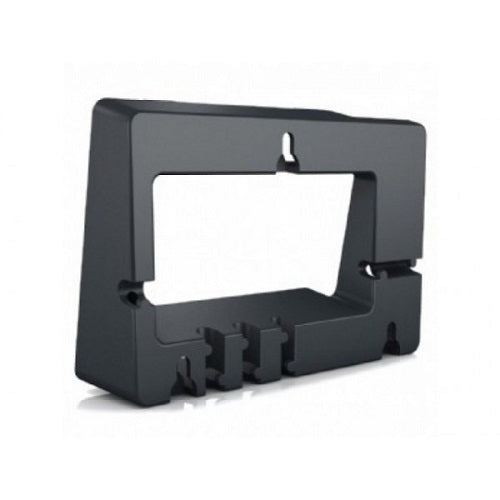
Yealink Wall Mount Bracket for T57W/T58W/MP58
Frequently Asked Questions
First, confirm all four screws are snug against the bracket and that any drywall anchors are fully expanded behind the wall. Then reseat the phone by pressing its mounting slots firmly onto the bracket’s hooks; sometimes it hasn’t clicked all the way down. If the issue persists, a Toronto-based VoIP support provider can usually help with a quick on-site check.
Yes—standard plastic wall anchors rated for at least 10 lbs will work, since the bracket and phone together weigh under 2 lbs. Make sure the anchors are flush with the wall surface before driving the screws, or the bracket may not sit flat.
This bracket is engineered only for the Yealink T57W, T58W, and MP58. Double-check your phone’s model label under the base. If it matches but still won’t line up, look for any protective film or a small plastic tab that might be covering the screw insets—in rare cases packing material gets missed.
Those phone models have a reversible hookswitch tab that must be rotated for wall use. Pop out the plastic tab from the handset cradle, turn it so the curved lip faces upward, and snap it back in. That lets the handset hang securely when the phone is vertical.
No—the mounting hole pattern and hook points are specific to the T57W, T58W, and MP58. Using it on any other phone will likely result in a loose fit or blocked ports, and you risk damaging the phone’s casing.
A slim-profile patch cable or a right-angle RJ45 connector can keep the cable nearly flush against the wall. Route it through the bracket’s lower cutout first, then plug it into the phone, so the excess stays behind the mount.
Generally not. The bracket covers the expansion module connector at the bottom of the phone, and there’s no cutout to accommodate the module’s attachment. If you need sidecar modules, a desktop or desk-mount solution is a better route. If you’re unsure about your options, a Toronto-based VoIP support provider can suggest an alternative setup that fits your space.
Accessories
Yealink Wall Mount Bracket for T57W/T58W/MP58
Product Type: Wall Mount Bracket Colour: Black Designed for Yealink SIP T57W/T58W/MP58 phones • Compatible with popular Yealink models for easy installation Additional Information: • Weight: 0.5 lbs • Dimensions: 8 × 8 × 4 in
About This Product
This bracket is a straightforward solution for anyone looking to reclaim desk space by mounting a Yealink T57W, T58W, or MP58 phone flush against a wall. It’s the kind of accessory that often gets overlooked until an office layout demands it—think a small Toronto law firm’s reception counter, a Vaughan dental clinic hallway, or a retail back-office where every square inch counts. Because it’s purpose-built for these specific models, the fit is secure and the phone’s natural cable routing is accounted for, so you’re not left improvising with generic mounts that could block ports or leave the phone wobbly.
Installation is simple but not entirely brainless: you’ll need basic tools and the right wall anchors if you can’t hit a stud. The bracket itself adds almost no depth, so the phone ends up sitting only a few centimetres off the wall. That keeps the screen at a fixed viewing angle—fine for standing use or a quick glance while passing by, but less forgiving if someone needs to read the display from a chair directly below. If your setup requires an expansion module or side-mounted headset adapter, you’ll likely find this mount impractical, since the phone’s lower edge and module connector end up pressed against the bracket. For a clean, single-phone-per-location deployment with no extras, though, it does exactly what it should.
Installation is simple but not entirely brainless: you’ll need basic tools and the right wall anchors if you can’t hit a stud. The bracket itself adds almost no depth, so the phone ends up sitting only a few centimetres off the wall. That keeps the screen at a fixed viewing angle—fine for standing use or a quick glance while passing by, but less forgiving if someone needs to read the display from a chair directly below. If your setup requires an expansion module or side-mounted headset adapter, you’ll likely find this mount impractical, since the phone’s lower edge and module connector end up pressed against the bracket. For a clean, single-phone-per-location deployment with no extras, though, it does exactly what it should.
Services We Provide
- Professional Installation & Configuration
- Ongoing Maintenance & Support
- Troubleshooting & Repairs
- System Upgrades & Updates



