
Yealink Wall Mount for T5W SIP Phones T53 T53W T54W
Frequently Asked Questions
First, ensure you have the correct bracket for your T53/T53W/T54W phone. Align the phone's mounting slots with the bracket's tabs, then slide the phone downward until it clicks into place. If it doesn't seat fully, double-check that the bracket is oriented correctly and the phone model matches.
This bracket typically does not include wall screws. You'll need #6 or #8 wood screws (or appropriate anchors for drywall) about 1 inch long. Match the screw head to the bracket's keyhole slots. If you're unsure, consult a hardware store or your facility manager for the right fasteners.
Check that the bracket is securely fastened to the wall with screws into studs or heavy-duty anchors. Also verify that the phone has clicked fully into the bracket's locking tabs. If the bracket itself is wobbly, tighten the wall screws or move the bracket to a better mounting surface.
Yes, the bracket is designed to accommodate the handset cord. When mounting, route the handset cord through the bracket's openings so it doesn't pinch. The phone's handset cradle still functions normally on the wall.
First confirm that the bracket is indeed for T53/T53W/T54W – some brackets look similar but are for other models. Then remove any existing mounting feet or stands from the phone. Align the bracket tabs with the slots on the back of the phone – there should be two tabs at the top and two at the bottom. If it still won't fit, contact your vendor to verify compatibility.
The bracket is designed for standard drywall or wood studs. On glass or metal, you would need specialty adhesives or drilling, which may void warranties or damage the surface. For non-standard materials, consult a professional installer before attaching the bracket.
Inspect the bracket carefully. If it appears damaged, return it to the seller for a replacement. Do not attempt to mount a bent bracket – it may not hold the phone securely or could damage the phone's mounting slots.
Use the bracket's cable management cutouts to route the Ethernet cable behind the phone on the wall. Make sure the cable is not stretched or kinked. For a clean look, you can use a surface-mount raceway on the wall leading to the bracket.
The phone should lock into place with a click. If it slides off, the locking tabs on the bracket may be obstructed. Check that no debris or plastic flashing is blocking the groove. Also ensure the phone's mounting slots are clean. If the issue persists, the bracket may be defective – contact your support provider.
Locate the release latch on the bracket (usually near the bottom or top). Press or lift the latch while gently pulling the phone upward and away from the bracket. Do not force it – if it's stuck, check that the handset cord isn't caught.
Accessories
Yealink Wall Mount for T5W SIP Phones T53 T53W T54W
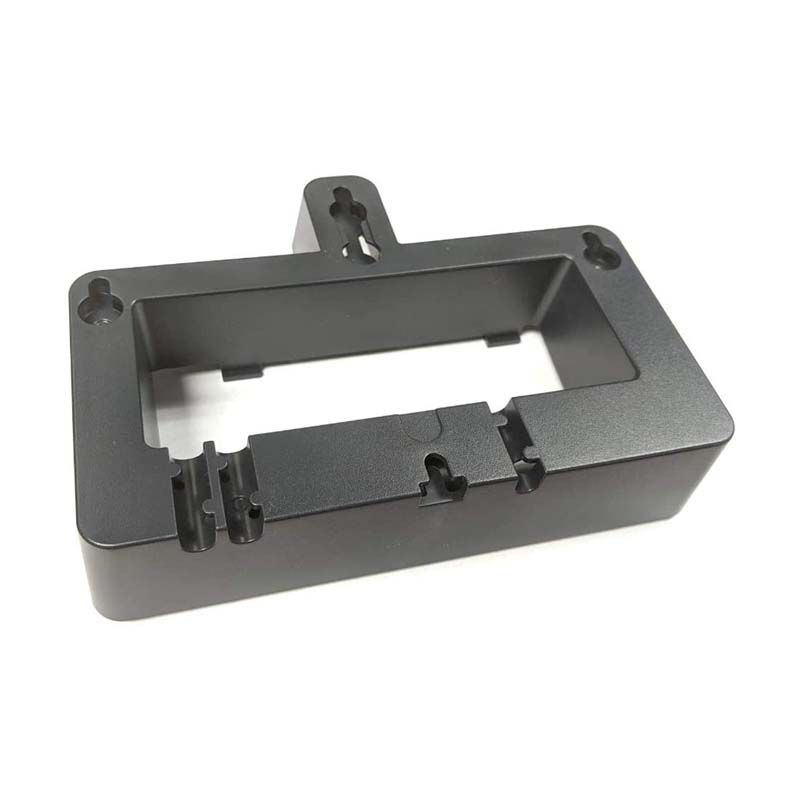
This Yealink wall mount bracket is designed for T53/T53W/T54W phones only. The key features of this product include: • Weight: 0.5 lbs • Dimensions: 8 × 8 × 4 in • Brand: Yealink • Accessory Type: Wall Mount Brackets Please note that the weight and dimensions are approximate values, and may vary slightly due to manufacturing tolerances.
About This Product
This wall mount bracket is designed specifically for Yealink T53, T53W, and T54W SIP desk phones. It's a practical accessory for environments where desk space is at a premium, such as open-plan offices, reception areas, or industrial settings. Mounting the phone on a wall keeps it accessible while freeing up the desk for other equipment or paperwork. For businesses in the GTA or other Canadian urban centres, this bracket can help optimize tight workspaces without sacrificing phone functionality.
The bracket pairs only with the listed models, so you must verify your phone's model number before purchasing. Installation is straightforward, but you'll need to locate wall studs or use appropriate anchors for drywall. One tradeoff to consider is that once wall-mounted, the phone becomes less portable and may be harder to reach for configuration changes or cable management. This bracket is overkill if you have ample desk space and never need to mount the phone, but it's a simple, cost-effective solution for anyone who does.
The bracket pairs only with the listed models, so you must verify your phone's model number before purchasing. Installation is straightforward, but you'll need to locate wall studs or use appropriate anchors for drywall. One tradeoff to consider is that once wall-mounted, the phone becomes less portable and may be harder to reach for configuration changes or cable management. This bracket is overkill if you have ample desk space and never need to mount the phone, but it's a simple, cost-effective solution for anyone who does.
Services We Provide
- Professional Installation & Configuration
- Ongoing Maintenance & Support
- Troubleshooting & Repairs
- System Upgrades & Updates



