
Yealink WH62 V3 Dual DECT Wireless Headset UC Version (WH62 Dual UC V3)-1308006(C)

Frequently Asked Questions

Ensure the base station is powered on and the headset is charged. Press and hold the pairing button on the base for about 3 seconds until the LED flashes rapidly, then press the answer button on the headset. If it still fails, check that no other headset is already paired—the WH62 Dual base supports two headsets, but you must pair them one at a time.
First, verify you are within the headset's 160-metre range and that there are no thick walls or metal obstructions between the headset and the base. Try repositioning the base to an open, elevated location away from electronic interference (like Wi-Fi routers or microwaves). If the problem persists, a Toronto-based VoIP support provider can help identify local interference sources.
Check that the base is connected to your PC via the USB cable and that the headset is selected as the default communication device in Windows sound settings (right-click the speaker icon, open Sound settings, and choose WH62 under Input and Output). Also, confirm that the Yealink USB Connect software is installed if needed—some UC platforms require a driver for full functionality.
First, make sure the busylight feature is enabled on the headset itself—typically by pressing and holding the volume-up button for a few seconds until you hear a tone. If it still doesn't work, check if the feature is supported with your specific UC platform or desk phone; the WH62 V3 supports busylight for Yealink phones and some softphones, but compatibility varies.
Lower the headset volume slightly, as high volume can cause feedback. Ensure the headset is worn correctly with the microphone close to your mouth. If you're using a softphone, check for any built-in echo cancellation settings in the application. A simple power cycle of both the headset and base often resolves temporary echo issues.
Yes, the WH62 V3 Dual UC version includes a telephone cable in the box. Connect the base's Tel port to your desk phone's headset port using that cable. You may need to configure the desk phone to use the headset port (check your phone's settings). Note that for desk phone integration, features like busylight and call control may be limited compared to USB softphone use.
The WH62 Dual offers up to 14 hours of talk time, but actual battery life depends on call volume and features like busylight. If you are experiencing significantly shorter runtime, first check that the headset is fully charged by placing it on the base until the LED turns solid green. A battery that has been deeply discharged multiple times may require replacement—contact your distributor if the issue continues.
Make sure the headset is properly paired and connected via USB. Some UC applications require you to assign call control to the headset within their settings (e.g., in Teams, go to Devices and select the WH62 as the audio device). If call control still doesn't work, try plugging the base into a different USB port or reinstalling the Yealink USB driver.
You can check the current firmware version by pressing the mute button for 3 seconds while the headset is on—it will announce the version. Compare this with the latest firmware listed on the Yealink UK or Canada support site. If an update is available, download the firmware file and use the Yealink USB Connect software to apply it (do not interrupt the update process).
First, confirm the power adapter is securely connected to the base and plugged into a working outlet. If using Power over Ethernet (PoE), note that this model does not support PoE—it requires the included power adapter. If the LED still doesn't light, try a different USB cable for data connection (but note that the base requires external power, not bus power from USB alone).
Headsets

Yealink WH62 V3 Dual DECT Wireless Headset UC Version (WH62 Dual UC V3)-1308006(C)
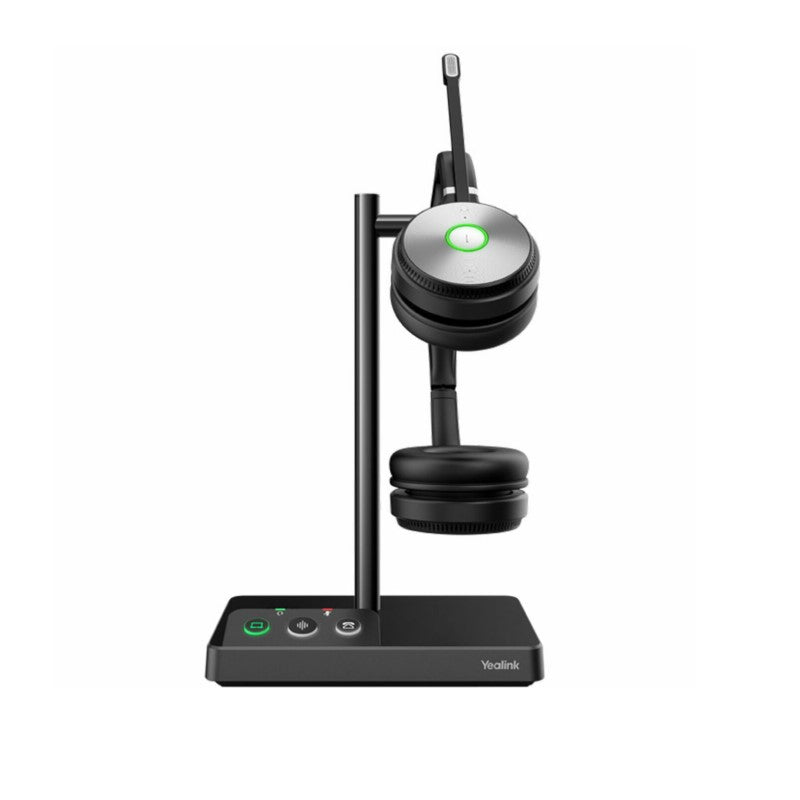
• Yealink WH62 Dual is a new entry-level DECT wireless headset designed for seamless integration with major UC platforms and Yealink IP phones. Experience crystal-clear sound with Yealink Super Wideband Technology and Acoustic Shield Technology, ensuring clear conversations during phone calls and video conferencing. • Key Features: • 2 Micro-USB connections • Ringer on the base • Supports busylight • Yealink Acoustic Shield Technology for enhanced audio quality • Up to 14 hours of talking time (Dual) • Wireless range up to 160m • Technical Specifications: GENERAL INFO: Model: WH62 Dual UC (V3) Part number: 1308006(C) Box Contents: Base Dual headset Power Adapter Telephone Cable for WH62/WH63 1.2m USB 2.0 Cable 0.8m USB 2.0 Cable Quick Start Guide Audio (Headset): Microphone type: dual microphone Microphone sensitivity: -44.0+/-3 dBV Microphone frequency range: 100 Hz-10 kHz Speaker size: Ф 28 Speaker sensitivity: 92.5+/-3 dB, 0.179 V Speaker impedance: 32+/-4.8 Ω Speaker max output power: 10 mW Speaker frequency range: 20 Hz-20 kHz Hearing Protection: Peak Block Protection (EN50332) Australian G616 Protection (AU G616) Daily Noise Exposure Protection

About This Product

The Yealink WH62 V3 Dual is an entry-level DECT wireless headset designed for professionals who need reliable hands-free communication in an office or home-office setting. It pairs seamlessly with major UC platforms like Microsoft Teams or Zoom, as well as with Yealink IP phones, making it a versatile choice for Canadian businesses, including those in the GTA, where hybrid work is common. Its dual-headset variant allows two users to share one base, which is practical for small teams in a shared workspace. While the 160-metre wireless range is generous for open offices, it is best suited for stationary use near the base—not for roaming far from your desk. For a business that values simplicity and good audio quality without a steep learning curve, this headset hits the right balance between cost and performance. However, it lacks advanced features like Bluetooth multipoint or premium noise cancellation, so it may feel underpowered if you need to juggle calls between a desk phone, a softphone, and a mobile device simultaneously. In a busy call centre with high headset turnover, the entry-level focus means it may not withstand the same daily wear as a higher-end model, but for individual use or small deployments, it is a solid, straightforward choice.
Services We Provide
  • Professional Installation & Configuration
  • Ongoing Maintenance & Support
  • Troubleshooting & Repairs
  • System Upgrades & Updates



