
Yealink WH62 V3 Wireless DECT Mono UC Headset (WH62 Mono UC V3)-1308005(C)

Frequently Asked Questions

First, confirm the base station is powered on and the USB cable is securely connected to your phone or computer. Then check that the headset is properly paired with the base—press the pairing button on the base and the headset simultaneously. If the issue persists, a Toronto-based VoIP support provider can usually resolve this remotely.
Make sure the headset is within the 160-metre range and there are no large metal obstacles between the headset and base. Also verify the base station is not placed near a Wi‑Fi router or cordless phone that could cause interference. Power cycling both the headset and base often clears temporary glitches.
Ensure the microphone boom is positioned close to your mouth, about one finger-width away. Check that the mute button on the headset is not accidentally engaged. If you're using a softphone, verify the correct audio device (Yealink WH62) is selected in the application's settings.
The busylight feature requires that the headset is registered with a supported UC platform or Yealink phone that sends the busy signal. First, confirm your softphone or desk phone supports busylight integration. Then check that the busylight option is enabled in the headset's settings via the Yealink USB Connect software.
Place the headset in the base cradle to charge, then press and hold the pairing button on the base for about four seconds until the LED flashes. On the headset, press and hold the volume up button for four seconds. The two should sync within 30 seconds. If not, power cycle both devices and try again.
Yes, the WH62 V3 is designed for seamless integration with major UC platforms. Connect the base station to your computer via the included USB cable, then select 'Yealink WH62' as your audio device in Teams or Zoom settings. The headset's call control buttons (answer/end, mute) will work natively with most softphones.
Echo usually occurs when the headset volume is too loud or the microphone picks up sound from the speaker. Lower the headset volume a few steps. Also ensure the microphone boom is not pointing toward the speaker. If using a softphone, check that acoustic echo cancellation is enabled in the application's audio settings.
First, make sure the headset is properly seated in the charging cradle and the base is powered on. Clean the charging contacts on both the headset and cradle with a dry cloth. If the battery still drains faster than the rated 13 hours, the battery may need replacement—contact support for assistance.
Yes, the WH62 V3 features Yealink Super Wideband Technology, which delivers a broader frequency range (speaker up to 20 kHz) for noticeably clearer speech. This works with any UC platform that supports wideband codecs. For best results, ensure your softphone or phone system is configured for wideband audio.
A periodic beep usually indicates the battery is low—place the headset in the charging cradle. If the beep continues after charging, check if the headset is within range of the base (a warning tone sounds when you move out of range). If neither applies, the beep may be a hearing protection alert; review the headset's peak block protection settings in the Yealink USB Connect software.
Headsets

Yealink WH62 V3 Wireless DECT Mono UC Headset (WH62 Mono UC V3)-1308005(C)
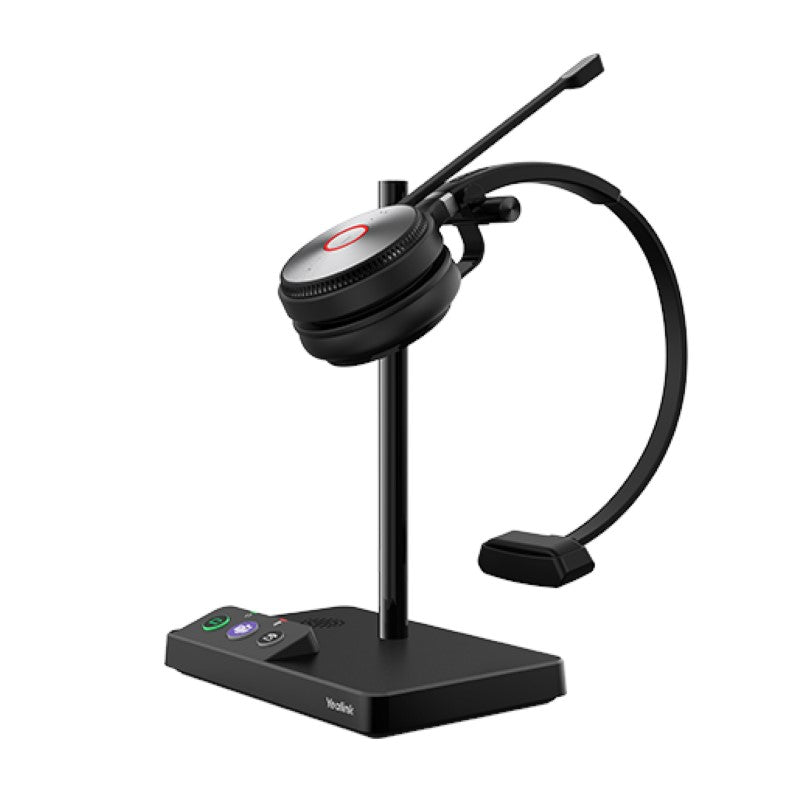
• Yealink WH62 Mono is a new entry-level DECT wireless headset, designed for seamless integration with major UC platforms and Yealink IP phones. It features crystal-clear sound thanks to Yealink Super Wideband Technology and Acoustic Shield Technology. Key Features: • 2 Micro-USB connections • Ringer on the base • Supports busylight • Yealink Acoustic Shield Technology • Talking Time up to 13 hours (Mono) • Wireless range up to 160m Technical Specifications: Microphone type: dual microphone Microphone sensitivity: -44.0±3 dBV Microphone frequency range: 100 Hz-10 kHz Speaker size: Φ28mm Speaker sensitivity: 92.5±3 dB, 0.179 V Speaker impedance: 32±4.8 Ω Speaker max output power: 10 mW Speaker frequency range: 20 Hz-20 kHz Hearing Protection: • Peak Block Protection (EN50332) • Australian G616 Protection (AU G616) • Daily Noise Exposure Protection For a full list of specifications, please refer to the product datasheet.

About This Product

The Yealink WH62 V3 Mono is an entry-level DECT wireless headset designed for professionals who need reliable, hands-free communication without the complexity or cost of high-end models. It's a natural fit for small to medium-sized offices in the GTA, where employees split their time between softphone applications (like Microsoft Teams or Zoom) and Yealink desk phones. The mono earpiece keeps you aware of your surroundings—ideal for open-plan environments or roles where you need to hear colleagues while on a call.
Services We Provide
  • Professional Installation & Configuration
  • Ongoing Maintenance & Support
  • Troubleshooting & Repairs
  • System Upgrades & Updates



