
Yealink WH64 Dual UC -1208673

Frequently Asked Questions

First, ensure the base station is powered on and the phone is connected to the base via the supplied USB or RJ9 cable. If the headset is not paired, place it in the charging cradle and press the pairing button on the base for about 3 seconds until the LED flashes. If the issue persists, a Toronto-based VoIP support provider can usually resolve this remotely.
Check that the charging contacts on both the headset and the cradle are clean and free of debris. Also verify that the cradle is receiving power—try a different USB port or power adapter. If the headset still does not charge, the battery may need to be replaced.
Make sure the microphone boom arm is positioned close to your mouth and not blocked by clothing. Also check that the mute button on the headset is not activated—press it once to unmute. If the problem continues, test the headset with another device to rule out a hardware issue.
Put the headset in pairing mode by pressing and holding the Bluetooth button on the headset for about 5 seconds until the LED flashes red and blue. Then go to your phone's Bluetooth settings and select 'WH64' from the list of available devices. Once paired, the headset will remember your phone for future connections.
This is usually a range issue. In DECT mode, the headset works up to 150 metres in open space, but walls and interference can reduce that. Try moving closer to the base station. If you are using Bluetooth, the range is about 50 metres—stay within that distance and avoid physical obstructions.
First, power cycle the base station by unplugging it for 10 seconds and plugging it back in. Then place the headset in the cradle to re-establish the DECT link. If disconnections persist, check for interference from other wireless devices (like Wi-Fi routers or cordless phones) and move the base away from them.
Yes, the WH64 is UC certified and works with most softphones. Connect the base to your computer via USB, and it should be recognized as a plug-and-play audio device. You may need to select 'WH64' as your audio input and output in the softphone's settings.
The busylight is controlled by the headset's call status. Make sure the headset is properly paired and that the call is active. If the light still does not work, check the busylight port connection on the base station. You can also test the light by pressing the busylight button on the headset to see if it toggles.
Firmware updates are done through Yealink's Device Manager or the Yealink USB Connect software. Connect the base station to your computer via USB, launch the software, and follow the on-screen instructions to check for and install updates. Do not disconnect the headset during the update process.
The WH64 is designed for all-day wear, but comfort can vary. Try adjusting the headband and rotating the ear cups for a better fit. If you still find it uncomfortable, consider using the optional gel ear cushions or taking short breaks to relieve pressure.
Headsets

Yealink WH64 Dual UC -1208673
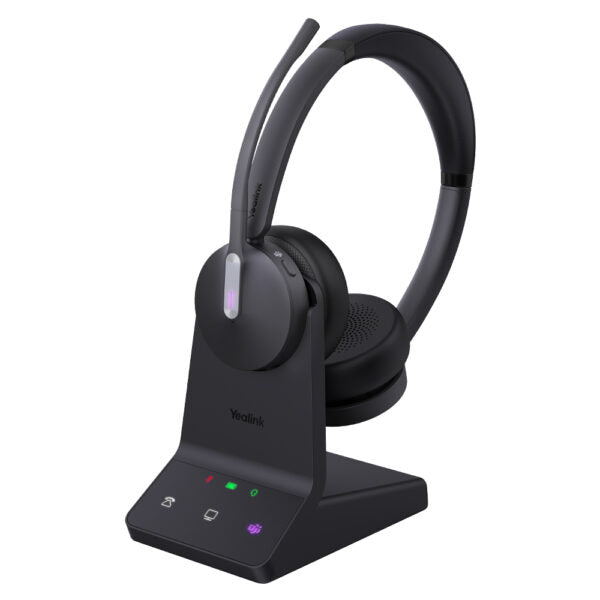
• The WH64 Dual UC wireless headset for business communication offers a seamless and efficient experience. Its advanced acoustic shield technology 2.0 filters out background noise, ensuring clear sound transmission. The busylight signals your call status to avoid interruptions. Key Features: • DECT & Bluetooth Hybrid Wireless Technology • All-day-wearing Comfort • Acoustic Shield Technology 2.0 • Hybrid Visual Busylight • Plug & Play for Mainstream IP Phones • Up to 32 hours Talking Time • Multiple Devices Connection • Compatible with mainstream UC platforms Weight: 1.74lb Dimensions: 7.6 × 9.4 × 3.92 in Headset Type: DECT, Stereo, UC Certified Technical Specifications: General Info: Model: WH64 Dual UC Part number: 1208673 Port: • 1 micro USB 2.0 port • 1 Type-C USB 2.0 port • 1 Mini USB port • 1 DC power port • 1 busylight port • 1 Type-C USB 2.0 (on headset) Charging stand (for headset) USB connectivity to PC and IP phone Boom arm adjustable: 280° Integrated busylight LED indicator WH64 Dual: Base: 180g Headset: 151 g Battery: Talk time: up to 16 hours (DECT mode), up to 32 hours (Bluetooth mode) Music time: up to 17 hours (DECT mode), up to 48 hours (Bluetooth mode) Standby time: 195 hours Charging time: 1.5 hours (5 V/1.2 A) DECT: Wireless range: up to 150 m/492 feet Frequency bands: 1880 – 1900 MHz (Europe), 1920 – 1930 MHz (US) Secure DECT (level): • Step C: authentication • DSAA2, encryption • DSC2 (128 bit) Bluetooth: Bluetooth® device Bluetooth version: Bluetooth5.2 Bluetooth profiles: HFP v1.8, A2DP v1.3.2, AVRCP v1.6.2, SPP v1.2 Operating range: up to 50m/164 feet Audio: Hearing protection: Peak Block protection (EN50332), Australian G616 Protection(AU G616), Daily Noise Exposure Protection Microphone type: 3 microphones MEMS Speaker size: Ф 30 Speaker frequency range: 20 Hz-20 kHz Talk mode: wideband, 100 Hz-8 kHz, 16 kHz sample rate Music mode: 20 Hz-20 kHz, 48 kHz sample rate, Stereo (Stereo only supported by Dual headset) Call Control: Answer/End/Reject a call Hold/Unhold call Volume up/down Microphone mute Move the microphone boom arm up to mute, or down to unmute For a full list of specifications, please refer to the <strong><a href="https://cdn.shopify.com/s/files/1/0643/6736/2234/files/yealink-wh64-dual-uc-headset-datasheet.pdf?v=1761273813" target="_blank" title="Download the Yealink WH64 Dual UC Wireless Headset Datasheet (PDF)" rel="noopener">Yealink WH64 Dual UC Headset datasheet</a></strong>.

About This Product

The Yealink WH64 Dual UC is a wireless headset designed for professionals who need to stay connected across multiple devices throughout the workday. It is a strong fit for open-plan offices or hot-desking environments in the GTA, where the combination of DECT and Bluetooth allows you to roam up to 150 metres from your desk phone while staying paired to your PC or mobile. The hybrid busylight and acoustic shield technology help minimize distractions, making it suitable for customer-facing roles or anyone who takes calls in a noisy space. A practical tradeoff is that while the headset offers excellent range and battery life in DECT mode, the Bluetooth range is shorter, so you may need to keep your paired device nearby for reliable connectivity. It pairs naturally with Yealink IP phones and works with most major UC platforms, but it may be overkill for a single-device user who rarely leaves their desk, and it is underpowered for a call centre agent who needs a dedicated wired headset with a quick-disconnect cable.
Services We Provide
  • Professional Installation & Configuration
  • Ongoing Maintenance & Support
  • Troubleshooting & Repairs
  • System Upgrades & Updates



