
Yealink WH64 Hybrid Dual Teams-DECT & Bluetooth Hybrid Wireless Technology

Frequently Asked Questions

First, make sure the WDD60 dongle is firmly plugged into a USB port on the computer or desk phone and that the headset is within a few metres of the dongle during pairing. Power-cycle the headset by turning it off and on again, then press and hold the pairing button on the dongle until its LED flashes. If the headset still doesn’t pair, try a different USB port—some docks or hubs don’t supply enough power for the dongle to enter pairing mode.
Confirm the boom arm is rotated down so the microphone is near your mouth, and that the mute function is not active (the busy light glows red when muted). In your softphone or meeting app, check that the WH64 is selected as the microphone device, not the laptop’s built-in mic. If the issue persists, try the headset with a different application to see if the problem follows the headset or is app-specific.
This usually means you’re approaching the edge of the DECT or Bluetooth range. For DECT, keep the dongle away from large metal objects and USB 3.0 devices, which can cause interference. If you’re using Bluetooth, note that the range is about 50 metres with clear line of sight; walls and furniture will reduce it. Try moving the headset closer to the source device and see if the audio clears.
DECT mode is more power-hungry than Bluetooth, so the rated talk time is up to 16 hours compared to 32 hours over Bluetooth. If you’re getting significantly less than that, check that the headset is fully charged (about 1.5 hours via USB-C) and that you’re not leaving it in an area where it constantly searches for a signal. A Toronto-based VoIP support provider can usually help diagnose battery health remotely if the issue continues.
Because this model is Teams-certified, it should appear automatically when the dongle is connected. First, unplug the dongle, wait a few seconds, and plug it directly into a USB port on the computer (not a hub). In Teams, go to Settings > Devices and look for the Yealink WH64 under Audio devices. If it’s still missing, try the headset with another computer to rule out a driver or USB port issue.
The WH64 connects to one device via the DECT dongle and one via Bluetooth simultaneously, so you can take a call on your computer while being ready to answer your mobile phone. It does not directly plug into a traditional analog desk phone’s headset port. If your desk phone supports USB headsets or a DECT dongle, you may be able to use it that way, but you’ll need to check compatibility with your phone model.
First, verify that the busy light feature is enabled in the Yealink USB Connect software on your computer. The light should glow red when you’re in an active call and the headset is paired via the dongle. If it’s still not working, check that the dongle is connected to a USB port that stays powered even when the computer sleeps, as some power-saving settings can interrupt the light’s signal.
Ensure your phone is within the Bluetooth range of about 50 metres and that there’s no physical obstruction between the headset and the phone. On your phone, forget the WH64 from the Bluetooth list, then re-pair it by putting the headset into Bluetooth pairing mode. If the problem happens only in a specific location, other 2.4 GHz devices might be causing interference—try moving to a different spot.
Download the Yealink USB Connect application from Yealink’s support site, connect the dongle to your computer, and the app will check for available firmware updates. Only update when prompted by the tool, and avoid interrupting the process. If an update fails or the headset behaves unexpectedly afterward, contact your IT team or a VoIP support provider before attempting any manual recovery steps.
Headsets

Yealink WH64 Hybrid Dual Teams-DECT & Bluetooth Hybrid Wireless Technology
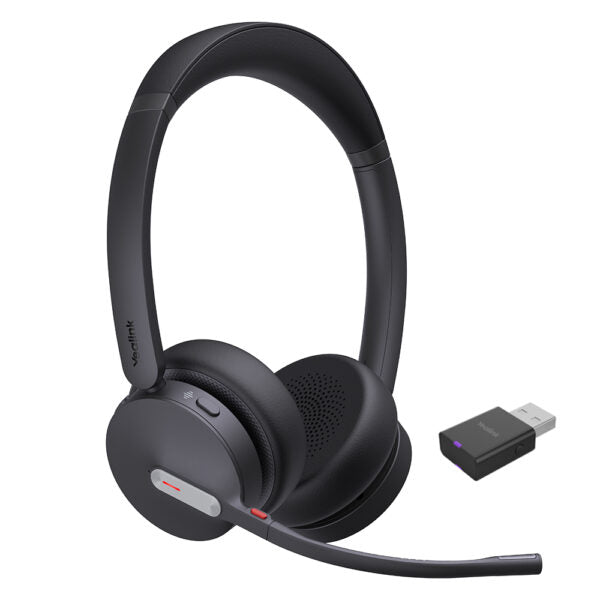
• Yealink WH64 Hybrid is a wireless headset with DECT dongle for hybrid working, offering flexible and efficient multi-connection mobile solutions. • Advanced acoustic shield technology 2.0 filters out background noise for clear sound transmission. • The DECT wireless connectivity technology provides an exceptional call range of up to 150 m, ensuring reliable communication over significant distances. • Key features include: • DECT & Bluetooth Hybrid Wireless Technology • Acoustic Shield Technology 2.0 • Advanced Level of Call Security • Ultra-Long-Range Connectivity • All-day-wearing Comfort • Hybrid Visual Busy light • Up to 32 hours Talking Time • Compatible with mainstream UC Platforms • Teams Certified • Additional information: • Weight: 0.69 lb • Dimensions: 6.97 × 8.15 × 2.09 in • Headset Type: Bluetooth, DECT, Stereo, Teams Certified, USB • Technical Specifications: • Model: WH64 Hybrid Dual Teams • Part number: 1208685 • Box Contents: • Dual Headset • USB 2.0 Cable (USB-A to USB-C) • WDD60 Dongle • Drawstring Bag • Quick Start Guide • Port: • 1 Type-C USB 2.0 port • Bluetooth connectivity to 1 mobile device • Boom arm adjustable: 280° • Integrated busy light LED indicator • WH64 Hybrid Dual: • DECT Dongle: 4.5 g • Headset: 151 g • Battery: • Talk time: • Dect mode: up to 16 hours • Bluetooth mode: up to 32 hours • Music time: • Dect mode: up to 16 hours • Bluetooth mode: up to 48 hours • Standby time: 195 hours • Charging time: 1.5 hours (5 V/1.2 A) • DECT: • Wireless range: up to 150 m/492 feet • Frequency bands: • 1880 ‒ 1900 MHz (Europe) • 1920 ‒ 1930 MHz (US) • Bluetooth: • Bluetooth device • Bluetooth version: Bluetooth5.2 • Bluetooth profiles: HFP v1.8, A2DP v1.3.2,<br>AVRCP v1.6.2, SPP v1.2 • Operating range: up to 50m/164 feet • Audio: • Speaker size: Ф 30 • Speaker frequency range: 20 Hz-20 kHz • Microphone type: 3 microphones MEMS • Call Control: • Answer/End/Reject a call • Volume up/down • Microphone mute

About This Product

The Yealink WH64 Hybrid Dual is built for professionals who split their day between a desk phone or softphone and a mobile device, needing a single headset that follows them across both. Its DECT dongle gives stable, long-range wireless for the office, while Bluetooth handles the smartphone side, making it a natural fit for hybrid workers in open-plan or multi-floor environments where calls can start at a desk and continue while grabbing coffee. The headset is Teams-certified, so button controls map correctly and mute sync works out of the box—important for any organization standardized on Microsoft’s UC stack.

For a Toronto office deployment, the DECT range of up to 150 metres means a user can roam across a typical downtown floorplate without dropping a call, provided the dongle is placed with clear line of sight. The trade-off is that DECT mode cuts talk time to 16 hours, while Bluetooth alone stretches to 32 hours; heavy callers who stay close to their computer may prefer leaving it in Bluetooth mode for longer battery life. On the audio side, the three-microphone array and Acoustic Shield 2.0 do a solid job suppressing background chatter, but in extremely noisy open offices, the noise cancellation has limits—it’s designed for voice clarity, not total silence.

This headset makes sense when you genuinely need the dual connection and long DECT range. If you’re a fully remote worker who only takes calls at a laptop a few feet away, a simpler Bluetooth-only headset would be more cost-effective. Conversely, if your team is spread across a large warehouse or campus where DECT’s range is critical, the WH64 is a strong choice, but you’ll want to confirm the DECT frequency band matches Canadian regulations (1920–1930 MHz for North America) and test coverage in your actual space, as walls and metal shelving will reduce that 150-metre figure.
Services We Provide
  • Professional Installation & Configuration
  • Ongoing Maintenance & Support
  • Troubleshooting & Repairs
  • System Upgrades & Updates



