
Yealink YHS34 Dual Headset– 1308023

Frequently Asked Questions

First, confirm the quick-disconnect plug is fully seated in the phone’s headset port. Then pick up the handset to verify the phone itself has dial tone; sometimes the issue is a downed SIP registration, not the headset. If the handset works, press the headset key on the Yealink phone—most models require you to switch audio to the headset manually. A simple phone reboot often clears a stuck audio path.
The microphone is on the boom arm, so make sure it is positioned about two finger-widths from the corner of your mouth. Gently bend the 330° arm so the mic faces you directly. Also check if the mute function on the phone or a mute button on the headset cord is engaged; many Yealink phones have a dedicated mute key that lights red when active.
Echo is frequently a network or phone-side acoustic issue, not a defect of the headset itself. Lower the phone’s speaker volume slightly—high volume can leak sound into the earcup and feed back into the microphone. If echo persists, ask the far-end caller to reduce their volume as well; sidetone or hybrid echo often originates from the other device.
The YHS34 Dual uses the dedicated RJ9 headset port and works with a long list of Yealink T-series phones—models like T31P, T33G, T43U, and many others. Check that your phone has a ‘headset’ port (not just a handset port) and that the model is listed in the official Yealink compatibility guide. A loose or dirty RJ9 connector can also prevent detection; unclip and firmly reconnect the quick-disconnect plug.
The headband is adjustable; extend it so the ear cushions sit gently over your ears without clamping pressure. The ultra-lightweight design aims to reduce fatigue, but comfort is personal—take a moment to shift the headband slightly forward or backward on your head. If you wear glasses, positioning the arm so the cushion seals around the frame often helps.
Not directly. The headset terminates in an RJ9 connector for a desk phone’s headset port. To connect to a PC or mobile device, you would need an active RJ9-to-USB or RJ9-to-3.5mm adapter, and even then, some phone-specific features may not function. If you split time between a desk phone and a PC, consider a USB headset designed for UC platforms instead.
The passive noise cancellation blocks sound for you, but the unidirectional, noise-canceling microphone is responsible for background noise at the caller’s end. Ensure the mic opening faces your mouth and is not rubbing against clothing. A gentle wipe with a dry cloth can clear debris from the mic port. Reducing nearby hard surfaces that reflect sound can also make a difference.
First, firmly re-seat both ends of the quick-disconnect cord and the RJ9 plug into the phone. Gently flex the cord near the connectors while on a call; if crackling syncs with movement, a damaged cord is likely. Test the headset on another compatible Yealink phone—if the problem follows the headset, the cord or earcup driver may need replacement.
Most Yealink phones have a dedicated ‘Headset’ button that toggles the audio path. You can also lift the handset during a call to transfer audio to it, then hang up to end the call. Some models allow hot-swapping: pressing the headset key while the handset is off-hook instantly routes audio to the headset. Check your phone’s user guide for the exact behavior.
The YHS34 Dual covers both ears, providing passive isolation from ambient noise and a more immersive listening experience. Single-ear versions let you hear your surroundings and are easier to wear with a headset on one side. If your role demands deep focus and you handle sensitive or complex calls, the dual model is usually the better choice. For a Toronto call center floor, the dual-ear design helps agents stay focused amid a busy pod.
Headsets

Yealink YHS34 Dual Headset– 1308023
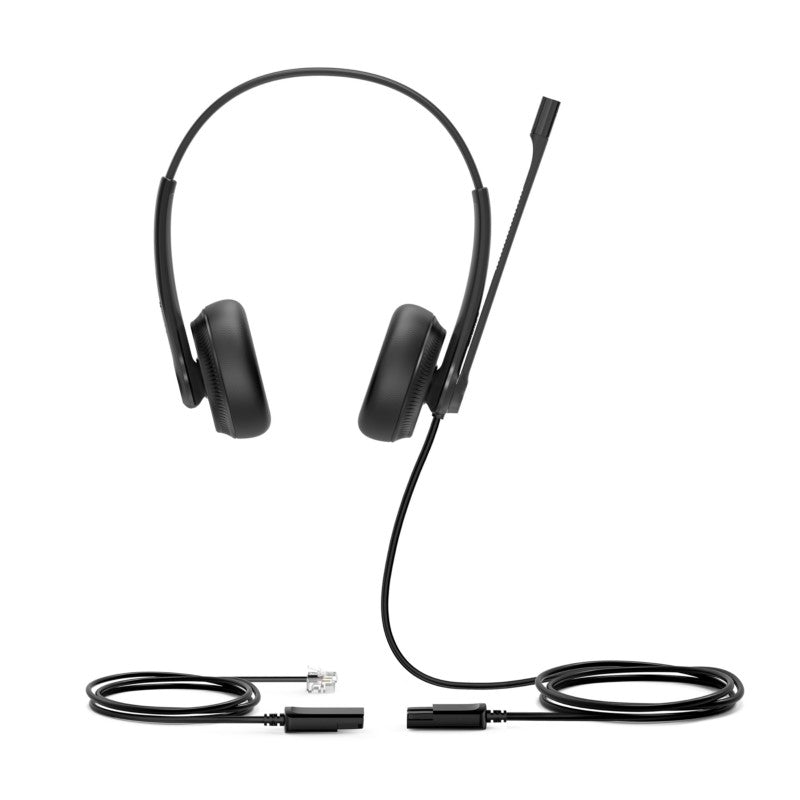
Yealink YHS34 Dual is a professional over-the-head style headset designed for office workers, SOHO, and call center staff. Its QD feature ensures quick and easy connectivity to Yealink enterprise IP phones. Key Features: • Excellent audio performance • All-day wearing comfort • Perfectly compatible with Yealink IP Phone • Noise-canceling microphone • Ultra-lightweight Technical Specifications: Main Features: • Plug-and-play RJ9 connectivity to Yealink IP phones, including T19(P) E2/T21(P) E2/T23P/T27G/T29G/T30/T31P/T33P/T33G/T40P/T40G/T41S/T42S/T46S/T48S • HD Voice/Wideband speaker performance • Noise-canceling microphone and passive noise cancellation • Active Protection technology safeguards users from acoustic injury • 330° bendable boom arm for easy adjustment without breaking

About This Product

The Yealink YHS34 Dual is a workhorse headset built for desk-bound professionals who spend hours on calls with a Yealink IP phone. Office workers, SOHO users, and call center agents who prioritize clear audio and all-day comfort will find it a straightforward, no-fuss upgrade over a handset. Its dual-ear design with passive noise isolation suits open-plan or moderately noisy environments, allowing you to concentrate on the conversation without cranking up the volume. Since it connects via the quick-disconnect RJ9 port, you stay tethered to the desk—an intentional trade-off that eliminates battery anxiety and wireless interference in dense office layouts.

This headset pairs natively with a wide range of Yealink T-series IP phones, so if your organization has standardized on that ecosystem, deployment is truly plug-and-play. It does not include a USB or 3.5mm adapter, so mixed-vendor environments or users who need to switch between a desk phone and a softphone on a PC will need to budget for an additional adapter or choose a different model. The noise-canceling microphone and Active Protection technology are practical benefits: they reduce ambient noise reaching the far end and guard against sudden loud spikes, which is valuable in call centers where agent hearing health matters.

For a Toronto business running a Yealink phone fleet, the YHS34 Dual fits neatly into high-volume inbound sales or support pods where agents rarely leave their desks. It is overkill for a front-desk role that takes only a handful of calls a day, and underpowered for a completely wireless, mixed-device workflow. The lightweight build and bendable boom arm make it a comfortable tool over long shifts, but it is not designed for heavy mobile use—this is a purpose-built desk phone companion.
Services We Provide
  • Professional Installation & Configuration
  • Ongoing Maintenance & Support
  • Troubleshooting & Repairs
  • System Upgrades & Updates



