
Yealink YLPOE30 - PoE injector

Frequently Asked Questions

First, confirm that the injector's power adapter is securely plugged into a working wall outlet and that the injector's PWR LED is lit. Then, ensure the Ethernet cable from the injector's 'PoE' port is firmly connected to your phone, and the cable from your network switch is connected to the injector's 'Data In' port. If the issue persists, a Toronto-based VoIP support provider can usually resolve this remotely.
The PoE LED indicates that power is being delivered to the connected device. If it is off, the connected device may not be PoE-compatible, or there could be a cable fault. Try a different Ethernet cable and verify that your device supports IEEE 802.3af or 802.3at PoE standards.
Yes, the YLPOE30 is a standard IEEE 802.3af/at PoE injector, so it will work with any PoE-compatible device that adheres to these standards, not just Yealink products. However, always check your device's power requirements to ensure the injector's 30W output is sufficient.
This is often a cabling issue. Try replacing the Ethernet cables between the injector and your phone, and between the injector and your network switch. Also, ensure the injector is not overheating—it should be in a well-ventilated area. If the problem continues, test the phone with a different power source to rule out a phone issue.
No, the YLPOE30 is a plug-and-play device. It requires no configuration. Simply connect your network switch to the 'Data In' port, your PoE device to the 'PoE' port, and plug in the power adapter. The injector will automatically detect and supply power if the device is PoE-compatible.
Yes, it is normal for PoE injectors to generate some heat during operation, especially when delivering power. The YLPOE30 is designed to operate within a temperature range of 0°C to 40°C. Ensure it is placed in a well-ventilated area and not covered by other objects. If it becomes too hot to touch, unplug it and contact support.
No, the YLPOE30 provides a maximum output of 30W (54V at 0.56A). Attempting to power a device that requires more power may cause the injector to overheat or fail. Check your device's power specifications before connecting it.
First, verify that the CP960 is a PoE-compatible model and that you are using a good quality Ethernet cable. The YLPOE30 should provide sufficient power for the CP960. If the phone still shows a low-power warning, try connecting the phone directly to a PoE switch to isolate the issue. If the problem persists, contact Yealink support.
Yes, the YLPOE30 supports 10/100/1000Mbps (gigabit) Ethernet connections, so it will work seamlessly with gigabit network switches and devices without slowing down your network.
No, PoE injectors are not designed to be daisy-chained. Each injector should be connected directly to a network switch and a single PoE device. Attempting to chain them could cause network issues or damage the equipment.
Accessories

Yealink YLPOE30 - PoE injector
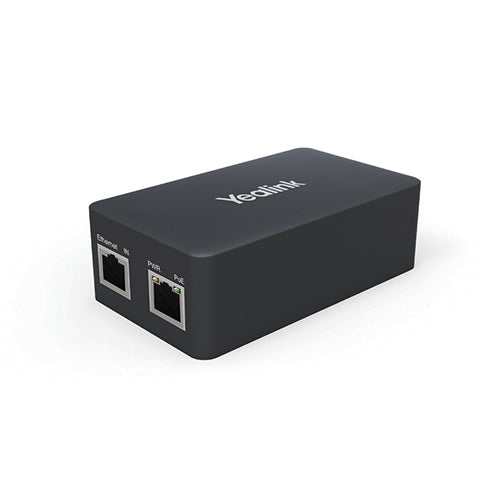
The Yealink YLPOE30 is a PoE injector designed to provide both data connection and electric power with only one Ethernet cable, keeping your desktop clean and tidy. It meets the IEEE802.3af and IEEE802.3at standards, making it plug-and-play without any extra deployment. Key Features: • 10/100/1000M PoE ports • Standard: IEEE802.3af, IEEE802.3at • Input: 100-240V AC 50/60Hz 1.0A • Output: 54V 0.56A • Compatible with Yealink CP960 IP conference phone and other PoE-enabled Yealink IP phones Additional Information: • Weight: 1 lbs • Dimensions: 8 × 5 × 5 in • Brand: Yealink • Accessory Type: PoE Injector Technical Specifications: • Standard: IEEE802.3af, IEEE802.3at • Interface: 10/100/1000M PoE ports • LED indicators: PWR, PoE • Input: 100-240V AC 50/60Hz 1.0A • Output: 54V 0.56A • PIN definition: 1/2(+), 3/6(-) • Operating temperature: 0°C~40°C (32°F~104°F) • Storage temperature: -40°C~70°C (-40°F~158°F) • Operating humidity: 10%~90%, non-condensing • Storage humidity: 5%~90%, non-condensing For a full list of specifications, please refer to the product datasheet.

About This Product

The Yealink YLPOE30 is a Power over Ethernet injector, a simple but essential accessory for any office where a PoE-enabled device needs to be placed away from a PoE switch. It is ideal for small to medium-sized businesses in the GTA that are deploying Yealink IP phones or conference phones, such as the CP960, in locations where running a separate power cable is inconvenient or unsightly. This injector sits between your existing network switch and the device, delivering both data and power over a single Ethernet cable. It is a straightforward, plug-and-play solution that requires no configuration, making it a practical choice for a single device or a small deployment where a full PoE switch would be overkill. However, for larger offices with many PoE devices, a dedicated PoE switch is usually more cost-effective and easier to manage than using individual injectors for each device. The YLPOE30 is also limited by its output power, so it is not suitable for powering high-draw devices like PTZ cameras or wireless access points that require more than 30 watts.
Services We Provide
  • Professional Installation & Configuration
  • Ongoing Maintenance & Support
  • Troubleshooting & Repairs
  • System Upgrades & Updates



