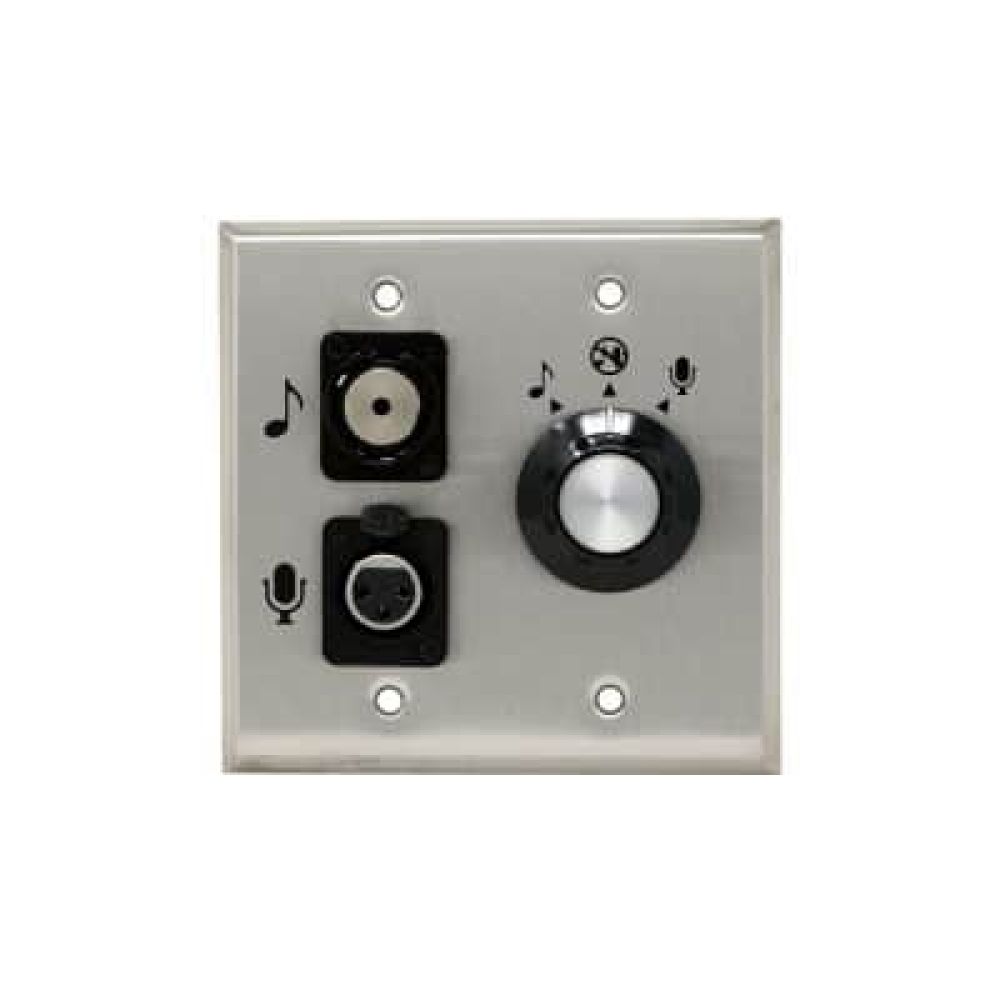
Algo 1205 Audio Interface for Microphone and Music Inputs

Frequently Asked Questions

First, verify that the control knob is not in the ‘off’ position and that the microphone input volume is turned up in the 8301’s web interface. Try a known-working dynamic microphone and XLR cable, ensuring the cable is fully seated. If the music input passes audio but the mic does not, double-check that the 8301 is set to accept input from the microphone channel.
A hum is often caused by a ground loop or an unbalanced connection. Use a balanced XLR cable, and plug the 1205 and the 8301 into the same power strip. If the microphone cable runs near electrical wiring, re-route it. As a quick test, try a different dynamic microphone; some mics can introduce noise if their shielding is damaged.
Log into the Algo 8301’s web interface and locate the Audio Input settings. There you’ll find separate volume sliders for the music input and microphone input. Increase the music input volume until the two sources are balanced. Also check the output volume on the connected music source itself—a low device volume will result in a weak signal.
The 1205’s XLR input is designed for dynamic microphones and does not supply phantom power. A condenser mic typically needs 48V phantom to operate, so you would need an external phantom power supply between the mic and the interface. Many wireless mic receivers output a line-level or balanced audio signal; that can work as long as the connector matches and no phantom power is required. Always check the receiver’s specifications for compatibility.
Ensure the cable between the 1205 and the 8301 is securely connected at both ends. The 8301 detects the knob position only when this connection is intact. Try rebooting the 8301 (a safe power cycle). If the problem persists, contact support. If the knob still fails to trigger audio, a Toronto-based VoIP support provider can usually resolve this remotely.
Look for loose connections in the audio cables, especially the 3.5 mm jack and the XLR connector. Test with a different music source and cable to rule out a faulty accessory. In the 8301’s web interface, confirm that the audio input isn’t being overridden by a higher-priority paging stream. If dropouts continue, a local VoIP specialist can assist—many Toronto-based providers offer remote diagnostics.
No. The 1205 is an accessory that connects exclusively to the Algo 8301 Paging Adapter. If your VoIP system includes SIP speakers or public address gateways from other manufacturers, you would need a different audio input solution. The 1205 is purpose-built for the 8301’s specific input port and cannot be used as a standalone audio interface.
The 3.5 mm input sums the left and right channels into a single mono signal that’s compatible with public address systems, which are typically mono. This is by design and cannot be changed on the 1205. If stereo is important, you would need a different audio routing solution outside the paging system.
Start by lowering the microphone input volume in the 8301’s web interface; too high a gain can cause clipping. Make sure the microphone is a dynamic type and that you’re speaking at a reasonable distance. If the distortion persists, test the mic and cable with another audio device to rule out a physical fault.
IP Paging

Algo 1205 Audio Interface for Microphone and Music Inputs

The 1205 Audio Interface provides a versatile connection solution for music sources and microphones to the Algo 8301 paging adapter. Key features include: • Simultaneous broadcast of audio to IP endpoints and legacy infrastructure • Automatic detection of control knob position to start or stop playing audio • Compatible with iPod and other sources through a 3.5mm stereo jack • Balanced mono signal compatible with public address (PA) infrastructure • Adjustable music volume using the Audio Input Volume setting in the web interface The microphone input features an XLR connector, making it compatible with dynamic microphones such as the Sennheiser E835. Music and microphone input volumes can be adjusted separately using the Audio Input Volume setting in the 8301 web interface.

About This Product

The Algo 1205 Audio Interface is a purpose-built accessory that expands the Algo 8301 Paging Adapter with dedicated microphone and music inputs, letting you bridge local analog audio sources into both IP-based and legacy paging infrastructure. It’s designed for environments where a live announcement or background music needs to reach all speakers—including older analog systems that aren’t being replaced—without deploying a separate audio mixer. Typical deployments include school public address, retail background music plus paging, and office communication in buildings that have a mix of IP speakers and traditional 70V/100V lines. In Canadian offices and retail spaces where legacy speakers remain in place, the 1205 helps extend the life of that investment. The simple control knob makes it easy for non-technical staff to start or stop an audio source, while separate volume controls within the 8301’s web interface allow a technician to balance mic and music levels for the whole site. Be aware that the 1205 requires an Algo 8301—it is not a stand-alone interface. The XLR input is wired for dynamic microphones, so condenser mics that need phantom power won’t work without an external supply. The 3.5 mm stereo input sums to mono, which is fine for background music but won’t preserve stereo separation. For a single SIP speaker or a purely digital system with no legacy wiring, a dedicated SIP paging endpoint without this interface is often simpler and more cost-effective.

Services We Provide
  • Professional Installation & Configuration
  • Ongoing Maintenance & Support
  • Troubleshooting & Repairs
  • System Upgrades & Updates