
Algo 8138 IP Color Visual Alerter | Outdoor-Rated, PoE, Multicast, Teams/InformaCast

Frequently Asked Questions

First, confirm the Ethernet cable is connected to a PoE port that delivers at least IEEE 802.3af power. Many unmanaged switches have a mix of PoE and non-PoE ports, so try a different port if you are unsure. Next, check the switch's PoE budget to ensure it hasn't been exceeded. If other PoE devices on the same switch are working, the cable itself may be faulty, so a simple cable swap is a safe next step.
A common cause is an accidental multicast activation from another device on the network. Log into the 8138's web interface and temporarily disable the multicast receive zones to see if the flashing stops. If it does, a scanning tool or a review of your multicast paging server can help locate the source. This is a safe, non-destructive diagnostic check.
Verify the SIP server address and extension credentials in the web interface. A single typo in the authentication username or password will prevent registration. Also confirm that your firewall or VLAN rules do not block the SIP port from this device's subnet. These are simple, reversible checks that catch the majority of registration issues.
Yes, the 8138 is outdoor-rated and built to withstand harsh conditions. For a reliable installation in places like the GTA, ensure that the Ethernet cable gland is properly sealed during mounting to prevent moisture ingress during freeze-thaw cycles. Also confirm your PoE switch can handle temperature variances if it is placed in an unheated enclosure.
You will need to onboard the device as a common area phone or a Teams SIP device through the Teams admin center, generating a provisioning URI. Enter that URI into the 8138's web interface under the advanced SIP settings. The genuine challenge is often the licensing assignment in Microsoft 365, not the device configuration itself.
Yes, the device has three configurable intensity levels. Access the web interface and check the alert profile currently assigned to your SIP or multicast event; it may be set to the lowest intensity. Increasing this level is a quick, reversible adjustment you can test immediately while it is safe to do so.
This typically points to a provisioning server that is overwriting local settings on boot. Check the provisioning tab in the web interface to see if a ZTP, HTTP, or TFTP server address is populated. If the server is pushing a blank or default config, the 8138 will dutifully apply it, which can appear as a loss of settings.
Yes, this is handled through RTP multicast. Configure the initiating device to send a multicast message and set all the target 8138 units to listen on that same multicast zone. The lights across all endpoints will then flash in perfect synchronization without needing individual SIP calls to each device.
First, check that the input is configured for the correct mode (normally open or normally closed) in the web interface, as an incorrect setting will prevent it from detecting the change. Also confirm that the alert profile you have linked to that input event is active and not set to 'Do Nothing.' If the issue persists, a Toronto-based VoIP support provider can usually resolve this remotely.
IP Paging

Algo 8138 IP Color Visual Alerter | Outdoor-Rated, PoE, Multicast, Teams/InformaCast
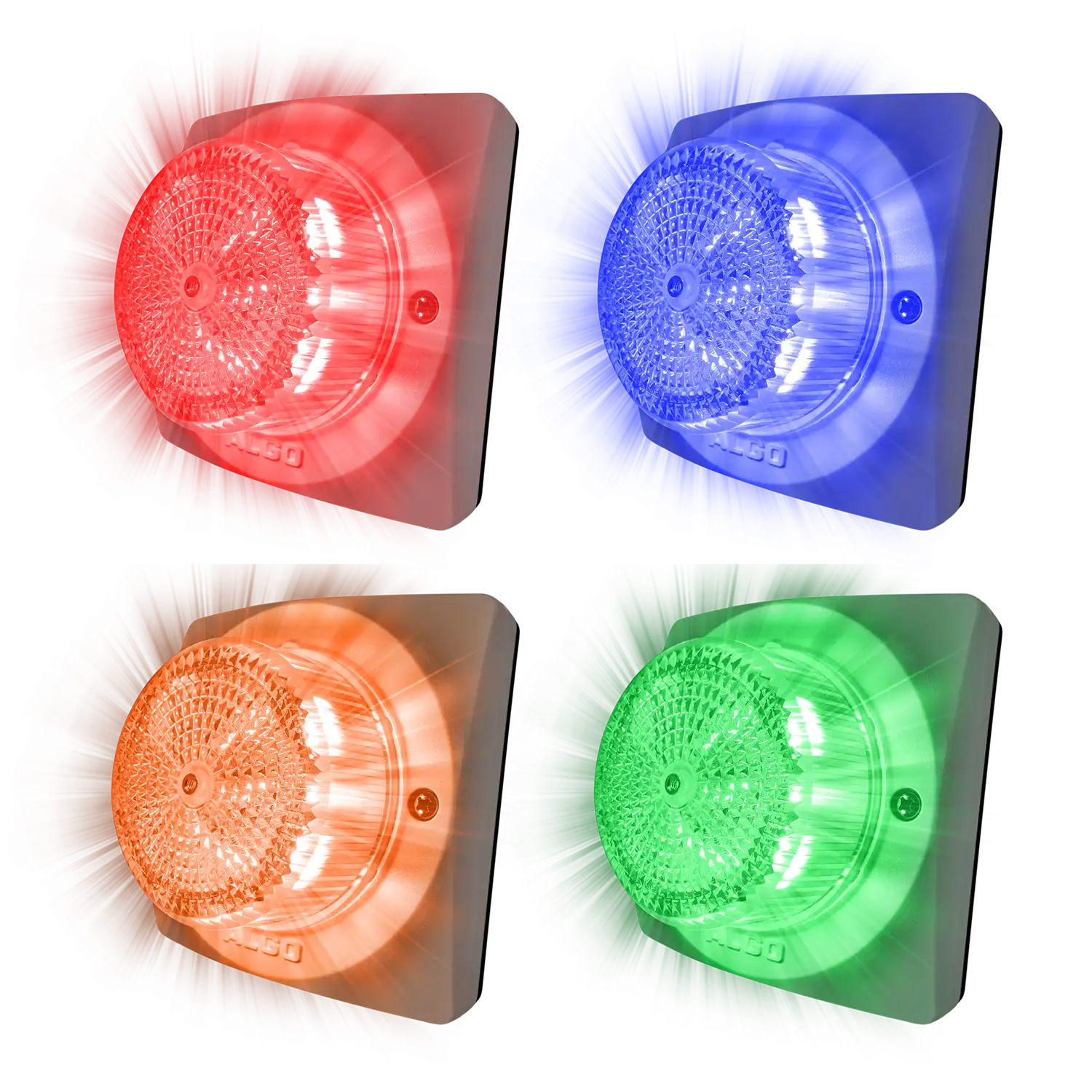
• The Algo 8138 IP Color Visual Alerter is a highly effective and scalable SIP endpoint designed for critical paging, telephone ring, and emergency alerting. • Key features: • High visibility: Achieves 360 x 180° visibility with up to 690 lumen flux and 190 peak candela via 16 ultra-efficient LEDs of each color. • 180 unique alert options: Features 4 colors (Amber, Blue, Green, Red), 15 flash patterns, and 3 intensity levels, offering a total of 180 possibilities for distinctive and location-specific alerts. • Safety compliance: Meets the IEC 62471 photobiological safety standard and helps meet OSHA and ADA compliance through customizable settings that eliminate flicker risk. • Versatile connectivity and seamless scalability: • Integrates easily into existing and future VoIP infrastructure, registering as a SIP extension (50 paging, 10 Emergency, 10 Ring extensions supported). • Powered solely by PoE (IEEE 802.3af Class 0), requiring just one Ethernet cable for power and signaling. • Supports 50 RTP Multicast send and receive zones, allowing one 8138 to trigger any number of other Algo endpoints simultaneously and keep them perfectly synchronized. • Uses TLS and SRTP for secure SIP communications and supports Mutual Authentication. • Broad platform integration and management: • Ready for integration into major UC and emergency notification platforms, including Microsoft Teams and Poly Group Page (Receive only). • Fully supports industry-leading platforms, such as InformaCast (license required) and Intrado Revolution. • Features a relay input for triggering alerts via dry contact closure and a relay output (Max 30 V 50 mA) to trigger external devices. • Configuration is done easily via a secure HTTP/HTTPS web interface and supports provisioning via ZTP, TFTP, FTP, HTTP, HTTPS, and TR069.

About This Product

The Algo 8138 is built for environments where an audible alert isn't enough. It is designed for loud manufacturing floors, emergency notification in warehouses, or silent-alert needs in healthcare and education settings where a phone ring might be missed. Think of it as a network-connected strobe light that registers directly to your VoIP platform, eliminating the need for a physical phone just to provide visual notification.

This device operates purely on Power over Ethernet, so a single cable handles both power and signalling. That makes it straightforward to mount high on a wall or ceiling without an electrician. It pairs well with other Algo multicast endpoints to create a building-wide visual sync, but it is not a general-purpose speaker; there is zero audio output. If a deployment calls for both sound and light, this unit works alongside an IP speaker rather than replacing one.

Network administrators should be aware that while integration with platforms like Microsoft Teams and InformaCast is a major selling feature, advanced emergency notification features often require an additional server license from the platform vendor. It is also a receive-only endpoint for Poly Group Page, which may limit its role in legacy voice-paging setups. For a small office that only needs a ring indicator for a single phone, this is overkill. Its strength lies in scaled-out, centralized deployments where danger or urgency must be seen from any angle.
Services We Provide
  • Professional Installation & Configuration
  • Ongoing Maintenance & Support
  • Troubleshooting & Repairs
  • System Upgrades & Updates



