
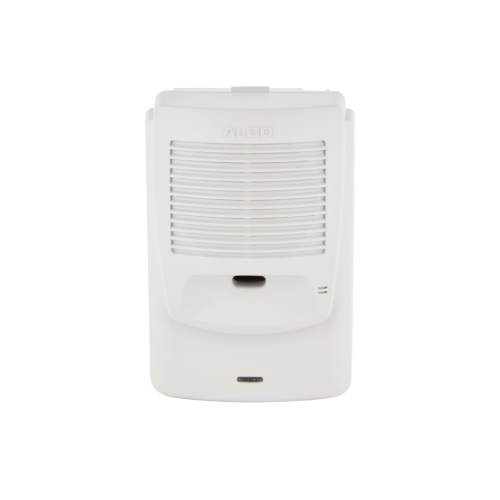
Algo 8180 SIP Audio Alerter (G2)
Frequently Asked Questions
First, check that the device has a valid IP address and can reach the SIP server. Verify that the SIP server address, port, and credentials are correctly entered in the device's web interface. If the problem persists, confirm that the server is not blocking the device's registration request and that your network allows SIP traffic. A Toronto-based VoIP support provider can assist with firewall configurations.
Ensure the unit is receiving PoE power (check the LED indicator) and that the volume settings are not muted or turned down. If you are using the optional horn speaker, verify it is properly connected. Test by triggering a page from your phone system to see if the device auto-answers.
Audio quality issues often stem from network congestion or low bandwidth. Check that the device is on a network with sufficient QoS for voice traffic. Also, confirm that the microphone on the talkback endpoint is not obstructed. If using the horn speaker, ensure it is mounted away from sources of electrical interference.
The secondary endpoint is set by default to auto-answer for paging calls. You can adjust this in the device's web interface under the Paging settings. Make sure the SIP server sends the correct call to the paging extension. For detailed steps, refer to the Algo documentation.
This could be due to a short ring timeout setting on your SIP server or a misconfigured ring pattern on the device. Check the ring duration in the system that is sending the call. Also, ensure the device's ring cadence is set to the desired pattern in the web interface.
No, the Algo 8180 is a SIP-based device and requires a VoIP network. It will not work with analog (PSTN) lines. You need a SIP server or hosted PBX that supports SIP registration. If you are in Canada, many business phone providers offer SIP trunking that is compatible.
Ensure that two-way audio is enabled in the device settings. The person initiating the paging call must also have a device that supports two-way audio (like a phone or softphone). Check that the microphone on the Algo 8180 is not muted.
Firmware updates are typically done via the web interface. Log in to the device, go to the firmware section, and point to the latest firmware file from Algo's support page. Always back up your configuration before updating. If the update fails, try a power cycle.
The LED indicates power and registration status. A steady green means powered and registered. Flashing green could indicate a call or paging activity. Red may indicate a registration failure or network issue. Check the product manual for exact patterns.
This likely means the paging extension is being treated as a regular call. Set the SIP server to send the call to the paging endpoint with auto-answer enabled and voicemail disabled for that extension. On the server, configure the extension to auto-answer without ringing to voicemail.
IP Paging
Algo 8180 SIP Audio Alerter (G2)
• The Algo 8180 VoIP SIP audio alerter is designed for loud ring and voice paging applications, utilizing dual endpoints with PoE required. • Upon registration with a SIP server, one endpoint plays an audio file from internal memory on detection of a ring, while the second endpoint auto-answer for voice paging, featuring two-way talkback. • Optional Algo 1186-01 horn speaker is available for use in loud environments to enhance sound quality. For detailed specifications, please refer to the product datasheet.
About This Product
The Algo 8180 SIP Audio Alerter is built for environments where audible notifications must cut through background noise—think factory floors, school corridors, hospital wards, or retail back offices. It pairs two VoIP endpoints in one unit: one triggers a stored audio file when a call comes in (like a loud ring), and the other auto-answers for one-way or two-way paging. For spaces that need even more volume, an optional horn speaker (Algo 1186-01) can be added.
Practical tradeoffs are straightforward: the device requires Power over Ethernet (PoE) from a compatible switch or injector, so plan your network cabling accordingly. It also depends on a SIP server (on-premise or hosted) to register and route calls. The two-way talkback feature turns the paging endpoint into a basic intercom, but it works only when the person paging uses a device that supports two-way audio. For most Canadian businesses, especially those in the GTA with modern PoE-capable networks, deployment is simple—connect the Ethernet cable, configure the SIP settings, and pair with any standard PBX.
Where does it fit best? It excels in medium-sized facilities where you need both loud ringing and a paging/intercom capability in one tidy box. It is overkill for a quiet office with only a few desks—a basic speakerphone would suffice. Conversely, it may be underpowered for a large campus needing dozens of speakers; multiple 8180 units with horn speakers could handle it, but a dedicated overhead paging system might be more cost-effective. The device is not designed for music or high-fidelity audio—its strength is clear, loud voice and alert tones.
Practical tradeoffs are straightforward: the device requires Power over Ethernet (PoE) from a compatible switch or injector, so plan your network cabling accordingly. It also depends on a SIP server (on-premise or hosted) to register and route calls. The two-way talkback feature turns the paging endpoint into a basic intercom, but it works only when the person paging uses a device that supports two-way audio. For most Canadian businesses, especially those in the GTA with modern PoE-capable networks, deployment is simple—connect the Ethernet cable, configure the SIP settings, and pair with any standard PBX.
Where does it fit best? It excels in medium-sized facilities where you need both loud ringing and a paging/intercom capability in one tidy box. It is overkill for a quiet office with only a few desks—a basic speakerphone would suffice. Conversely, it may be underpowered for a large campus needing dozens of speakers; multiple 8180 units with horn speakers could handle it, but a dedicated overhead paging system might be more cost-effective. The device is not designed for music or high-fidelity audio—its strength is clear, loud voice and alert tones.
Services We Provide
- Professional Installation & Configuration
- Ongoing Maintenance & Support
- Troubleshooting & Repairs
- System Upgrades & Updates



