
Algo 8186 Wideband IP Horn Speaker

Frequently Asked Questions

First, confirm that the speaker has a valid IP address by checking its web interface or using a network scan. Then verify the SIP credentials (username, password, server address) are entered correctly in the SIP settings. Ensure your PBX allows registration from the speaker's IP subnet and that no firewall is blocking the SIP port (typically 5060). If the issue persists, a Toronto-based VoIP support provider can usually resolve this remotely.
The 8186 receives power via PoE (802.3af). Check that the Ethernet cable is securely connected and that the switch or injector is PoE-enabled and delivering power. Try a different known-working PoE port or cable. If the speaker still shows no activity (no LED or audio), the PoE source might not be supplying enough power; verify the switch's PoE budget and that the port is not administratively disabled.
Start by testing the speaker with a simple SIP call to a registered extension on the device—use a softphone or desk phone to call the 8186’s extension. If you hear ringtone but no page audio, check that the speaker’s volume setting is not muted and that the codec G.722 or G.711 is enabled in both the PBX and the speaker. Also ensure the page is being sent to the correct extension or multicast address.
Distortion often results from excessive volume relative to the input signal. Lower the speaker’s volume through its web interface by 10–20% and test again. Also verify that the network connection is stable and that jitter buffers are not set too low. If using wideband G.722, check that the PBX and endpoints all support the same codec without transcoding issues.
Multicast relies on IGMP snooping and proper network configuration. Ensure all switches in the path have IGMP snooping enabled and that multicast traffic is not blocked by VLAN settings or firewalls. Verify each speaker is configured to listen on the same multicast IP address and port. A simple test is to disable IGMP snooping temporarily on the access switch; if all speakers then hear the page, the snooping configuration needs adjustment.
First, verify the server’s IP address and protocol (TFTP, FTP, or HTTP) are correctly entered in the speaker’s provisioning settings under the web interface. Confirm that the server is reachable from the speaker’s network (ping from a connected PC). Then check that the configuration file exists on the server with the correct filename—often the speaker’s MAC address in uppercase or lowercase. Make sure no firewall is blocking the provisioning port.
Yes, the 8186 is standard SIP-compliant and will register with most IP-PBX platforms, including Asterisk, 3CX, FreePBX, and cloud-hosted services like RingCentral or Teams (with an SBC). However, verify that your PBX supports G.722 codec if you want HD voice. Multicast features are independent of SIP and require the PBX to send audio to a multicast address, which may need a dedicated paging module.
The 8186 has a programmable dry contact input that can be used with a normally-open momentary switch. Wire the button between the input terminal and ground. In the web interface, configure the input to trigger a page, play a WAV file, or activate a SIP call. Ensure the button is supervised if needed; the speaker can detect an open or short circuit on the input for alarm purposes.
Check the relay configuration in the speaker’s web interface—it may be set to trigger only on specific events (e.g., a multicast page, SIP call, or input activation). Verify the relay mode (Normally Open or Normally Closed) matches your external device’s requirements. Also test the relay manually via the web interface; if it clicks, the hardware is working. If not, confirm the power supply can handle the relay’s rated load (1A at 24VDC).
Yes, the 8186 supports SNMP (Simple Network Management Protocol) for supervision. You can poll the device for system health, audio state, and registration status. To set it up, enter the SNMP community string and trap receiver IP in the speaker’s web interface. Many network management systems also support HTTP-based status monitoring via the speaker’s built-in web pages.
IP Paging

Algo 8186 Wideband IP Horn Speaker
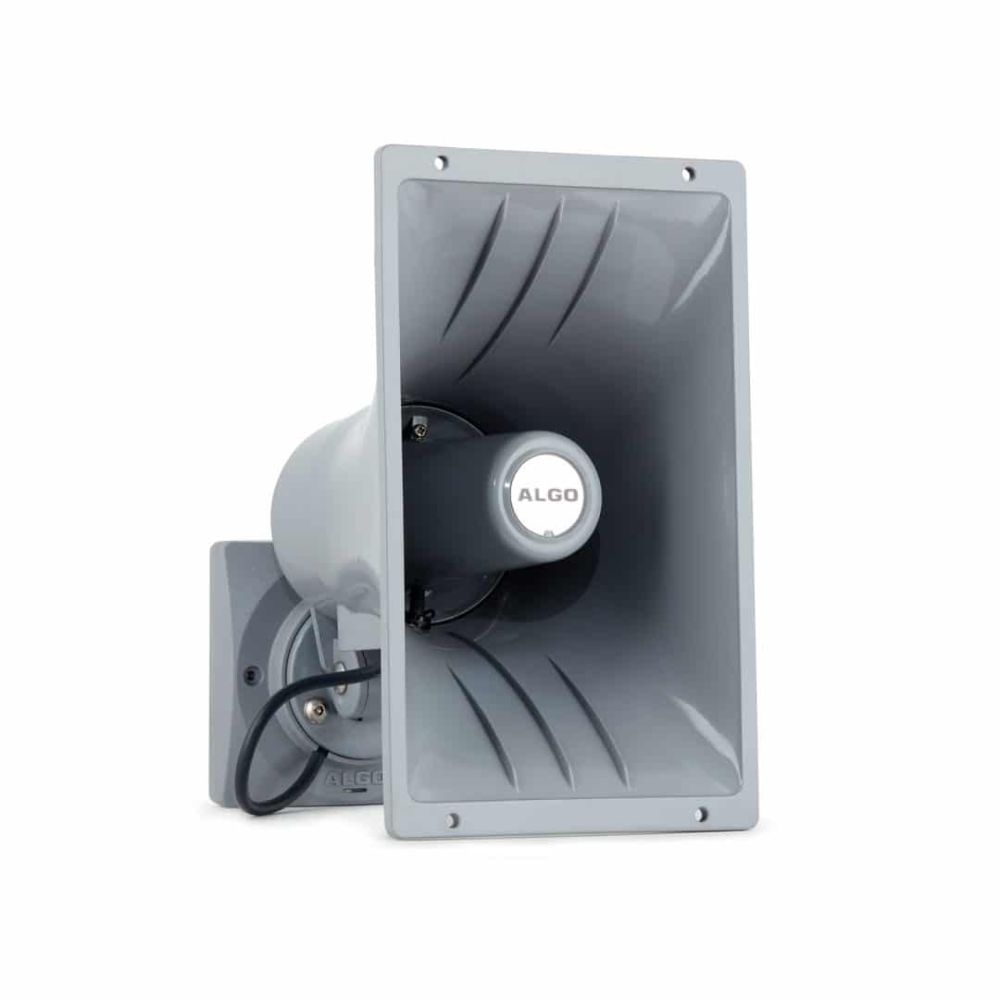
<p>The 8186 is a weatherproof SIP compliant IP horn/loudspeaker for voice paging, loud ringing, and emergency/safety/ security notification and alerting. The speaker is PoE (802.3af) and does not require an additional amplifier. Key Features: • Superb audio clarity and intelligibility • Network managed and supervised SIP and multicast endpoint • PoE (802.3af) for plug and play network connectivity - no additional amplifier needed • Eliminates narrowband FXS port or ATA • Multicast to scale from one to many speakers • Multifunctional speaker for voice paging, loud ringing, emergency notification alerting and bell scheduling applications • Compatible with all varieties of Algo speakers, paging adapters and strobes for more comprehensive alerting solution requirements • Suitable for outdoor and wet environments when properly installed with included mounting gaskets • Three-axis rotation for widest range of vertical and horizontal adjustments - wall or ceiling mount • Wideband G.722 codec support for HD Voice • Multicast receive or broadcast capability • Configurable through web interface • Auto-provisioning (i.e., TFTP, FTP, HTTP) • SNMP supervision • Internal memory of 1GB for uploaded WAV files or recorded messages • Multiple SIP registrations for Ring (10) and Page (50) extensions • Programmable relay (dry contact) output • Programmable relay (dry contact) input for illuminated and supervised wall button • UL/CSA, FCC, CE compliant For a full list of specifications, please refer to the product datasheet.

About This Product

The Algo 8186 Wideband IP Horn Speaker is designed for environments where clear, reliable voice paging and emergency alerting are critical, such as warehouses, manufacturing floors, parking garages, school campuses, or any outdoor area needing weatherproof notification. It fits naturally into an IP-based communication system, replacing older analog paging solutions that required dedicated amplifier and FXS ports. The speaker works well with most SIP-compatible PBX platforms and can scale from a single unit to dozens via multicast, making it suitable for both small facilities and large distributed sites. A practical tradeoff is its directional horn design: it projects sound in one direction, so coverage planning requires careful placement for areas that need all-around audio. While PoE simplifies installation, the 802.3af power budget means the speaker's maximum volume is limited compared to externally amplified units; in very noisy or massive spaces, multiple units or a more powerful dedicated amplifier may be needed. For Canadian businesses, the weatherproof construction and included mounting gaskets make it a natural choice for outdoor GTA locations exposed to rain, snow, and temperature swings, provided the network switch delivering PoE is also rated for the environment or is indoors. This speaker is overkill for a quiet office where a desktop phone’s speakerphone suffices, and it is underpowered for a large open-area factory floor that requires a central siren; in both cases, alternate paging solutions would be more appropriate.
Services We Provide
  • Professional Installation & Configuration
  • Ongoing Maintenance & Support
  • Troubleshooting & Repairs
  • System Upgrades & Updates



