
Algo 8196 PoE+ SIP Horn Speaker

Frequently Asked Questions

Verify that the speaker’s IP address, subnet mask, and default gateway are correctly set, and that it can reach the SIP server on the required port (usually 5060 for UDP). Check the SIP credentials and domain in the web GUI—typos in the username or password are common. If you’re using TLS, ensure the speaker’s time is synchronized via NTP, as certificate validation will fail otherwise.
Start by confirming the speaker is not in silent or do-not-disturb mode via its web interface. Next, check the paging extension or multicast group configuration—if you’re sending a page to a multicast address, verify the speaker is subscribed to that same address and port. A quick test is to use the speaker’s built-in test tone from the web GUI to rule out hardware issues.
This often points to insufficient power. The 8196 requires PoE+ (802.3at); if it’s connected to a standard PoE (802.3af) switch or injector, it may boot but become unstable under load. Confirm your switch port is providing at least 25.5W. Also check the Ethernet cable—long or damaged cables can cause voltage drop.
Multicast traffic must be allowed across your network switches and routers. Ensure IGMP snooping is enabled on the switches, and that the multicast IP address and port match exactly across all speakers and the paging source. If the speakers are on different VLANs, you may need a multicast router or PIM configuration.
First, confirm the feature is enabled in the speaker’s audio settings. The microphone that senses ambient noise is located on the front of the horn; make sure it isn’t blocked by debris or a mounting bracket. The algorithm needs a few seconds of consistent noise to react, so test with a steady sound source like machinery rather than intermittent clatter.
Yes, the 8196 is certified for the Microsoft Teams SIP Gateway, which allows it to register directly to Teams as a SIP device. You’ll need to configure the speaker’s SIP settings with the provisioning URL provided in the Teams admin center. No additional gateway hardware is required, but the Teams SIP Gateway service must be enabled for your tenant.
The 8196 supports up to three passive satellite speakers connected via the rear terminal block. Use 16-gauge or thicker speaker wire, and keep total wire length under 100 feet to avoid significant power loss. Remember that the 16W output is shared—if you connect three satellites, each will receive considerably less power than the main horn.
The delay is designed to compensate for network jitter and speaker wake-up time, but if it’s too short, you’ll lose the first syllable. Increase the delay setting in the web GUI under the paging configuration. Start with an extra 500 ms and adjust upward until the full message plays cleanly. This is especially important when paging from a softphone or mobile client.
First, reboot the speaker and check that its IP address hasn’t changed (it may have defaulted to DHCP). Log into the web GUI and confirm the provisioning server URL is still correct and that the speaker can reach that server. If the firmware update reset the configuration, you may need to re-enter the provisioning details. If the issue persists, a Toronto-based VoIP support provider can usually resolve this remotely.
IP Paging

Algo 8196 PoE+ SIP Horn Speaker
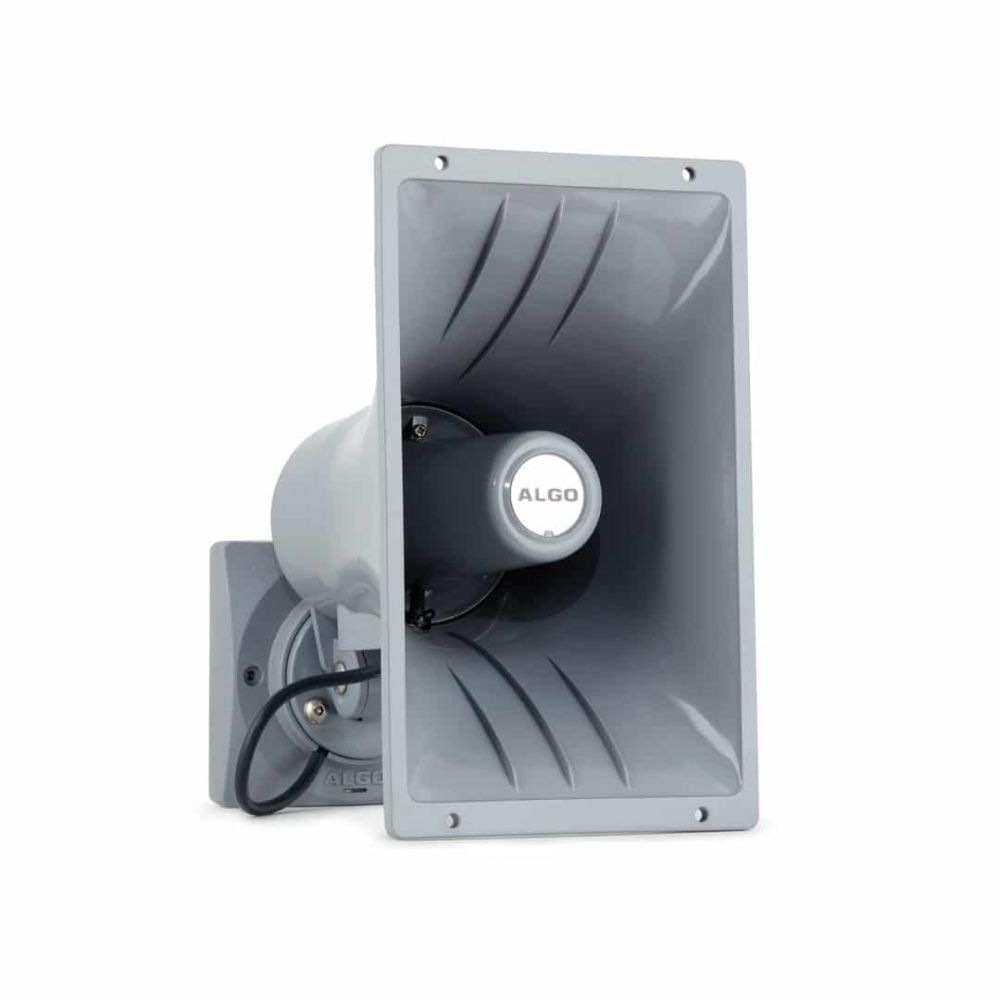
The Algo 8196 IP PoE+ Horn Speaker is a SIP-compliant, multicast-capable IP speaker suitable for voice paging, loud ringing, and alert/notification solutions in wide areas and high-noise places. Certified for native compatibility with Microsoft Teams via the Microsoft Teams SIP Gateway. Utilizes Algo's Ambient Noise Response Technology to detect ambient noise and adjust volume automatically in any environment. Features a delayed page feature to deliver clear, effective voice messages with minimal operational challenges. Up to three satellite speakers can be connected to share 16W of available audio power, covering vast areas with just one speaker. Key features include: • SIP, Multicast, Polycom Group Page, InformaCast, Revolution compatibility • 16W audio output power from PoE+ • Web GUI configurable and centralized provisioning • TLS, MTLS, SRTP security • Near limitless zoning options • Multicast scalability • Ambient noise responsive technology • Codec support for G.711, G.722, OPUS 48 kHz For a full list of specifications, please refer to the product datasheet.

About This Product

The Algo 8196 is built for environments where a standard IP speaker simply isn’t loud enough—think busy warehouses, manufacturing floors, school campuses, or outdoor loading docks. It’s a SIP endpoint that doubles as a wide-area alerting tool, and its ability to natively register with Microsoft Teams via the SIP Gateway makes it immediately relevant for organizations that have standardized on Teams for voice but still need physical paging. The horn form factor projects intelligible voice across large, noisy spaces, and the adaptive volume feature means you won’t be constantly tweaking levels as ambient conditions change.

This speaker really shines when paired with an Algo paging adapter or a SIP-based phone system that supports multicast. The ability to drive up to three satellite speakers from a single unit simplifies covering cavernous areas without running separate network drops to every corner. However, the 16W output is shared across all connected speakers, so the more satellites you add, the quieter each one becomes. It’s a practical trade-off: broad coverage at moderate volume versus focused, high-output from the main horn alone.

Power is drawn exclusively from PoE+, which keeps cabling simple but means you’ll need a PoE+ switch or injector—standard PoE won’t cut it. Also, while the horn is weather-resistant, it’s not designed for direct exposure to heavy rain without additional shelter. For a typical Toronto-area business, it’s a solid fit for a warehouse in Mississauga or a schoolyard in Scarborough, but it would be overkill for a carpeted office suite where a ceiling speaker would blend in better. If your paging needs are limited to a single small room, a simpler SIP speaker or even an analog horn with an ATA might be more cost-effective.
Services We Provide
  • Professional Installation & Configuration
  • Ongoing Maintenance & Support
  • Troubleshooting & Repairs
  • System Upgrades & Updates



