
C620 SIP Wireless Conference Phone with wireless mic pods
AIM Telecom provides troubleshooting and configuration support for this product to businesses across Toronto and the GTA. Contact us to confirm whether the issue can be handled by phone or requires on-site service.
Get Support Call 416-312-4819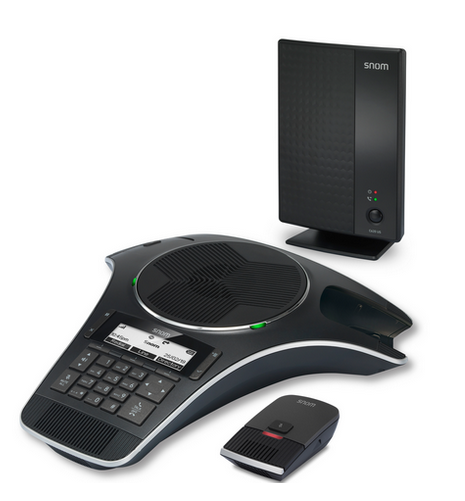
Common issues and fixes
Reviewed troubleshooting steps are not yet available for this model.
Ask AIM Telecom about this productAbout this product
• The Snom C620 wireless conference phone offers a completely wireless conference experience using DECT 6.0 technology, allowing for freedom from conference room wires.
• Key features include:
• Full-duplex speakerphone in base
• Wireless freedom with up to 24 hours of talk time
• Flexibility with the ability to add up to two accessory C52-SP DECT expansion speakerphones
• Intuitive design and HD voice quality
• Built-in wireless microphone charging bays for convenience
• Operable in small, medium, and large rooms
• 3-year standard warranty and automatic gain control
• The phone also includes:
• Fast adaptive feedback control and acoustic echo cancellation technology for improved audio quality
• Comfort noise injection and enhanced noise reduction/Dynamic noise reduction (DNR)
• Digital mixing and volume control: 10 levels
• Local phonebook up to 200 entries and call history up to 200 entries
• Weight: 6.4 lb
• Dimensions: 16 × 13 × 7 in
• Phone Type: Conference
• Key features include:
• Full-duplex speakerphone in base
• Wireless freedom with up to 24 hours of talk time
• Flexibility with the ability to add up to two accessory C52-SP DECT expansion speakerphones
• Intuitive design and HD voice quality
• Built-in wireless microphone charging bays for convenience
• Operable in small, medium, and large rooms
• 3-year standard warranty and automatic gain control
• The phone also includes:
• Fast adaptive feedback control and acoustic echo cancellation technology for improved audio quality
• Comfort noise injection and enhanced noise reduction/Dynamic noise reduction (DNR)
• Digital mixing and volume control: 10 levels
• Local phonebook up to 200 entries and call history up to 200 entries
• Weight: 6.4 lb
• Dimensions: 16 × 13 × 7 in
• Phone Type: Conference
More product details
The Snom C620 is a wireless conference phone designed for meeting spaces where running cables to a tabletop unit is impractical or unsightly. It uses DECT 6.0 to connect the base station to the main speakerphone and optional expansion pods, giving you a clean, wire-free setup in small to large rooms. This device is a good fit for huddle rooms or mid-sized conference rooms in a GTA office, especially where you want to move the phone between spaces without re-cabling. It pairs naturally with a hosted PBX or SIP trunk and can replace a traditional wired conference phone, though you should confirm your provider supports DECT-based endpoints for registration. The tradeoff is that DECT range is limited compared to Wi-Fi, so the base and pods need to be within about 50 metres of each other; in a large open-plan office with metal partitions, you may need to position the base carefully. For a boardroom with more than half a dozen participants, the base unit’s full-duplex speakerphone and two optional expansion pods work well, but for a very large room or one with challenging acoustics, a dedicated ceiling microphone array might be a better choice. The C620 is not overkill for a standard conference room, but if you only need a basic speakerphone for a desk, a simpler corded model would save cost and complexity.