
Yealink VCM34 Microphone
AIM Telecom provides troubleshooting and configuration support for this product to businesses across Toronto and the GTA. Contact us to confirm whether the issue can be handled by phone or requires on-site service.
Get Support Call 416-312-4819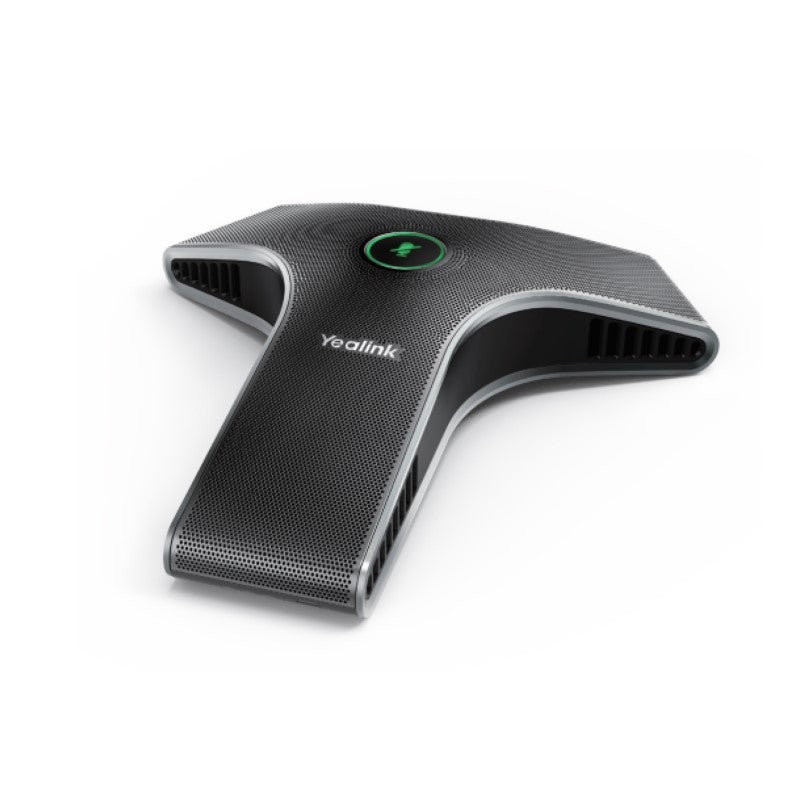
Common issues and fixes
Reviewed troubleshooting steps are not yet available for this model.
Ask AIM Telecom about this productAbout this product
*Built-in 3-microphone array for improved audio quality
• 20ft (6m) and 360° voice pickup range for effective communication in large conference rooms
• Yealink Noise Proof Technology to reduce background noise and ensure clear audio
• Power over Ethernet (PoE) for convenient installation
• Up to 4 units can be cascaded for extended audio capture distance
• Weight: 1 lbs, Dimensions: 9 × 8 × 4 in
*Additional Information:
• Suitable for large and medium-sized video conferencing rooms
• Compatible with Microsoft Teams and Zoom video conferencing platforms
• Brand: Yealink
*Technical Specifications:
• Built-in 3-microphone array
• 360° voice pickup
• Optima HD voice quality
• 20ft (6m) voice pickup range
• Muting the microphone with touchpad
• Background noise suppression
• VAD (Voice Activity Detection)
• CNG (Comfort Noise Generator)
• AEC (Acoustic Echo Canceling)
• Yealink Noise Proof Technology
• 20ft (6m) and 360° voice pickup range for effective communication in large conference rooms
• Yealink Noise Proof Technology to reduce background noise and ensure clear audio
• Power over Ethernet (PoE) for convenient installation
• Up to 4 units can be cascaded for extended audio capture distance
• Weight: 1 lbs, Dimensions: 9 × 8 × 4 in
*Additional Information:
• Suitable for large and medium-sized video conferencing rooms
• Compatible with Microsoft Teams and Zoom video conferencing platforms
• Brand: Yealink
*Technical Specifications:
• Built-in 3-microphone array
• 360° voice pickup
• Optima HD voice quality
• 20ft (6m) voice pickup range
• Muting the microphone with touchpad
• Background noise suppression
• VAD (Voice Activity Detection)
• CNG (Comfort Noise Generator)
• AEC (Acoustic Echo Canceling)
• Yealink Noise Proof Technology
More product details
The Yealink VCM34 is a dedicated conference room microphone array built for medium and large meeting spaces where the table microphones built into a speakerphone simply cannot reach every seat. It is designed as an accessory, pairing with a compatible Yealink conference phone or video bar to dramatically extend the audio pickup zone. In a huddle room or small boardroom, this device is overkill; its value is clear in large rectangular or U-shaped tables where participants are spread far apart, or in spaces with difficult acoustics.
When cascading up to four units together, the VCM34 becomes a scalable solution for very large boardrooms or training rooms. This makes it a practical alternative to installing expensive, permanently wired ceiling microphone arrays, especially in leased offices common in the GTA where structural changes are limited. It connects over a single Ethernet cable with Power over Ethernet, so placement is flexible as long as you can reach a PoE switch or injector. The primary trade-off is that it is not a standalone device; you must already have a Yealink host system like an MVC-series video bar or a CP965 conference phone to process its audio.
Canadian businesses evaluating this microphone should note that it relies entirely on the host device’s platform certification. The VCM34 itself is not a USB device you can plug into any computer; its compatibility with Microsoft Teams and Zoom is dependent on the host system it is connected to. Noise Proof Technology is particularly relevant in open-concept Canadian offices or converted warehouse-style spaces, where HVAC noise and cross-talk from adjacent workstations can be a constant problem. It is designed to suppress that background noise without cutting out quieter voices at the far end of the table.
For a deployment in a standard 4-to-6-person room, a single high-quality speakerphone is usually sufficient and simpler. The VCM34 makes sense when you have a long table and people seated far from the main system, or when the room is acoustically live and you need to bring the microphones closer to the talkers. It is a purpose-built expansion tool, not a general-purpose microphone, and it performs best when that specific purpose is a genuine need.
When cascading up to four units together, the VCM34 becomes a scalable solution for very large boardrooms or training rooms. This makes it a practical alternative to installing expensive, permanently wired ceiling microphone arrays, especially in leased offices common in the GTA where structural changes are limited. It connects over a single Ethernet cable with Power over Ethernet, so placement is flexible as long as you can reach a PoE switch or injector. The primary trade-off is that it is not a standalone device; you must already have a Yealink host system like an MVC-series video bar or a CP965 conference phone to process its audio.
Canadian businesses evaluating this microphone should note that it relies entirely on the host device’s platform certification. The VCM34 itself is not a USB device you can plug into any computer; its compatibility with Microsoft Teams and Zoom is dependent on the host system it is connected to. Noise Proof Technology is particularly relevant in open-concept Canadian offices or converted warehouse-style spaces, where HVAC noise and cross-talk from adjacent workstations can be a constant problem. It is designed to suppress that background noise without cutting out quieter voices at the far end of the table.
For a deployment in a standard 4-to-6-person room, a single high-quality speakerphone is usually sufficient and simpler. The VCM34 makes sense when you have a long table and people seated far from the main system, or when the room is acoustically live and you need to bring the microphones closer to the talkers. It is a purpose-built expansion tool, not a general-purpose microphone, and it performs best when that specific purpose is a genuine need.