
Yealink VCM36-W Package – 1303143
AIM Telecom provides troubleshooting and configuration support for this product to businesses across Toronto and the GTA. Contact us to confirm whether the issue can be handled by phone or requires on-site service.
Get Support Call 416-312-4819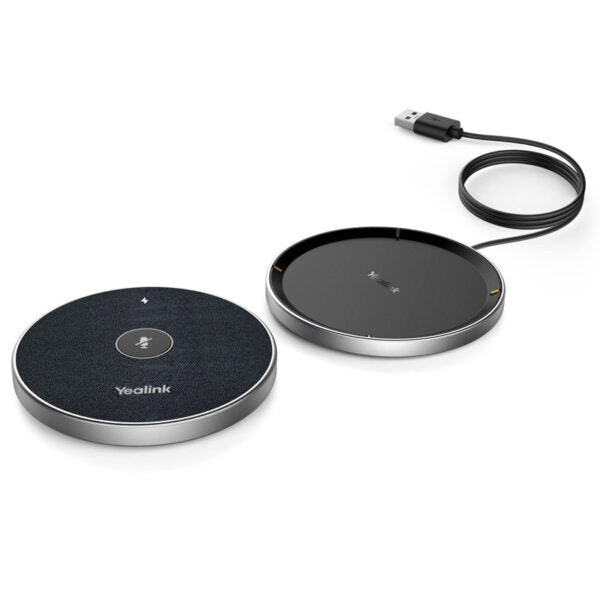
Common issues and fixes
Reviewed troubleshooting steps are not yet available for this model.
Ask AIM Telecom about this productAbout this product
• The Yealink VCM36-W is a cutting-edge wireless video conferencing microphone designed to meet diverse meeting room requirements.
• Equipped with a built-in 3-microphone array, it offers a 20-foot (6-meter) 360° voice pickup range and advanced echo cancellation and noise suppression technology that reduces ambient noise by up to 90 dB for superior audio quality.
Key Features:
• Optima HD Voice
• Full-Duplex technology
• Wireless charging dock with convenient placement options
• Portable design for flexibility and convenience
Additional Information:
• Weight: 1 lbs
• Dimensions: 8 × 8 × 4 in
• Accessory Type: Microphone
Technical Specifications:
Package Content:
• 1x VCM36-W Video Conference Microphone
• 1x Charger Cradle
• 1x 1.2m USB-C Cable
• 1x USB Adapter
• Double-sided adhesive
• Quick Start Guide
• Equipped with a built-in 3-microphone array, it offers a 20-foot (6-meter) 360° voice pickup range and advanced echo cancellation and noise suppression technology that reduces ambient noise by up to 90 dB for superior audio quality.
Key Features:
• Optima HD Voice
• Full-Duplex technology
• Wireless charging dock with convenient placement options
• Portable design for flexibility and convenience
Additional Information:
• Weight: 1 lbs
• Dimensions: 8 × 8 × 4 in
• Accessory Type: Microphone
Technical Specifications:
Package Content:
• 1x VCM36-W Video Conference Microphone
• 1x Charger Cradle
• 1x 1.2m USB-C Cable
• 1x USB Adapter
• Double-sided adhesive
• Quick Start Guide
More product details
The Yealink VCM36-W is a wireless add-on microphone built specifically for Yealink's video conferencing bars and room systems. It targets huddle rooms, small boardrooms, and open collaboration spaces where the built-in mics of a MeetingBar or similar device can't quite reach every seat. Adding this puck-shaped unit extends the voice pickup zone without pulling cables across the floor, making quick room rearrangements far easier. For Toronto offices that are retrofitting older meeting rooms for hybrid work, it's a straightforward way to improve audio capture without a full hardware refresh.
The biggest advantage is cable-free flexibility – you can place it at the center of a table, move it closer to a presenter, or even pass it around during a brainstorming session. It pairs seamlessly with Yealink's wireless presentation system, so no separate dongle is required on the host device. That said, it's deeply tied to the Yealink ecosystem; it will not work as a generic Bluetooth microphone with a laptop or a competing video bar. You'll also be managing battery life and the charging cradle, which adds a small point of daily routine. For a six-person room, the 6-metre pickup range is adequate, but in spaces with heavy glass, metal furniture, or significant background hum, the noise reduction may be working harder than you'd like.
A common deployment scenario in the GTA sees this paired with a Yealink A20 or A30 MeetingBar in a mid-size boardroom. At this price, it's a cost-effective way to balance a single-vendor setup. If your room already demands multiple wireless mics to cover a long table, you may be better served by a solution that supports daisy-chaining or includes a dedicated DSP. For a basic 4-to-6-person meeting pod, though, the VCM36-W fits the bill without overcomplicating the install.
The biggest advantage is cable-free flexibility – you can place it at the center of a table, move it closer to a presenter, or even pass it around during a brainstorming session. It pairs seamlessly with Yealink's wireless presentation system, so no separate dongle is required on the host device. That said, it's deeply tied to the Yealink ecosystem; it will not work as a generic Bluetooth microphone with a laptop or a competing video bar. You'll also be managing battery life and the charging cradle, which adds a small point of daily routine. For a six-person room, the 6-metre pickup range is adequate, but in spaces with heavy glass, metal furniture, or significant background hum, the noise reduction may be working harder than you'd like.
A common deployment scenario in the GTA sees this paired with a Yealink A20 or A30 MeetingBar in a mid-size boardroom. At this price, it's a cost-effective way to balance a single-vendor setup. If your room already demands multiple wireless mics to cover a long table, you may be better served by a solution that supports daisy-chaining or includes a dedicated DSP. For a basic 4-to-6-person meeting pod, though, the VCM36-W fits the bill without overcomplicating the install.