
Yealink CPW65 Package Wireless Microphones for CP965
AIM Telecom provides troubleshooting and configuration support for this product to businesses across Toronto and the GTA. Contact us to confirm whether the issue can be handled by phone or requires on-site service.
Get Support Call 416-312-4819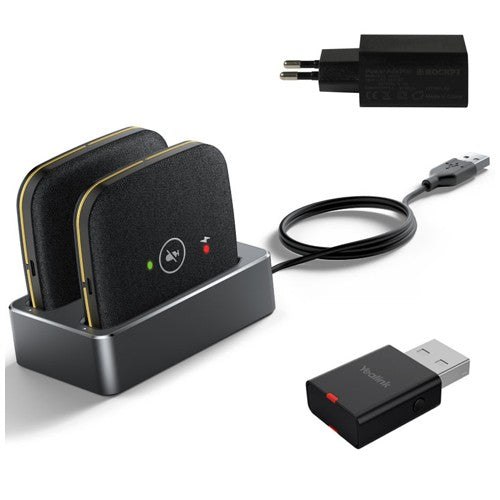
Common issues and fixes
Reviewed troubleshooting steps are not yet available for this model.
Ask AIM Telecom about this productAbout this product
• The Yealink CPW65 is a wireless expansion mic that works as an audio input device for the Yealink CP965 conference phone. Its elegant design, made from black fabric, ensures a waterproof and greaseproof product.
Key features:
• 3 built-in microphones with a 360-degree voice pickup range of up to 10 feet (3 meters)
• Up to 20-meter connection distance with CP965
• 11-day standby time and 12-hour talk time
• Intuitive capacitive mute buttons
• 360° nondirectional charging on charger cradle
• DECT Technology for clear audio transmission
Additional information:
• Weight: 1.12 lbs
• Dimensions: 8.82 × 3.23 × 2.8 in
• Brand: Yealink
• Phone Type: Conference
• Accessory Type: Microphone
Technical specifications:
• Model: Yealink CPW65 Package
• Part number: 1204622
• Box contents: 2x CPW65 wireless microphones, 1x charger cradle, 1x 5V/2A power adapter, 1x 1.8m USB cable, and 1x WDD60 USB DECT dongle (including 2-year hardware warranty)
Key features:
• 3 built-in microphones with a 360-degree voice pickup range of up to 10 feet (3 meters)
• Up to 20-meter connection distance with CP965
• 11-day standby time and 12-hour talk time
• Intuitive capacitive mute buttons
• 360° nondirectional charging on charger cradle
• DECT Technology for clear audio transmission
Additional information:
• Weight: 1.12 lbs
• Dimensions: 8.82 × 3.23 × 2.8 in
• Brand: Yealink
• Phone Type: Conference
• Accessory Type: Microphone
Technical specifications:
• Model: Yealink CPW65 Package
• Part number: 1204622
• Box contents: 2x CPW65 wireless microphones, 1x charger cradle, 1x 5V/2A power adapter, 1x 1.8m USB cable, and 1x WDD60 USB DECT dongle (including 2-year hardware warranty)
More product details
The Yealink CPW65 package extends the reach of a CP965 conference phone into larger or more formal meeting spaces where the base unit’s built-in microphones are not quite enough. It is designed for boardrooms, huddle rooms, and training areas in which participants are spread around a long table or seated away from the central phone. By placing these wireless pods closer to the speakers, the system captures voices more evenly and reduces the hollow, distant sound that can occur when everyone relies on a single pickup point in the middle of the room.
This kit pairs naturally with a CP965 that already serves as the hub for a Microsoft Teams or Zoom-enabled space. It is not a standalone microphone system and will not function with other Yealink models or third-party conference phones. The included DECT dongle provides a dedicated, interference‑resistant link between the mics and the host phone, which matters in downtown Toronto offices where Wi‑Fi and Bluetooth spectrum can be crowded. The two-mic package suits rectangular tables of about eight to fourteen seats; a single pod would cover a smaller round-table setup, but buying the pair upfront avoids the hassle of adding a second unit later.
The trade‑off to keep in mind is reliance on DECT range and battery life. The 20‑meter connection distance is open‑air; walls, metal furniture, and AV racks will reduce it. The 12‑hour talk time covers a full business day, but back‑to‑back bookings without returning the pods to the charging cradle will eventually drain them. For deployments that run from early morning through evening without a break, it is worth building a charging routine into the room‑turnover process. Also, the mute buttons on the pods are capacitive, so a misplaced notepad or coffee cup can trigger an unintended mute or unmute.
For a small huddle room where everyone sits within a metre or two of the CP965, this add‑on is overkill; the base unit’s own mic array handles that scenario well. At the other extreme, a divisible ballroom or town‑hall space with dozens of participants is beyond what two wireless pods can cover effectively. The CPW65 package fits best in that middle ground—a single large table in a dedicated meeting room—where it bridges the gap between the convenience of a conference phone and the voice coverage of a professionally installed ceiling‑mic system.
This kit pairs naturally with a CP965 that already serves as the hub for a Microsoft Teams or Zoom-enabled space. It is not a standalone microphone system and will not function with other Yealink models or third-party conference phones. The included DECT dongle provides a dedicated, interference‑resistant link between the mics and the host phone, which matters in downtown Toronto offices where Wi‑Fi and Bluetooth spectrum can be crowded. The two-mic package suits rectangular tables of about eight to fourteen seats; a single pod would cover a smaller round-table setup, but buying the pair upfront avoids the hassle of adding a second unit later.
The trade‑off to keep in mind is reliance on DECT range and battery life. The 20‑meter connection distance is open‑air; walls, metal furniture, and AV racks will reduce it. The 12‑hour talk time covers a full business day, but back‑to‑back bookings without returning the pods to the charging cradle will eventually drain them. For deployments that run from early morning through evening without a break, it is worth building a charging routine into the room‑turnover process. Also, the mute buttons on the pods are capacitive, so a misplaced notepad or coffee cup can trigger an unintended mute or unmute.
For a small huddle room where everyone sits within a metre or two of the CP965, this add‑on is overkill; the base unit’s own mic array handles that scenario well. At the other extreme, a divisible ballroom or town‑hall space with dozens of participants is beyond what two wireless pods can cover effectively. The CPW65 package fits best in that middle ground—a single large table in a dedicated meeting room—where it bridges the gap between the convenience of a conference phone and the voice coverage of a professionally installed ceiling‑mic system.