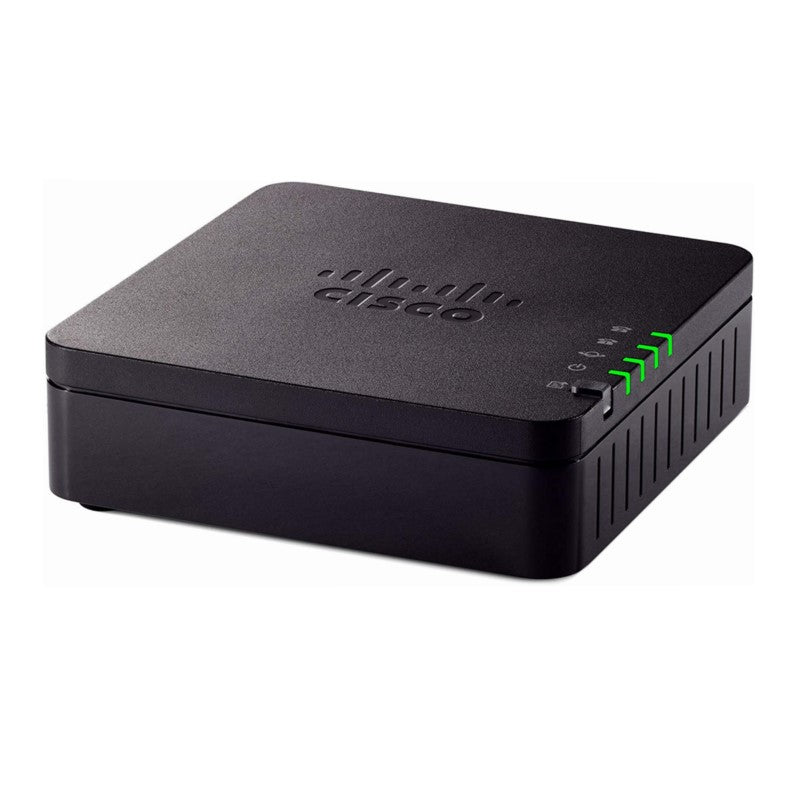
Cisco 191 Multiplatform Analog Telephone Adapter – ATA191-3PW-K9

Frequently Asked Questions

Start by confirming the ATA itself has power and a network link—check that the power adapter is seated and the Ethernet port light is active. Next, verify the phone cable is plugged into the correct FXS port (Phone 1 or Phone 2) and not into the Ethernet port. If the ATA’s corresponding line LED is off, the line may not be registered; log into the web interface to confirm the SIP registration status for that port.
First confirm the SIP server address, username, and password entered in the line configuration exactly match what your provider supplied—watch for typos or extra spaces. Also check that your network firewall allows outbound SIP traffic on port 5060 (or the provider’s custom port) and that SIP ALG is disabled on your router, as ALG can rewrite packets and break registration. If the device is behind double NAT, you may need to work with your provider on NAT traversal settings.
Choppy audio usually points to network jitter or packet loss rather than a faulty adapter. Start by power-cycling the ATA 191 and your network switch, then check whether other devices on the same local network are consuming heavy bandwidth during calls. If your router supports Quality of Service, prioritizing the ATA’s MAC address or its VLAN can make a significant difference.
Yes. Each FXS port is configured independently with its own SIP registration, so you can set Phone 1 to one provider’s credentials and Phone 2 to a completely different service. This is handy if you want a fax line from a fax-friendly provider on one port and a voice line from another provider on the second port.
A blinking line LED typically indicates the port is attempting to register but failing. Log into the device’s web interface and look at the registration state under the Voice or Line status page. Common causes are an expired SIP password, an IP address change on the ATA that no longer matches a whitelist on the provider side, or a temporary outage at your VoIP carrier. If the issue persists, a Toronto-based VoIP support provider can usually resolve this remotely.
Connect the fax machine to one of the FXS ports and set that line’s preferred codec to G.711 (either a-law or μ-law, matching your region); avoid G.729 for fax, as the compression will corrupt fax tones. In the line configuration, disable silence suppression and echo cancellation for that port if the option is available, and ask your VoIP provider to enable T.38 fax protocol support on your SIP trunk. These steps give fax transmissions the best chance of completing cleanly over IP.
First confirm you are using the correct IP address—pick up an analog phone connected to the ATA, dial the interactive voice response access code (usually ****), and use the IVR to announce the current IP address. Ensure your computer is on the same subnet and that no browser proxy is interfering. If access still fails, temporarily disable your PC’s firewall and try again; some firewall rules block HTTP access to local devices on non-standard ports.
Power-cycle the adapter by unplugging it for 30 seconds, then plug it back in and wait for it to fully boot and re-register. Check that your network switch and router also came back up properly after the outage—sometimes the ATA boots faster than upstream network gear and fails to obtain an IP address. If the problem continues, log in and verify the configuration was not lost; a brief power surge can occasionally corrupt settings.
The ATA 191 does not support Power over Ethernet; you must use the included external power adapter. Plan your placement near an AC outlet, and avoid connecting it to a PoE switch port expecting the switch to power it—the device simply will not turn on without its dedicated power supply.
VoIP Adapters

Cisco 191 Multiplatform Analog Telephone Adapter – ATA191-3PW-K9
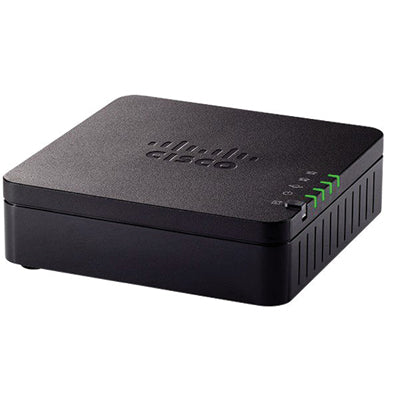
The Cisco ATA 191 Multiplatform Analog Telephone Adapter turns traditional telephone, fax, and overhead paging communications devices into IP devices for greater cost-effectiveness. This adapter is ideal for customers connecting to enterprise networks, small offices, or unified communications as a service from the cloud. • Offers clear, natural-sounding voice quality via advanced preprocessing, high-performance echo cancellation, voice activity detection, and comfort noise generation • Enables zero-touch provisioning via TR-069 and XML configuration files for cloud provisioning • Provides a complete security solution for both media and signaling to protect customer investments • Improves serviceability with a dedicated problem reporting button for log collection • Enables IPv6 dual stack to help with migration to IPv6 Key Features: • Two standard FXS ports, configured independently as two Session Initiation Protocol (SIP) registrations • Works with third-party call control systems and does not work with Cisco call control systems • Provides advanced audio features such as echo cancellation, voice activity detection, comfort noise generation, adaptive jitter buffer, frame loss concealment, adjustable audio frames per packet, call progress tone generation, impedance and gain adjustment, and dynamic audio payload Weight: 1.04 lb Dimensions: 9.6 × 6 × 2.5 in Number of Ports: FXS Technical Specifications: • Audio codecs: G.711 a-law, G.711 μ-law, G.729a, G.729ab, G.726 • Full-duplex audio • Echo cancellation • Voice activity detection • Silence suppression • Configurable silence threshold • Comfort noise generation • Adaptive jitter buffer • Frame loss concealment • Adjustable audio frames per packet • Call progress tone generation • Impedance and gain adjustment • Dynamic audio payload For a full list of specifications, please refer to the Product Datasheet.

About This Product

The Cisco ATA 191 is a practical bridge for organizations that need to keep a handful of analog devices—think a lobby phone, a fax machine, or an overhead paging system—alive on a modern IP-based voice network. It is well suited to small and mid-sized offices, retail counters, or branch locations in the GTA where the core phone system has moved to a cloud UCaaS platform or a third-party SIP trunk, but a couple of legacy endpoints remain. Its two independent FXS ports let you connect two devices with separate registrations, which covers the most common small-deployment scenarios without requiring a larger gateway.

This adapter pairs naturally with hosted voice services and on-premise SIP platforms from providers like 3CX, Asterisk, or Metaswitch. It is explicitly designed for third-party call control, so it will not register to Cisco’s own Unified Communications Manager. If your environment runs on Cisco call control, this is the wrong tool; look instead at Cisco’s enterprise-focused voice gateways. For everyone else, the ATA 191 offers a straightforward, secure way to avoid replacing perfectly functional analog equipment.

Buyers should understand the limits of the form factor. You get two analog lines, and that is it—there is no built-in router, no failover to PSTN, and no onboard Wi-Fi. The device relies entirely on the quality of your LAN connection and the SIP platform it registers to. In a congested small-office network without proper QoS, voice quality will suffer regardless of how good the echo cancellation is. It is also a purely SIP device; it does not speak older protocols like MGCP or H.323, so it fits a modern SIP trunk or hosted PBX but not a legacy TDM migration without a SIP intermediary.

For a Toronto professional services firm with a single fax line and a desk phone in the reception area, the ATA 191 is a tidy, affordable choice that can be provisioned remotely. It becomes overkill where you only need one analog port, and it is underpowered for a warehouse with a dozen analog paging horns or a hotel needing to convert a block of analogue room phones—those jobs call for a multi-port gateway. In the right two-device sweet spot, however, it delivers clean, dependable voice conversion with minimal fuss.

Services We Provide
  • Professional Installation & Configuration
  • Ongoing Maintenance & Support
  • Troubleshooting & Repairs
  • System Upgrades & Updates