
Fanvil A12 IP Audio Intercom - 2 SIP lines 10W Speaker

Frequently Asked Questions

First, check that the Ethernet cable is securely connected and that the switch or injector is providing Power over Ethernet (PoE) according to the device's requirements (usually 802.3af). If you are using a 12V DC adapter, verify it is plugged in and delivering the correct voltage. A quick test is to try a different known-good PoE port or cable.
Access the device's web interface via its IP address (default credentials are often admin/admin). Under the SIP settings, enter your account details: SIP server domain or IP, extension number, and password. Make sure the transport protocol (UDP/TCP/TLS) matches your PBX configuration. Save and reboot the intercom; then check the status page for registration success.
First, confirm the volume settings on both the intercom and your phone. On the A12, adjust the speaker volume through the web interface under Audio settings. Also ensure the intercom's microphone and speaker are not obstructed by dirt or debris; clean the panel gently with a soft cloth. If the issue persists, test with a different handset or softphone to rule out your phone's audio path.
Log into the web interface and navigate to the Intercom or Auto Answer settings. Enable auto-answer and set the delay to 0 or a low number (e.g., 500 ms). This is common for door entry applications where the visitor should be connected immediately without pressing a button. Save and reboot for the change to take effect.
Echo is often caused by acoustic coupling between the speaker and microphone. Lower the speaker volume slightly through the web interface (Audio > Speaker Volume). Also ensure the intercom is mounted firmly and not near reflective surfaces. If the A12 has an echo cancellation setting (AEC), verify it is enabled. A Toronto-based VoIP support provider can usually resolve this remotely if the basic adjustments don't help.
No, the A12 is a pure IP intercom that requires a SIP-based VoIP system. It cannot connect directly to an analog POTS line. You would need an ATA (analog telephone adapter) to convert the analog line to SIP, but that adds complexity. For a simple upgrade from analog, consider a SIP-to-analog gateway or choose a different intercom model that supports both.
First, verify that an SD card is inserted and formatted correctly (FAT32) in the intercom. The broadcast feature relies on stored audio files; check that a recording exists in the SD card's designated folder. Also ensure the broadcast trigger (e.g., a button press or scheduled event) is properly configured in the web interface under Broadcast settings.
Check the button's function assignment in the web interface under Key Settings. It may be set to a specific action like calling an extension or triggering a relay. If it's configured correctly, test the button while monitoring the device's log or status page to see if the action is registered. A physical defect is rare; most issues are configuration-related.
Volume adjustments are made via the web interface. Go to Audio > Volume Settings. You will find separate sliders for speaker volume (handset and hands-free) and microphone gain. Start with moderate levels and test from a distance to avoid feedback. Save and reboot for changes to apply.
The A12 accepts standard SD cards (not SDHC or SDXC) up to 32 GB, formatted as FAT32. Insert the card into the slot behind the front panel (you may need to unscrew the panel). After insertion, use the web interface to format or manage recordings. If the card is not recognized, try a different brand or capacity.
Door Phones

Fanvil A12 IP Audio Intercom - 2 SIP lines 10W Speaker
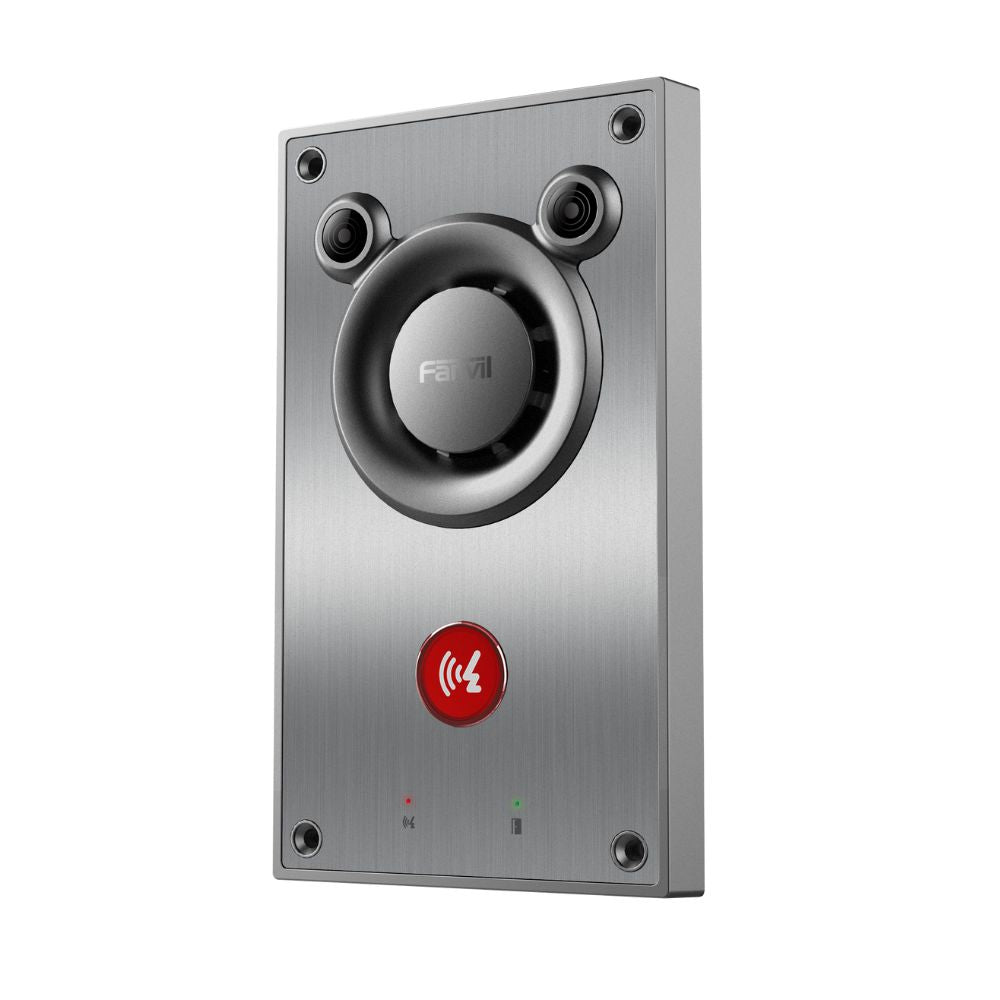
• The Fanvil A12 is a next-generation intercom with exceptional sound quality, powered by innovative turbine sound cavity technology and advanced speech analysis algorithms. It features a built-in 10W speaker for clear voice pickup from up to 5 meters away. • Key Features: • Excellent sound quality: Unique turbine cavity design • Intelligent audio: AEC, ANR, AGC, AVC speech algorithms • Loud sound: 10W speaker, 90dB hands-free call and 100dB broadcast • Remote pickup: Covers a range of 5 meters with accurate word capture • Self-check function: Simplifies maintenance and reduces costs • Recording broadcast: Supports SD card slot for recording and preset broadcast • Beautiful and durable: Stainless steel panel with aluminum alloy structure, up to IK10 anti-riot standard • Protection grade: IP66 waterproof and dustproof grade • Friendly interaction: 27mm backlit big button and dual status indicator • High compatibility: Compatible with SIP-based mainstream IP PBX/softswitch/IMS platforms • The Fanvil A12 is built to withstand tough environments, meeting the highest industry standards for durability. Its features make it an ideal solution for various applications. • For a full list of specifications, please refer to the Product Datasheet.

About This Product

The Fanvil A12 is a rugged IP audio intercom designed for outdoor or semi-public environments where durability and clear two-way communication are critical. With its stainless steel panel, IP66 weatherproofing, and IK10 anti-riot rating, it can withstand rain, dust, and physical impact, making it a strong fit for building entrances, gated parking lots, warehouse loading bays, or condominium lobbies in the Greater Toronto Area. It replaces older analog intercom systems when upgrading to a SIP-based VoIP network, allowing seamless integration with existing IP PBX platforms such as FreePBX, 3CX, or hosted providers.

This device is best suited for locations that need a loud, reliable call point rather than a full-featured video doorbell. The 10W speaker and advanced audio processing (AEC, ANR, AGC) ensure voices are heard clearly even in noisy environments, with effective pickup up to 5 metres. However, it is not a video intercom, so it cannot provide visual verification; if you need to see who is at the door, consider a model with a camera. Additionally, the A12 is a fixed unit without a keypad for dialing extensions—it is intended for one-touch calling or auto-answered intercom zones.

For Canadian deployments, the A12's robust build handles freeze-thaw cycles and heavy snow loads well, and its compatibility with standard SIP platforms means it works with most Canadian VoIP carriers. The trade-off is that it requires Power over Ethernet (PoE) or a separate 12V DC supply, so plan for network cabling. In a small office with only a few staff, the A12 may be overkill compared to a basic indoor intercom, while in a large multi-tenant building without video, it might be underpowered for managing visitor traffic efficiently. Overall, it is a focused, industrial-grade audio intercom that excels at its one job: reliable voice communication at the point of entry.
Services We Provide
  • Professional Installation & Configuration
  • Ongoing Maintenance & Support
  • Troubleshooting & Repairs
  • System Upgrades & Updates



