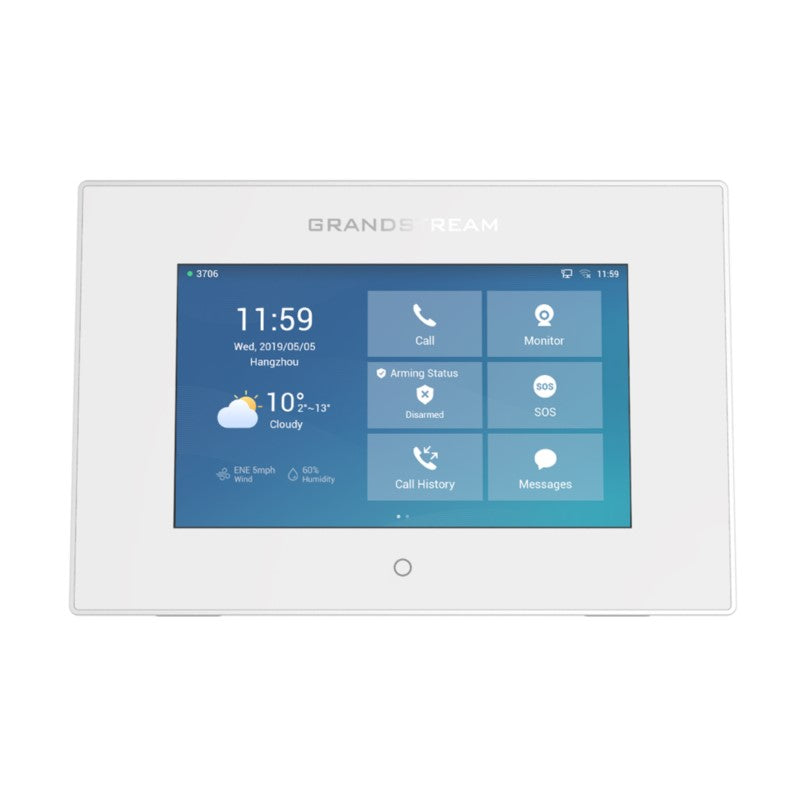
Fanvil i505W Android SIP Indoor Station

Frequently Asked Questions

Start by confirming the device has an IP address and can reach the server. Check that the SIP server address, port, username, and password entered on the station match what your provider or PBX expects. A typo in the authentication ID or domain field is the most common cause. Also verify the account isn’t already in use on another device, as most SIP extensions only allow one registration at a time.
First, make sure the outdoor station is powered on and its camera is active. On the i505W, check that both devices are using a compatible video codec (H.264 is the safest starting point). Next, verify that the network between the two devices can pass RTP streams; a simple test is to call from another SIP endpoint to the outdoor station. If the issue only occurs over Wi-Fi, try a wired connection to rule out wireless congestion.
A frozen touchscreen is often caused by a temporary software hang rather than a hardware fault. Power the unit off by removing the 12 V adapter or PoE cable, wait 15 seconds, then reconnect it. This is a safe restart and won’t erase your configuration. If the screen remains unresponsive after reboot, inspect the screen for physical damage and ensure the room isn’t subject to extreme temperatures or condensation.
If your unit includes the optional 2.4 GHz Wi-Fi module, you can connect to a wireless network. Go to the Android system settings, enable Wi-Fi, and select your SSID. Keep in mind the station only supports the 2.4 GHz band, so it won’t see 5 GHz networks. In a busy Toronto office building, 2.4 GHz can be crowded; a wired PoE connection will always give you more reliable audio and video.
Begin by checking that the station’s volume isn’t muted and the speaker isn’t blocked. Next, confirm audio codec compatibility between the indoor and outdoor stations—G.722 and Opus are both supported and usually work well. If you’re using a SIP PBX, look at the call record to see if two-way audio is being negotiated successfully. In some cases, a firewall or router’s SIP ALG can interfere with RTP streams, so testing on a flat local network is a good diagnostic step.
First, verify the wiring between the sensor and the input terminal, ensuring no wires have become loose or corroded. Use a multimeter to confirm the sensor is switching states correctly. Then, open the station’s alarm configuration and make sure the input is enabled, the correct normally open/closed setting is chosen, and any associated actions are defined. If the sensor is far from the station, check that the cable run hasn’t been damaged by recent renovations.
The i505W uses a short circuit output to trigger an electric strike or magnetic lock. Confirm that the output is wired to the lock’s control circuit and that the lock power supply is on. In the station’s settings, check that the door release function is assigned to that specific output. A quick reality check: test the lock with a manual switch at the door controller to rule out a mechanical problem before blaming the station.
Firmware updates on the Android-based i505W should be approached with caution. Before updating, back up your configuration using the station’s export function if available. Download the firmware only from Fanvil’s official support portal. Apply the update via the system’s built-in upgrade tool, and follow the release notes exactly. If you’re not sure the update is correct for your hardware version, contact your support provider—installing the wrong firmware can genuinely brick the device.
Intermittent drops are often tied to network issues rather than the devices themselves. Check whether the link is flapping on the switch port or if DHCP leases are too short, causing the station to get a new IP. If using Wi-Fi, look for interference sources. Also verify that SIP keep-alive settings are enabled so the PBX maintains the session. A quick test is to give the i505W a static IP address temporarily and see if the problem disappears.
You can install many Android apps as long as they are compatible with Android 9.0 and the device’s screen resolution. Keep in mind the i505W isn’t a general-purpose tablet; its processor and memory are tuned for intercom functions, not heavy multitasking. Loading too many background apps can degrade call performance. Test any critical app thoroughly before rolling out to tenants.
Door Phones

Fanvil i505W Android SIP Indoor Station

Fanvil i505 is a 7-inch color touchscreen indoor unit based on the Android 9.0 operating system, designed to meet customization needs and secondary development for industry applications. • Two-way intercom with access control for one-click remote door opening • Supports real-time residential security with 8 alarm inputs and industrial power socket interface • Connects to various sensors for reliable security assurance • Provides convenient visitor call services in a wide range of settings, including residential communities, villas, office buildings, and more Key Features: • Screen: 7-inch 1024 x 600 Color Touch Screen • Operating System: Android 9.0 • Panel: Plastic • HD Audio: G.722, Opus • Video Decoding: Up to 1080P @30fps, H.264, H.265 (optional) • Network: 1* 10/100Mbps • Speaker: 4R2W • WiFi: 2.4GHz Wi-Fi (optional) • Power Supply: 12V-1A/PoE • Alarm Input Interface: 8 • Short Circuit Output: 1 • Short Circuit Input: 1 • Working Temperature: -10℃-45℃ • Working Humidity: 10-90% • Installation: Wall mounted For a full list of specifications, please refer to the product datasheet.

About This Product

The Fanvil i505W is an Android-powered indoor station built for properties that want more than a simple doorbell intercom. It targets multi-tenant residential buildings, villa complexes, and small to mid-sized offices where a customizable touchscreen endpoint can serve as the hub for visitor calls, access control, and basic security monitoring. Because it runs Android 9.0, integrators can load custom apps or tailor the interface, making it a fit for projects that require branded tenant directories, smart-home tie-ins, or industry-specific workflows rather than a fixed-function panel.

This unit pairs naturally with SIP-based outdoor door stations and sensor arrays. The eight alarm inputs let it double as a lightweight security panel, which is genuinely useful in condos or house-scale deployments where a separate alarm system would be overkill. Keep in mind the plastic housing and indoor-only design mean it’s not suitable for unconditioned entryways or exterior walls. The optional 2.4 GHz Wi-Fi works for spots without Ethernet, but in dense buildings that band is often crowded and can cause jitter on video calls—wired PoE is the more predictable path.

For a GTA property manager, the i505W sits in a practical middle ground. It’s overkill for a single-family home that only needs to ring a chime and show a door camera; a simpler SIP video phone would cost less and be easier to set up. At the same time, it’s underpowered for campus-scale deployments or high-security sites that demand continuous recording, advanced analytics, or integration with commercial access control systems. The 10/100 Mbps port and older Android version also mean it won’t satisfy teams that need gigabit throughput or frequent OS-level security patches.

In a Canadian business context, the unit’s wide voltage tolerance and PoE support make it straightforward to deploy across standard network closets, and its SIP stack should interoperate with most hosted VoIP platforms used in Toronto offices, provided the firmware is current. Just be aware that the optional Wi-Fi is limited to 2.4 GHz, so if you’re counting on a wireless link, plan for an AP in the same room to keep performance acceptable.
Services We Provide
  • Professional Installation & Configuration
  • Ongoing Maintenance & Support
  • Troubleshooting & Repairs
  • System Upgrades & Updates