
Grandstream GSC3570 HD Intercom and Facility Control Station

Frequently Asked Questions

First, verify that the account’s SIP credentials (username, password, and server address) are entered correctly under the web interface’s Account settings. Check that the device can reach the server by pinging it from a computer on the same network. If registration still fails, reboot the GSC3570 and your router; if the issue persists, a Toronto-based VoIP support provider can usually resolve this remotely by reviewing packet captures or server logs.
Confirm that the volume is turned up and the mute button is not active on the touch screen. Next, inspect the handset or speaker connection, and ensure the call is not inadvertently put on hold. If the problem continues, verify that your network is not blocking RTP ports (typically 5004-65000) and that the SIP server’s audio codec settings match the GSC3570’s codec priority list.
A frozen screen is often a temporary software halt. Unplug the Ethernet cable (or power adapter if not using PoE), wait 10 seconds, and reconnect. This safe reboot preserves all settings. If unresponsiveness returns frequently, check that the device’s firmware is up to date and that no foreign object is pressing against the display.
Confirm that the Ethernet cable is plugged into the correct PoE-capable switch port and that the switch’s total power budget isn’t exhausted. Try a different known-working PoE port and a short, known-good cable to rule out wiring issues. If the unit still doesn’t light up, test with the optional 12V power adapter to isolate whether the problem is the internal PoE circuit or the network switch.
The GSC3570 supports video streams up to 720p resolution; ensure your cameras are not set to output a higher resolution that the device cannot decode. Also confirm that the cameras use a compatible codec (H.264) and are on the same subnet with no firewall blocking the RTSP ports. If the feed remains black, a Toronto-based VoIP support provider can usually resolve this remotely by verifying ONVIF profiles and network path settings.
Intermittent call drops are often caused by network jitter or packet loss. Start by testing the connection quality from a wired laptop on the same switch port using a ping plotter or VoIP quality tool. If using Wi-Fi, switch to a wired connection temporarily to see if interference is the root cause; also check that your router’s SIP ALG feature is disabled, as it can interfere with SIP signaling.
The GSC3570 can trigger a door strike via its built-in relay or through an HTTP command to a networked controller. In the web interface, navigate to the Door System or Intercom settings, configure the relay action and the destination for open-door commands, and wire the relay output to your door hardware. You will also need to assign a SIP door phone or intercom to the relevant account for two-way audio before the door control flow works.
Yes, the device supports standard SIP registration and will work with any provider that supplies SIP credentials. Simply enter the provider’s server address, username, and password into one of the four SIP accounts. Be aware that some providers require specific codec or transport settings; adjust the account’s GSC3570 settings to match their recommended configuration.
It integrates natively with Grandstream UCMs using zero-config provisioning or manual SIP extension setup. After connecting both to the same network, you can auto-discover the PBX and assign an extension. You’ll then be able to use the GSC3570 for intercom calls, camera viewing, and door control features managed by the UCM.
Log into the device’s web interface and go to the Phone Settings or Display section. You can upload audio files in the supported format (usually WAV) for custom ringtones and an image file for the background. Follow the on-screen size and format guidelines to avoid upload errors, and save the changes; the new tone or background will apply immediately after a refresh.
Door Phones

Grandstream GSC3570 HD Intercom and Facility Control Station
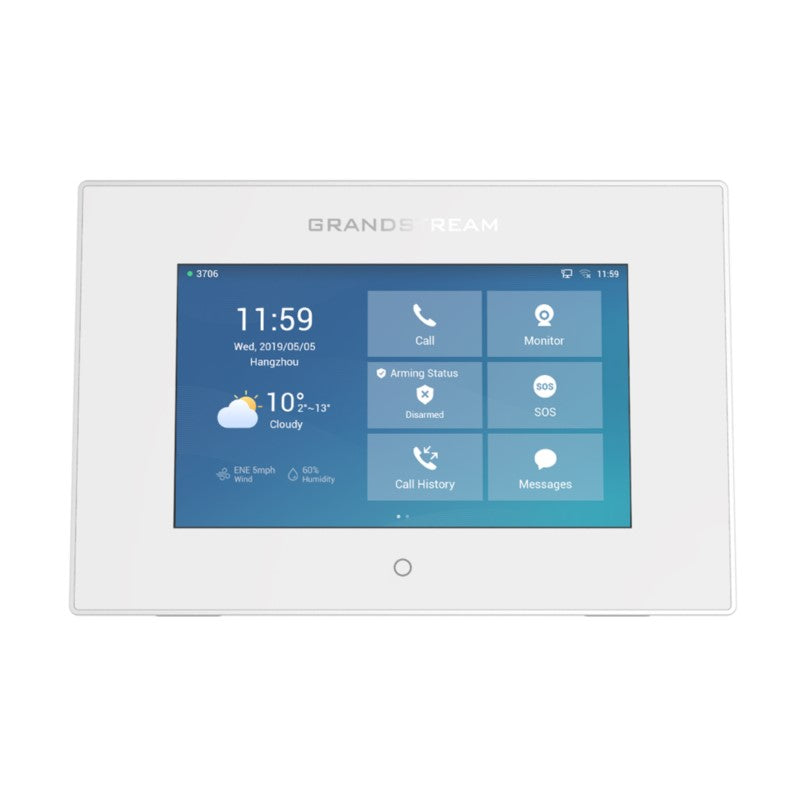
The GSC3570 is a powerful intercom and facility control station designed to provide businesses with a dedicated device to manage facility communications, door access, physical security, and more. This device can be wall-mounted or placed on a desktop as a solution for easy door control, intercom, and paging communication, security camera management, and facility-wide UC integration. Key Features: • 7-inch capacitive touch screen LCD • Full duplex 2-way HD audio with advanced echo cancellation • Dual-band 802.11 ac Wi-Fi support • PoE connectivity for a network connection to the device • Secure Boot & Data, TLS, and SRTP security encryption technology • Supports four SIP accounts and various telephony features • Video decoders and capabilities up to 720p resolution Additional Information: • Weight: 1.95 lbs • Dimensions: 11 × 8 × 3 in • Door Phone Type: Indoor, Intercom, Keypad Technical Specifications: • Protocol/Standards SIP RFC3261, TCP/IP/UDP, RTP/RTCP, HTTP/HTTPS, ARP, ICMP, DNS (A record, SRV, NAPTR), DHCP, PPPoE, SSH, TFTP, NTP, STUN, SIMPLE, LDAP, 802.1x, TLS, SRTP, IPv6 • Network Interface: Dual switched 10/100Mbps ports • Graphic Display: 7’’ 1024×600 capacitive touch screen TFT LCD with Home key • Voice Codecs and Capabilities: G.711μ/a, G.722 (wide-band), G.726-32, iLBC, Opus, G.729A/B, DTMF (In audio, RFC2833, SIP INFO), VAD, CNG, AEC, PLC, AJB, AGC, ANS • Video Decoders and Capabilities: H.264 BP/MP/HP, video resolution up to 720p, frame rate up to 30 fps, bit rate up to 2Mbps

About This Product

The GSC3570 is a central control station for businesses that need to manage intercom, paging, door access, and security camera feeds from one location. It suits small to mid-sized offices, retail front counters, or warehouse dispatch desks where a dedicated, always-on touch panel simplifies day-to-day facility operations. The device sits on a desk or mounts to a wall indoors; it is not weather-sealed, so it belongs in a climate-controlled environment.

Because it handles up to four SIP accounts and includes dual-band Wi-Fi, the GSC3570 pairs well with standards-based IP PBXs and can reduce wiring clutter if Ethernet isn't already at the mounting point. Its 720p video decoding is adequate for confirming identity at a door or checking a camera view, but it will not serve as a high-resolution surveillance monitor. Organizations that need to view 1080p or 4K streams should pair the station with a separate NVR and monitor.

Deployment trade-offs center on scope. For a single entry point with a door phone and one or two cameras, the GSC3570 is a capable all-in-one answer. In larger facilities with dozens of doors and cameras, it becomes a complementary interface rather than the sole control hub—users would still need a broader access control or video management system behind it. Canadian businesses in the Greater Toronto Area will find it compatible with most hosted VoIP providers and on-premise platforms, provided the network supports PoE or a local power adapter.
Services We Provide
  • Professional Installation & Configuration
  • Ongoing Maintenance & Support
  • Troubleshooting & Repairs
  • System Upgrades & Updates



