Fanvil GA10 FXS Gateway
Frequently Asked Questions
Start by verifying that the SIP server address, username, and password entered in the gateway’s web interface match exactly what your provider supplied. Next, confirm the gateway’s network settings are correct—check that it has a valid IP address on your local subnet and can reach the internet. If you are using a hosted service popular with Canadian businesses, ensure the outbound proxy field is filled in if your provider requires it. A quick test is to try pinging the provider’s SIP server from another device on the same network.
The GA10 likely sits behind a NAT router. Open the gateway’s web interface, navigate to the SIP settings, and confirm that NAT traversal is enabled. Also verify that the RTP port range you specified (often starting at UDP 10000) matches any port-forwarding or firewall rules on your router. A simple restart of both the gateway and the router can sometimes clear a stale NAT binding.
A dark SIP status light usually means the gateway has no active registration. Double-check that the ‘SIP Server’ field points to the correct domain or IP and that the line is enabled in the configuration. If the registration port is non-standard, confirm it is appended correctly to the server address. Also try disabling any DNS SRV lookup option temporarily to rule out a name resolution issue.
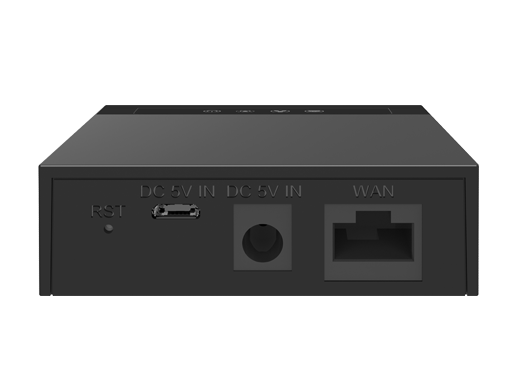
Yes, the GA10 supports power through its USB port. Connect it to a standard USB power adapter or a powered USB port that can supply sufficient current. If the device does not turn on with USB power alone, try the included AC power adapter to rule out an under-powered USB source before assuming a fault.
HD voice codecs like G.722 and Opus are not suitable for fax. Log into the gateway’s configuration and ensure the codec priority for that line forces G.711a or G.711u as the first choice and disables high-definition codecs. Also, disable silence suppression and enable the T.38 fax mode if your VoIP provider supports it, which is common with many Canadian SIP trunk carriers.
The GA10 supports desktop and wall-mounted installation out of the box. The underside has mounting slots that fit standard screw-heads, allowing you to securely hang the small metal chassis on a wall. Route the cables from the side so there is no strain on the connectors, and choose a spot near an Ethernet jack and power source.
First, swap the phone cable between the gateway and the analog phone; a damaged cord is often the culprit. If the issue continues, test with a different analog handset to see if the phone itself is causing the noise. Also try connecting the gateway to a different Ethernet cable and switch port—electrical interference can leak onto the analog side through poor network cabling.
It does. The Fanvil GA10 uses standard SIP, so it is compatible with most Canadian VoIP services. You will need the provider’s SIP server address and your assigned account or sub-account credentials. Some providers require an outbound proxy entry; if registration fails even with correct credentials, check the provider’s device configuration guide for Fanvil or generic SIP ATA settings.
The GA10 has only a wired 10/100 Ethernet port. It will work through a Wi-Fi-to-Ethernet bridge or a powerline adapter, as long as the connection is stable and low-latency. For reliable call quality, avoid heavily congested wireless channels and ensure the bridge assigns a consistent IP address to the gateway.
VoIP Gateways
Fanvil GA10 FXS Gateway
The Fanvil SIP ATA Gateway is a single FXS port device that supports 2 SIP Lines, HD voice, and USB port for power supply connection. It also features G.722 and Opus audio codec. • Supports 3-way conference call • Compact and portable, easy to install • Features G.722 and Opus audio codec • 10/100Mbps Ethernet, single network port • 4 status indicator lights for Power/Network/SIP State/Call • USB port or power adapter for power supply • Support desktop and wall-mounted installation modes • Comes with PSU by default For a full list of specifications, please refer to the product datasheet.
About This Product
The Fanvil GA10 fills a very specific role: connecting a single analog telephone, fax machine, or overhead paging system to a modern SIP-based VoIP platform. It is best suited for small professional offices, retail counters, home offices, or any environment where just one legacy device needs to stay in service. Because it is compact and can be powered through its USB port, it also works well in mobile or temporary setups where a traditional power adapter is inconvenient.
This gateway makes the most sense when paired with a hosted PBX or an on-premise IP phone system that lacks analog ports. It is a practical alternative to replacing a perfectly good cordless phone or a specialized analog device like a bell ringer. For a small business in the GTA moving to a service like VoIP.ms or a local hosted provider, the GA10 is a low-cost, single-purpose bridge that avoids the complexity of a larger multi-port gateway.
The GA10’s single 10/100 Mbps network port and modest two-line SIP capacity are honest. It will not satisfy an office that needs to connect multiple analog devices, and it is the wrong choice for high-density faxing or alarm line transmission where T.38 reliability is non-negotiable. Deployment is trivial for anyone familiar with basic network provisioning, but buyers should know it does not have a built-in router or PoE support; you will need a nearby Ethernet drop and either the included power supply or a USB power source.
For a multi-line call centre or a school needing to tie in a dozen analog classroom phones, this unit is underpowered. A larger multi-port analog telephone adapter or gateway would be far more appropriate. The GA10 is at its best when the job is straightforward: give a single analog device an IP voice path and leave the rest alone.
This gateway makes the most sense when paired with a hosted PBX or an on-premise IP phone system that lacks analog ports. It is a practical alternative to replacing a perfectly good cordless phone or a specialized analog device like a bell ringer. For a small business in the GTA moving to a service like VoIP.ms or a local hosted provider, the GA10 is a low-cost, single-purpose bridge that avoids the complexity of a larger multi-port gateway.
The GA10’s single 10/100 Mbps network port and modest two-line SIP capacity are honest. It will not satisfy an office that needs to connect multiple analog devices, and it is the wrong choice for high-density faxing or alarm line transmission where T.38 reliability is non-negotiable. Deployment is trivial for anyone familiar with basic network provisioning, but buyers should know it does not have a built-in router or PoE support; you will need a nearby Ethernet drop and either the included power supply or a USB power source.
For a multi-line call centre or a school needing to tie in a dozen analog classroom phones, this unit is underpowered. A larger multi-port analog telephone adapter or gateway would be far more appropriate. The GA10 is at its best when the job is straightforward: give a single analog device an IP voice path and leave the rest alone.
Services We Provide
- Professional Installation & Configuration
- Ongoing Maintenance & Support
- Troubleshooting & Repairs
- System Upgrades & Updates