
Fanvil i16S-02P Outdoor SIP Intercom

Frequently Asked Questions

Start by confirming the device has network connectivity and the correct SIP server address is entered under the account settings. Next, verify the extension credentials and that the server allows a new device to register. If the registration port is non-standard, ensure it is correctly specified in the intercom's web interface. If the issue persists, a Toronto-based VoIP support provider can usually resolve this remotely.
Check the microphone hole on the front panel for debris, ice, or heavy dust that could block sound. In the web interface, confirm that the microphone sensitivity and speaker volume are not set to their minimum levels. If the problem is one-way audio, verify that your router/firewall is not blocking RTP voice ports or that you are not behind a symmetric NAT without a SIP-aware firewall rule.
First, confirm the device is powered on and the network link light is active on the Ethernet port. You can find the IP address assigned to the intercom by checking your router's DHCP client list or by short-pressing the call button to have the device announce its IP address if that feature is enabled. If you have set a static IP and forgotten it, a network scan of your subnet can help locate it.
Inspect the Ethernet cable for signs of wear, moisture, or a loose RJ45 connector at both the intercom and switch ends. If the cable run is long, verify it is within the 100-meter limit for standard Ethernet. Try connecting the intercom with a known-good, short patch cable to rule out in-wall wiring issues.
The i16S-02P has built-in relay output ports that can be wired directly to a door strike. In the web interface, you can configure the relay action to trigger on a DTMF code during a call, or by pressing one of the front buttons. Ensure the strike's power supply is correctly wired through the relay's common and normally-open terminals, and never draw more current than the relay contact rating.
The tamper detection is a physical switch that activates when the front cover is separated from the housing. First, ensure the tamper alarm feature is enabled in the intercom's settings. If it is enabled but not reporting, check the switch on the back of the front panel to make sure it is not physically broken or stuck. You will also need to configure the intercom to send an alert to your SIP server or a specific phone number for the notification to be useful.
Yes. You can load audio files onto a TF card inserted into the built-in slot. Through the web interface, you can then schedule those files to play as broadcasts at set times. This is a local function, so it works even if the intercom is not actively registered to a SIP server at that moment.
Check the speaker volume level; if it is set too high, the microphone may be picking up the speaker output. Try lowering the output volume through the web interface first. Also, ensure that the physical installation is solid and the unit is not vibrating against a hollow surface, which can create a feedback loop.
Door Phones

Fanvil i16S-02P Outdoor SIP Intercom
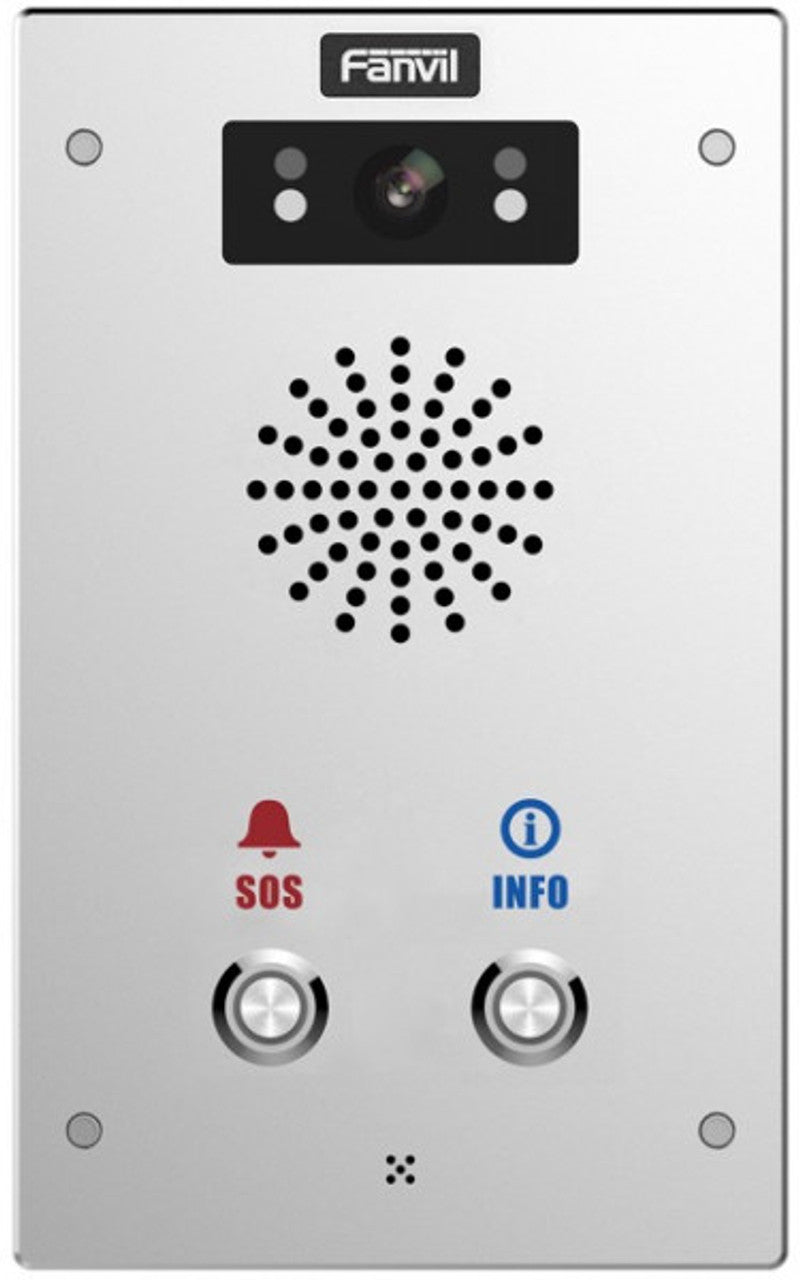
• I16S-02P is a SIP intercom with an exquisite appearance, integrating audio/video intercom and broadcasting functionalities. It features 2 shortcut buttons and supports wall mounting. Key Features: • IP65 waterproof and dustproof • IK10 anti-collision with robust die-cast aluminum frame • Anti-tamper-alarm as long as the cover is apart from the housing, and reporting to the control center at the same time • HD voice speech quality with built-in 3W speaker and Acoustic Echo Canceller • Audio line out port, expandable external active speaker • Built-in 2 short-in detect port and 2 short-out control port • Support built-in TF card slot for data storage or audio offline broadcasting For a full list of specifications, please refer to the product datasheet.

About This Product

The Fanvil i16S-02P is a SIP-based outdoor intercom station built to withstand harsh environments while providing clear two-way communication. It is purpose-built for exterior entry points, loading docks, or secured gates where weather exposure and physical durability are primary concerns. The die-cast aluminum body and IK10 rating mean it can take an impact that would destroy a lesser intercom, making it a practical choice for industrial facilities, parking structures, and public-facing building entrances across Canada where winter conditions and heavy use are expected.

This unit fits well in deployments that already use VoIP infrastructure or are migrating from aging analog intercom systems. It pairs naturally with a SIP-compatible PBX or cloud-based VoIP platform, and its relay ports allow it to control electronic strikes or magnetic locks directly without additional hardware. For a small office in downtown Toronto or a single-entry warehouse, this device may be more rugged than necessary; a simpler indoor-rated door phone would suffice. For a multi-tenant commercial building in the GTA, however, its integrated access control I/O ports and anti-tamper alarm make it a sensible fit.

There are a few practical considerations. Power is supplied via PoE, which simplifies cabling but requires a PoE switch or injector capable of reaching the installation point. The built-in speaker is sufficient for most entries, but the audio line-out port for an external powered speaker is there if the ambient noise level is high. The anti-tamper alarm is a useful security feature, but it will need to be integrated into the broader access control or monitoring system to be useful; the intercom itself will report the event, but you will need a SIP server or control system capable of receiving and acting on that notification.

For a deployment where audio-only intercom with basic access control is needed, this model is well-positioned. If video is required, a different model in the Fanvil i-series would be needed. The offline broadcast capability via the TF card slot is genuinely useful for scheduled announcements in public areas, but it is not a full public address system; it is a supplementary feature for simple, repetitive messaging.
Services We Provide
  • Professional Installation & Configuration
  • Ongoing Maintenance & Support
  • Troubleshooting & Repairs
  • System Upgrades & Updates



