
Fanvil i16S SIP Intercom
Frequently Asked Questions
First, confirm the intercom is powered on and connected to the network via PoE. Then check the SIP server address and credentials in the web interface or provisioning file—typos or mismatched ports are the most common cause. If the network uses VLAN segmentation, ensure the intercom is on the same VLAN as the PBX.
Verify that the volume is turned up both in the device settings and on the remote party's phone. Reseat the Ethernet cable to ensure PoE power is stable—low power from a marginal switch can cause audio dropouts. If the issue persists, test with a different PoE injector or switch.
The i16S has two short-circuit output ports that can control a relay for electric door locks. Use a dry contact relay module rated for your door strike's voltage/current—the intercom outputs are low-voltage signal only. Wire the trigger output to the relay coil and connect the door strike power separately.
The DSS key must be assigned an action in the device configuration, such as a speed dial number or relay activation. Double-check that the key is programmed via the web interface. Also ensure the connected PBX handles the DTMF or call pickup feature you assigned.
Echo is often caused by acoustic feedback or incorrect echo cancellation settings. Check that the room or entry area doesn't have hard surfaces that bounce sound. In the device web settings, verify the Acoustic Echo Canceller is enabled and set to a appropriate mode. Lowering the speaker volume slightly can help.
No, the i16S is a pure SIP device—it requires a VoIP PBX or SIP-compatible service. It cannot connect directly to a traditional analog phone line or POTS. If you need an intercom for a legacy phone system, you would need an analog-to-SIP converter or a different product.
Flickering LEDs usually indicate a power issue. Since the i16S runs on PoE, try a different switch port or a PoE injector that provides at least the device's power rating (check the datasheet). Also inspect the Ethernet cable for damage or loose crimps. If the behavior continues, contact a Toronto-based VoIP support provider to test further.
Upload the MP3 file to a TF card (microSD) inserted into the slot, then configure the intercom in the web interface to play that file when triggered (e.g., on incoming call or during broadcast). The file must be a standard MP3 format; the device supports playback from the TF card without additional conversion.
First, ensure the remote phone is set to send DTMF as in-band (RFC 2833) rather than SIP INFO if the PBX expects that. Wait for the intercom to fully answer the call before pressing digits—some units require the call to be established for a second. Lower the audio volume on the remote phone to reduce possible clipping.
A failed firmware update can leave the device unbootable. Do not attempt a factory reset yet—first, try a power cycle by disconnecting PoE for 30 seconds. If it still won't boot, the bootloader may be corrupted. Contact the supplier or a VoIP technician for recovery options; do not attempt to re-flash the firmware yourself without guidance.
Door Phones
Fanvil i16S SIP Intercom
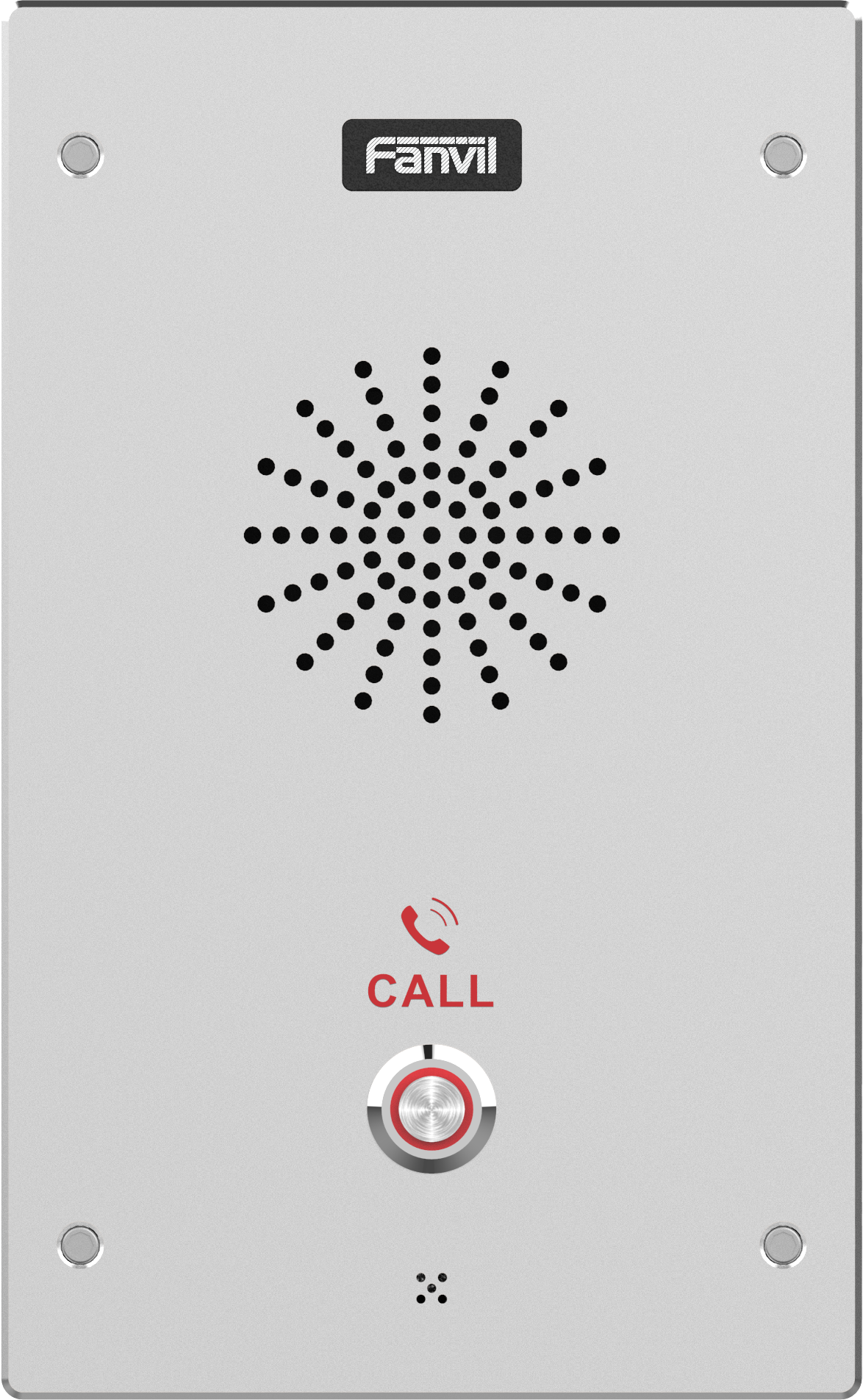
The Fanvil i16S SIP Intercom is designed for outdoor scenes with high reliability, HD voice speech quality, and a built-in 3W speaker. It features an Acoustic Echo Canceller for clear communication. Key Features: • 2 SIP Lines PoE • IP65&IK10 rating for durability • HD Voice, G.722, Opus audio quality • 1 DSS Key for secure authentication • 2 Short-circuit Input ports and 2 Short-circuit output ports for flexible connectivity • MP3 broadcast capabilities • TF card reader for expandable storage For a full list of specifications, please refer to the product datasheet.
About This Product
The Fanvil i16S is a SIP-based intercom built for outdoor entry points in small to medium-sized commercial or multi-tenant environments. Its IP65 and IK10 ratings mean it can withstand rain, dust, and physical impact, making it a practical choice for gatehouses, loading docks, or lobby doors where durability matters. The unit pairs well with an existing IP-PBX or hosted SIP trunk, effectively replacing older analog door phones without requiring new cabling—PoE powers both the device and the audio line. Because it supports only two SIP lines and one DSS key, it suits locations where one or two call destinations are enough, like a single entrance for a small office or a suite of retail units. For larger apartment buildings with dozens of tenants, a multi-station system would be more appropriate, but for a GTA office or warehouse with a single front door, the i16S provides reliable HD voice communication without overcomplicating the setup. The MP3 broadcast and TF card slot allow custom announcements or instructions to be played at the entry, adding utility beyond basic door answering. The tradeoff is limited expandability: you cannot add more physical call buttons or integrate a video camera without separate equipment, so it's best for audio-only access scenarios.
Services We Provide
- Professional Installation & Configuration
- Ongoing Maintenance & Support
- Troubleshooting & Repairs
- System Upgrades & Updates



