
Fanvil i16SV-02P Outdoor Video SIP Intercom

Frequently Asked Questions

First verify network connectivity by checking that the intercom has obtained an IP address (e.g., via the PBX's lease table or a port scan). Ensure the SIP server address and port in the intercom's settings match exactly what your PBX expects, and confirm that the device's MAC address is allowed if your PBX uses MAC-based authentication. If these steps don't help, contact your VoIP support provider.
Check the speaker volume setting in the intercom's web interface and confirm that the audio line out is not muted or misconfigured. If the internal speaker is still silent, try connecting an external active speaker to the line-out port to isolate the issue. A Toronto-based VoIP support provider can usually resolve this remotely.
Log into the intercom's web interface and go to SIP settings. Enter the SIP credentials (extension number, password, registrar) provided by 3CX. Ensure the intercom is on the same network segment as the 3CX server, or that routing and firewall rules allow SIP traffic. 3CX may offer an auto-provisioning template for Fanvil devices; otherwise, manual configuration works.
Check that the infrared LEDs around the camera lens are clean and unobstructed. In the intercom's web interface, verify that night vision mode is enabled and the IR cut filter is set to auto. If the environment has bright light sources nearby, they may be overpowering the IR sensor; repositioning the unit may help.
Random reboots usually indicate a power delivery issue. Verify that your PoE switch or injector supplies at least 802.3af PoE (the required wattage is listed in the datasheet). Try using a different PoE port or a known-good injector. If the problem continues, a Toronto-based VoIP support provider can help diagnose the power circuit remotely.
Access the intercom's web interface via its current IP address (or use Fanvil's discovery tool to find it). Navigate to Network > IPv4 and switch from DHCP to Static. Enter the desired IP, subnet mask, gateway, and DNS server. Click Apply and reboot the device to confirm the change.
Start by lowering the speaker volume in the web interface, and ensure the microphone is not obstructed by debris or the mounting bracket. Hard surfaces like concrete walls can reflect sound and cause echo. If the problem remains, check the audio gain settings and confirm that acoustic echo cancellation is enabled.
The buttons must be programmed in the intercom's web interface under Button Configuration. Assign each button a SIP target—typically an extension number or a SIP URL. If they are already programmed, verify that the intercom is registered to the PBX and that the PBX can route calls to those targets.
This intercom is designed for SIP-based VoIP networks and requires a compatible PBX to function. It cannot directly replace an analog doorbell without an external SIP-to-analog converter or a gateway. For standalone use, you would need a cloud-based intercom service or a local PBX that can handle SIP endpoints.
Locate the reset pinhole on the device (typically near the Ethernet port). With the unit powered, press and hold the reset button for about 10 seconds until the intercom reboots. Be aware that this erases all settings. Before attempting a reset, try to recover the password via the web interface's forgot-password option, or contact support.
Door Phones

Fanvil i16SV-02P Outdoor Video SIP Intercom
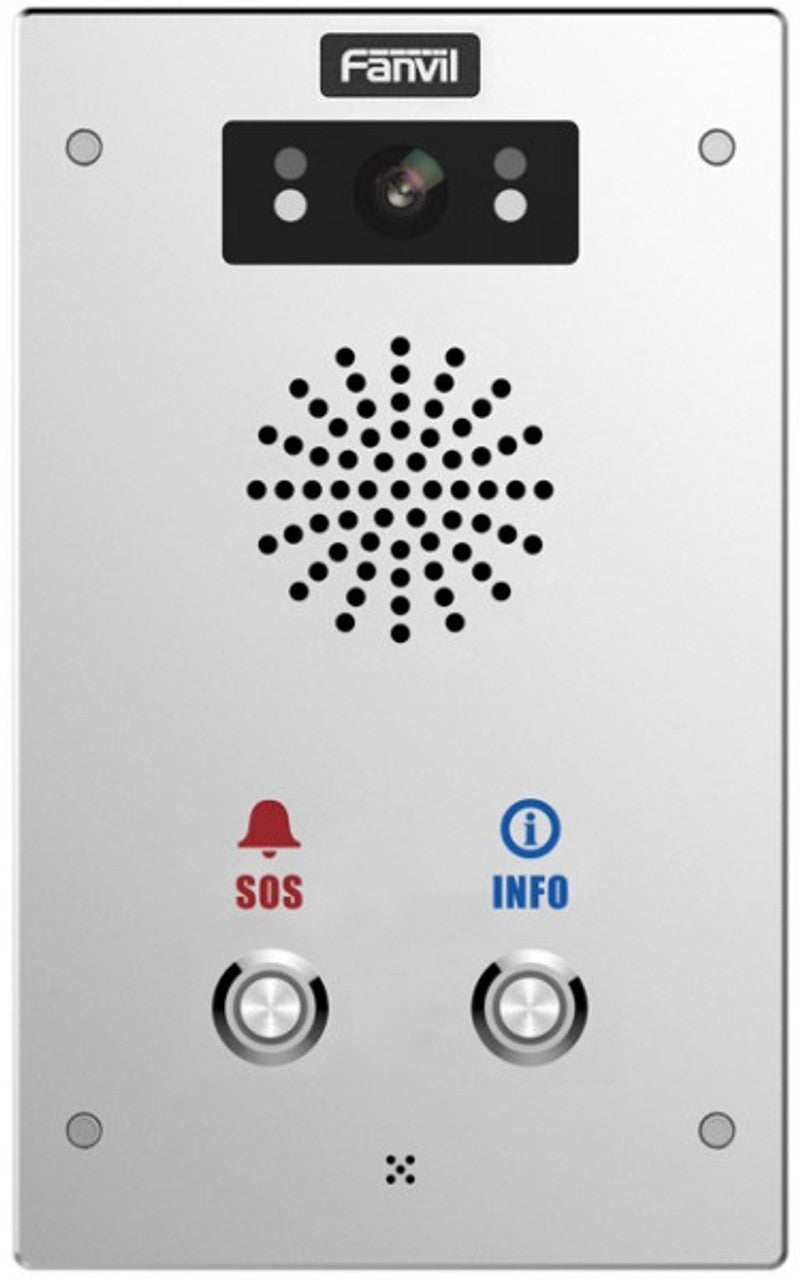
i16SV-02P SIP Intercom with Exquisite Appearance • 2 shortcut buttons for easy operation • Wall mounting support for convenient installation • IP65 and IK10 protection grade for dustproof, waterproof, and anti-collision design • Built-in HD camera with infrared night vision and H.264 codec • HD voice speech quality with built-in 3W speaker and Acoustic Echo Canceller • Audio line out port and expandable external active speaker • Built-in 2 short-in detect port and 2 short-out control port for easy connectivity • Support built-in TF card slot for data storage or audio offline broadcasting Built with a robust die-cast aluminum frame, the i16SV-02P SIP Intercom is ideal for various indoor and outdoor applications. For a full list of specifications, please refer to the product datasheet (available at Fanvil i16SV-02P Outdoor Video SIP Intercom).

About This Product

The Fanvil i16SV-02P is an outdoor-rated SIP video intercom designed for managed entry points such as building lobbies, gated communities, parking lot gates, or office reception areas. Its rugged die-cast aluminum housing with IP65 weatherproofing and IK10 impact resistance makes it suitable for Canadian winters and high-traffic installations. This device works with any standard SIP-based PBX system, allowing it to integrate into an existing VoIP phone network rather than functioning as a standalone unit. It pairs well with hosted PBX services common among Toronto businesses, and can replace older analog door phones or complement smart intercom systems on the same network. Practical tradeoffs include the need for PoE (Power over Ethernet) or a separate power source, and reliance on network cabling to the mounting location. The two programmable shortcut buttons are convenient for calling specific extensions or opening a gate, but the intercom is not intended for large multi-tenant buildings where dozens of directory entries are needed—for those, a model with a keypad or directory display would be better suited. For small to medium-sized deployments, this unit offers robust build and clear two-way audio with echo cancellation, plus an HD camera with night vision. It does not include built-in RFID or Bluetooth access control, so entry features must be handled through the connected PBX or external relays.
Services We Provide
  • Professional Installation & Configuration
  • Ongoing Maintenance & Support
  • Troubleshooting & Repairs
  • System Upgrades & Updates



