
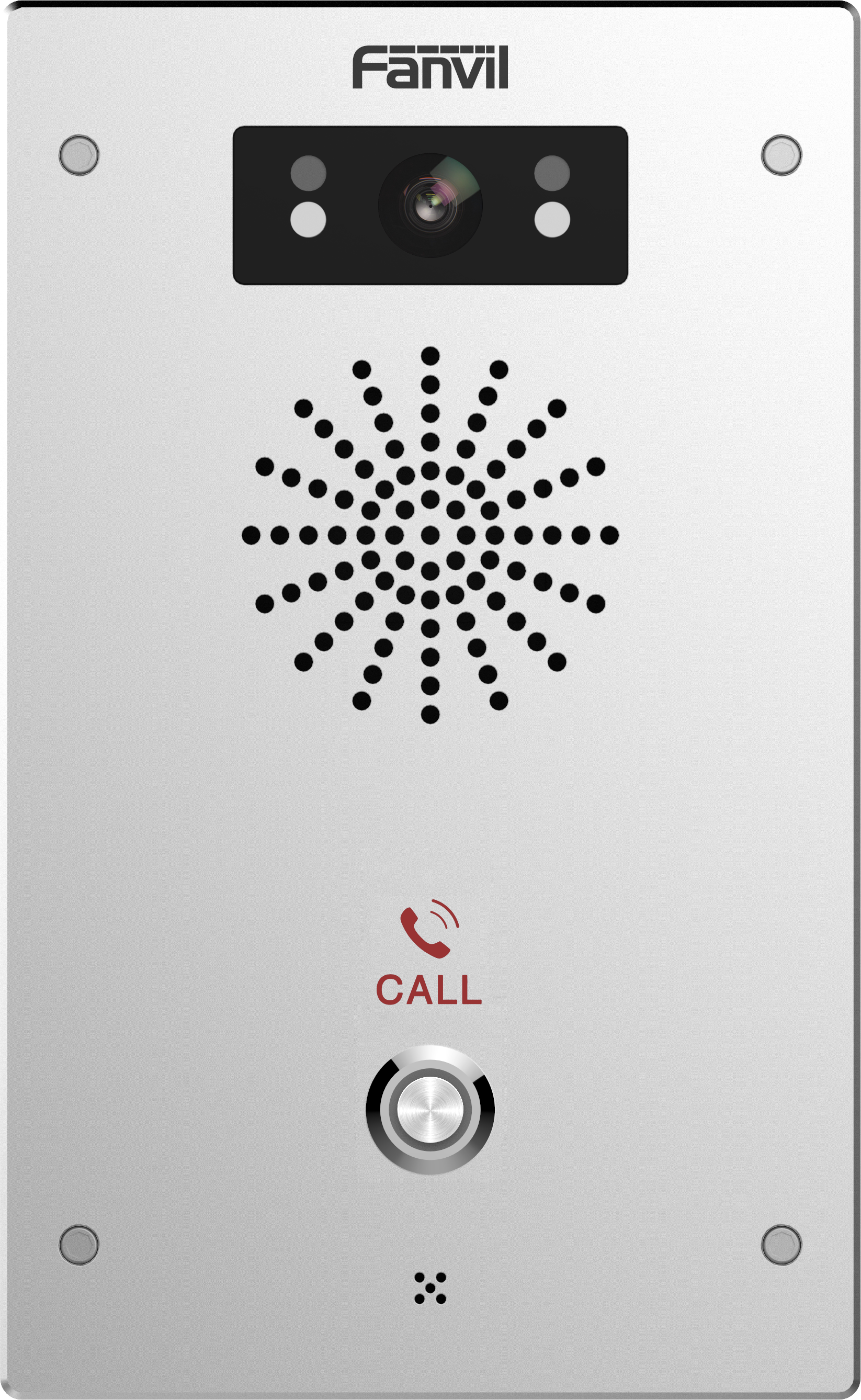
Fanvil i16V SIP Video Intercom
Frequently Asked Questions
First, verify that the intercom's IP address, subnet mask, and default gateway are correct for your network. Then double-check the SIP server address, port, and transport protocol (UDP/TCP) entered in the device's web interface. A common oversight is mismatched authentication credentials—ensure the username and password exactly match what's configured on the SIP extension.
Confirm that the PoE switch or injector is supplying enough power (the i16V needs 802.3af) and that the Ethernet cable is intact. If using ONVIF, check that the ONVIF port and authentication settings on the intercom match those in your NVR. Also, verify that the video codec (H.264) is enabled and that the receiving device supports it.
Start by checking the microphone hole on the front panel for debris or ice, especially in winter. In the device's audio settings, ensure the speaker volume isn't muted or set too low, and that echo cancellation is enabled. Network jitter can also cause one-way audio, so try temporarily connecting the intercom directly to the switch with a short cable to rule out cabling issues.
Log into the i16V's web interface and review the 'Basic Settings' or 'Call Settings' page. Look for the 'Dial Number' or 'Destination' field—this is the SIP extension or ring group the button dials. Make sure the number is correct and that the target device is reachable. If your PBX uses a prefix for external calls, that prefix may be missing.
This often points to a power or environmental issue. Confirm that the PoE switch or injector isn't on a timer or that the electrical circuit isn't being shut off. If the intercom is exposed, check for condensation inside the housing after temperature changes. The unit is sealed, but a damaged gasket can let moisture in, so inspect the weatherproofing.
Yes, most Canadian VoIP providers that support standard SIP registration will work. You'll need the provider's SIP server address, port, and your assigned credentials. Some providers require specific codec settings or STUN for NAT traversal; check their knowledge base for recommended intercom settings. If the provider supports it, you can also use the i16V's built-in VPN client for a more secure connection.
The i16V has a relay output that you can wire to an electronic door lock. In the web interface, you'll find a 'Relay' or 'Output' setting that lets you assign the relay to the call button or to a DTMF code. Make sure the lock's power supply is separate and that the relay is rated for the lock's current. The wiring diagram in the quick start guide shows the terminal block connections.
First, disconnect and reconnect the Ethernet cable to force a fresh PoE negotiation. If the problem persists, the device may be stuck in a boot loop, possibly due to a corrupted configuration. Avoid initiating a factory reset right away; instead, power it down, wait 30 seconds, and restore power while holding the call button (if supported) to enter a safe mode, then contact your vendor for recovery steps.
Door Phones
Fanvil i16V SIP Video Intercom
The i16V offers HD SIP video capabilities, HD audio, and broadcasting functionalities. Key features include: • 2-way speaker with HD audio and noise reduction • Compatible for use as a 24-hour video surveillance device • Call button setup for full duplex video calls • Infrared night vision camera for clear visibility at night • Weatherproof and dustproof design to withstand temperatures from -40°F to 158°F Features: • SIP Standard • HD Voice • HD Audio • PoE (Power over Ethernet) • Support for ONVIF • Temperatures as low as -40°F • Supports many platforms For a full list of specifications, please refer to the product datasheet.
About This Product
The Fanvil i16V is built for locations that need a durable, all-weather SIP intercom with video. It fits well at building entrances, loading docks, and perimeter gates where a vandal-resistant, IP-based door phone can replace analog systems or supplement an existing VoIP deployment. In Canadian settings, the wide temperature tolerance makes it a practical choice for unheated entryways. It integrates easily with most SIP platforms, so it often pairs with on-premise IP PBXs or cloud-hosted voice services already used by small and mid-sized businesses.
Because it supports ONVIF, the i16V can feed video to a network video recorder or surveillance system, which is useful when you want a single device for both two-way communication and general monitoring. The night vision capability keeps the camera functional after hours, but the fixed lens and integrated design mean it isn't a replacement for a dedicated PTZ security camera if you need detailed, zoomable coverage. For straightforward visitor screening and remote door control, it hits the mark.
One trade-off is that it relies on Power over Ethernet. If your cable runs are long or your switch doesn't supply PoE, you'll need an injector or a local power source, which adds a small installation step. The intercom's audio quality holds up well in moderate noise, but in extremely loud environments like truck bays, the built-in speaker may struggle without an external horn or amplifier. For a single-tenant office or a small retail store, it's a capable all-in-one unit; for a multi-building campus with dozens of entry points, you'd likely want a more centralized door controller architecture.
It's also worth noting that while the i16V supports many platforms, provisioning against a hosted VoIP service sometimes requires manual configuration of SIP credentials and codecs. Most Canadian ITSPs provide generic SIP settings that work, but if you plan to use advanced features like multicast paging or door unlock relays, confirm compatibility with your provider beforehand.
Because it supports ONVIF, the i16V can feed video to a network video recorder or surveillance system, which is useful when you want a single device for both two-way communication and general monitoring. The night vision capability keeps the camera functional after hours, but the fixed lens and integrated design mean it isn't a replacement for a dedicated PTZ security camera if you need detailed, zoomable coverage. For straightforward visitor screening and remote door control, it hits the mark.
One trade-off is that it relies on Power over Ethernet. If your cable runs are long or your switch doesn't supply PoE, you'll need an injector or a local power source, which adds a small installation step. The intercom's audio quality holds up well in moderate noise, but in extremely loud environments like truck bays, the built-in speaker may struggle without an external horn or amplifier. For a single-tenant office or a small retail store, it's a capable all-in-one unit; for a multi-building campus with dozens of entry points, you'd likely want a more centralized door controller architecture.
It's also worth noting that while the i16V supports many platforms, provisioning against a hosted VoIP service sometimes requires manual configuration of SIP credentials and codecs. Most Canadian ITSPs provide generic SIP settings that work, but if you plan to use advanced features like multicast paging or door unlock relays, confirm compatibility with your provider beforehand.
Services We Provide
- Professional Installation & Configuration
- Ongoing Maintenance & Support
- Troubleshooting & Repairs
- System Upgrades & Updates



