
Fanvil i55A SIP Indoor Station

Frequently Asked Questions

First, verify that the i55A has network connectivity by checking the network icon on the screen or pinging the device from another computer on the same LAN. Then confirm that the SIP server address, port, and extension credentials entered in the phone's account settings exactly match what your PBX expects. A common oversight is an incorrect transport protocol (UDP vs. TCP) or a firewall rule blocking SIP traffic. If the issue persists, a Toronto-based VoIP support provider can usually resolve this remotely.
The i55A supports Power over Ethernet (PoE), so if your network switch provides PoE (802.3af), you only need a single Ethernet cable for both data and power. If your switch does not support PoE, you can use a PoE injector between the switch and the i55A. The device does not include a dedicated DC power adapter, so plan accordingly.
First, power cycle the unit by disconnecting the Ethernet cable (or PoE power) for 30 seconds and reconnecting it. If the screen remains unresponsive, check for any protective film still attached to the display. Ensure the ambient temperature is within the device's operational range — extreme cold can affect touch sensitivity in outdoor-adjacent indoor stations. If these steps don't help, contact your supplier for further diagnostics.
Yes, the i55A includes two embedded relays and eight alarm input interfaces (GPIO), along with RS-485 for integration with electric door strikes, magnetic locks, or third-party controllers. You'll need to configure the relay activation in the device's settings (typically triggered by a DTMF code or screen button). Always verify the voltage and current requirements of your door strike to ensure compatibility with the relay ratings listed in the data sheet.
Choppy video is often a network issue. Check that both the i55A and the outdoor station are on a wired Ethernet connection — avoid Wi-Fi for video intercoms. Ensure your network has sufficient bandwidth and low latency; a dedicated VLAN for voice and video traffic can help. Also, confirm that the H.264 encoding settings (resolution, bitrate) match between the two devices.
First, adjust the speaker volume from the i55A's audio settings menu. If it's still low, check that the built-in 2W speaker isn't obstructed by dust or the mounting surface. In environments echo cancellation is active, ensure no other audio sources (like a second speaker) are positioned too close to the intercom. A quick test call to another SIP endpoint can isolate if the issue is on the near end or far end.
Remote door opening via the i55A typically requires your PBX or SIP server to support DTMF relay or in-call feature codes. On the i55A, configure the relay trigger in the phone's 'Action' or 'DTMF' settings to send a specific code when you answer a call. Your mobile calling app must also be able to send DTMF tones during the call. Consult your PBX documentation for the exact DTMF sequence.
For a door phone station, wired Ethernet is strongly recommended over Wi-Fi due to reliability and latency. If you must use Wi-Fi, ensure the i55A is within good range of your access point on the 5GHz band for less interference. Try changing the Wi-Fi channel and disabling power-saving modes on the access point. Even so, a wired connection is the most reliable way to avoid missed intercom calls.
First, confirm that the outdoor station is registered to the same SIP server and is reachable on the network. On the i55A, ensure that video streaming is enabled in the account settings — some SIP trunks disable video by default. Check that each device supports the same video codec (H.264 in this case) and that the resolution is matched. A packet capture can help if the issue persists.
Firmware updates can be applied via the web interface or provisioning server. Log into the i55A's web UI (using its IP address), go to the 'Upgrade' section, and either point the device to a local firmware file or an HTTP/HTTPS server URL. Ensure you download the correct firmware version for the i55A from Fanvil's official support site. Never interrupt the process, and if you suspect an issue, contact your distributor before attempting a downgrade.
Door Phones

Fanvil i55A SIP Indoor Station
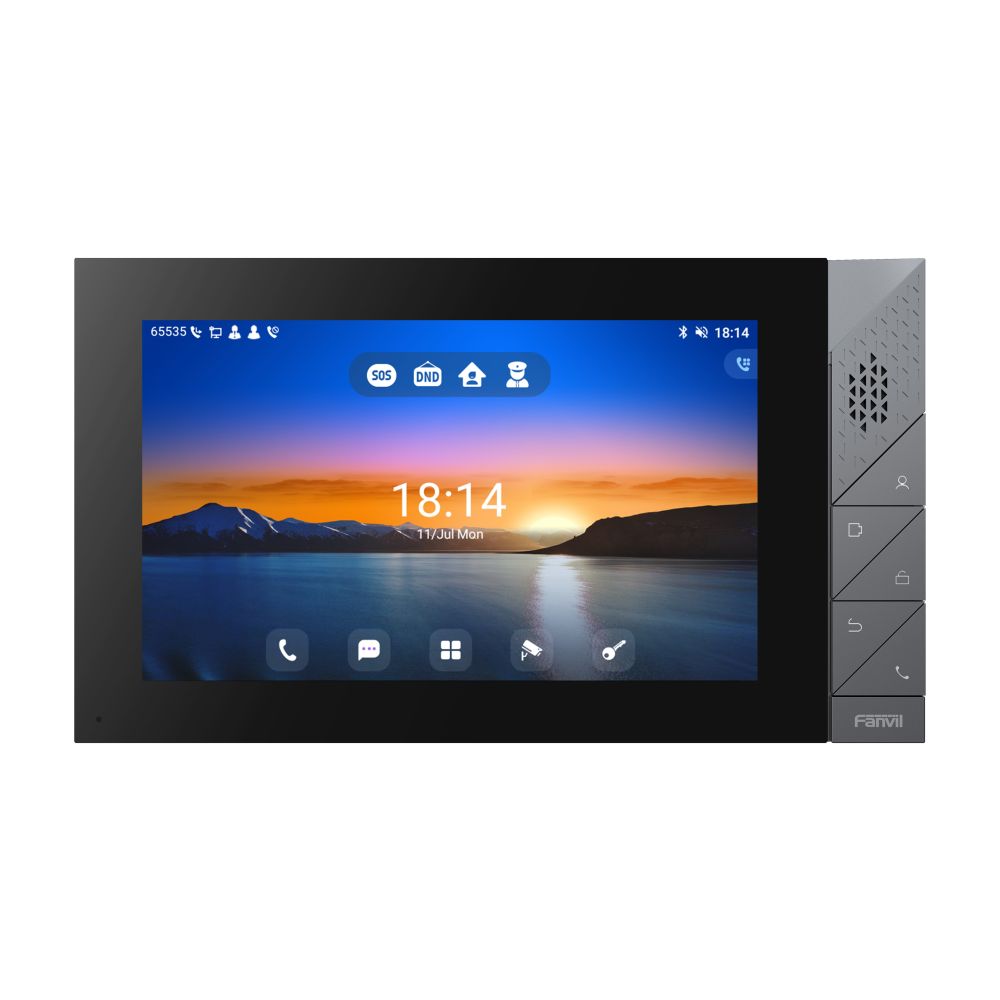
• A management assistant for communities, villas, and office buildings with powerful functionalities such as remote door opening and real-time monitoring of security devices. • Key Features: • 7-inch (1024×600) capacitive color touch screen • Android 9.0 operating system for customization and secondary development • Five physical buttons for reliability and durability • High-definition video with H.264 codec and 1080P resolution • HD voice quality with built-in 2W speaker and Acoustic Echo Canceller • Built-in Bluetooth 5.0 and 2.4GHz/5G WiFi • Support for RS-485, 8 alarm input interfaces, and 2 embedded relays • PoE support for wall-mounted installation For a full list of specifications, please refer to the Product Data Sheet.

About This Product

The Fanvil i55A is an indoor station designed for managing building entry in multi-unit residential buildings, gated communities, and commercial offices. It serves as the internal endpoint that connects to an outdoor door station or gate intercom, allowing residents or staff to see and speak with visitors and remotely release doors. Its Android operating system enables custom app integration, making it well-suited for environments that require bespoke access control workflows or integration with property management software.

This device pairs naturally with Fanvil's outdoor door phones or any standard SIP-compatible door station, and it can replace older wired intercom systems in retrofit deployments where network cabling (PoE) is available. The large touch screen provides an intuitive interface, while the physical buttons offer reliable fallback for frequently used actions like answering or unlocking. For Canadian multi-tenant buildings, particularly in the GTA, the i55A's PoE support simplifies installation in existing network drops, though a dedicated VLAN for access control traffic may be needed to ensure video and audio quality.

A key practical tradeoff is that the i55A runs Android 9.0, which may eventually reach end-of-life for security updates — buyers should plan for eventual firmware or hardware upgrades if long-term support is critical. Additionally, while the device includes Bluetooth and Wi-Fi, wired Ethernet is strongly recommended for reliability in door-phone applications where missed calls are unacceptable. The unit is overkill for a single residential front door where a basic audio intercom would suffice, but it is underpowered if you need high-end video analytics or integration with complex multi-site access control systems — in those cases, a purpose-built IP security station may be more suitable.
Services We Provide
  • Professional Installation & Configuration
  • Ongoing Maintenance & Support
  • Troubleshooting & Repairs
  • System Upgrades & Updates



