
Fanvil i56A Touchscreen Android Indoor Door Phone and Intercom Station

Frequently Asked Questions

Start by confirming the SIP credentials (username, password, server address) exactly match what is configured on your PBX extension. Next, verify the station’s network connection: if you are using Wi‑Fi, try a wired Ethernet link temporarily to rule out wireless instability. Also check that your firewall allows SIP and RTP traffic between the indoor station and the server.
First, confirm the outdoor door phone is powered on and its camera is active by checking its own web interface or a test call from another device. Then verify that both the indoor and outdoor units are using the same video codec (typically H.264) and that the codec is enabled in the i56A’s account settings. A common culprit is a network switch blocking multicast video; if your setup uses multicast, ensure IGMP snooping is configured correctly on the switch.
A soft restart often clears temporary interface lag. If the screen remains slow, check that the station is receiving adequate power—insufficient PoE or a weak power adapter can cause erratic touch performance. Also remove any screen protector or debris that might interfere with the capacitive touch surface.
Yes, the built‑in 2.4 GHz and 5 GHz Wi‑Fi lets you place the station where a network cable is impractical. For consistent video and call quality, position it within good range of the access point and prefer the 5 GHz band to reduce interference. Keep in mind that a wired connection remains the most reliable option for real‑time intercom traffic.
First, confirm the wiring between the i56A’s relay output and the door strike or maglock is intact and properly terminated. Then check the station’s web interface to ensure the relay output is assigned to the correct door phone account and that the unlock DTMF code or SIP‑INFO method matches what the outdoor unit expects. A safe next step is to test the relay manually from the station’s diagnostic page before retrying a live call.
The i56A can manage multiple door phones by configuring each as a separate SIP account or by using the station’s door‑phone management interface. Assign each outdoor unit a distinct extension on your PBX, then add those accounts to the indoor station. Once configured, you can label each door clearly on the touchscreen so staff know which entrance is calling.
The station’s built‑in AEC (Acoustic Echo Cancellation) is designed to handle this, but it works best when the speaker volume is not set to maximum. Try lowering the indoor station’s speaker volume slightly and ensure the outdoor unit’s microphone isn’t obstructed. If echo persists, a Toronto‑based VoIP support provider can usually resolve this remotely by fine‑tuning gain levels and echo cancellation parameters.
Door Phones

Fanvil i56A Touchscreen Android Indoor Door Phone and Intercom Station
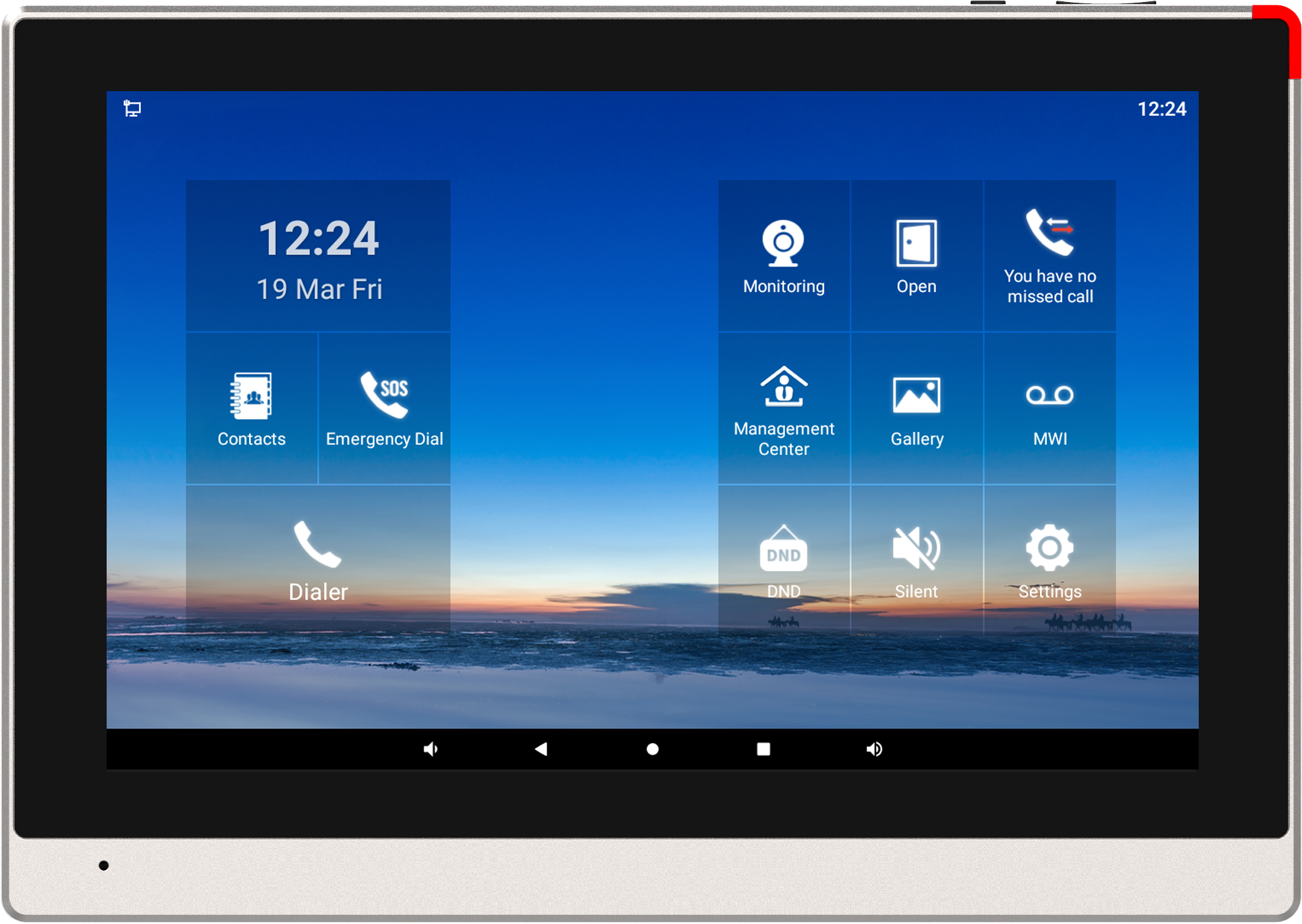
The i53W station offers a user-friendly experience with its 7-inch color touchscreen display. Key features include: • Android 9.0 OS for seamless functionality • 10.1-inch color touch screen for intuitive operation • Built-in 1W double speakers with AEC for clear audio • Visual intercom and remote access control capabilities • Real-time monitoring of door phone and cameras • Built-in 2.4G/5G Wi-Fi and Bluetooth 5.0 for connectivity • RS-485 interfaces, alarm input interfaces, and short circuit output interfaces • Wall-mounted and desktop installation methods available • Compatible with major platforms: 3CX, Avaya, Asterisk, BroadSoft, Metaswitch, Elastix, and more The i53W station is designed for the modern forward thinker who requires a reliable interface for their door-entry installation.

About This Product

The Fanvil i56A is an Android‑powered indoor station built for offices, multi‑tenant buildings, and residential lobbies that already run a SIP‑based communication platform. Its 10.1‑inch touchscreen and Android 9.0 environment make it a practical choice when you want a familiar, app‑like interface for answering door calls, viewing camera feeds, and triggering door releases without having to walk to a separate panel. For a Toronto condominium or a mid‑sized GTA office, it fits neatly into a reception desk or security kiosk where staff need a dedicated, always‑on intercom endpoint that doesn’t double as a general‑purpose tablet.

This station pairs naturally with Fanvil outdoor door phones and third‑party SIP door stations that support video calling and remote relay control. Because it registers as a standard SIP extension, it slots into platforms such as 3CX, Asterisk, and BroadSoft without extra middleware, so the deployment stays close to your existing voice infrastructure. The built‑in dual‑band Wi‑Fi and Bluetooth 5.0 give you flexibility in placement, though in a busy RF environment a wired Ethernet connection will always deliver more predictable video and audio quality.

A buyer should understand that the i56A is a purpose‑built intercom endpoint, not a general‑purpose Android tablet. You won’t be loading arbitrary apps from the Play Store, and the interface is tuned for door control and monitoring rather than web browsing or media consumption. The RS‑485 and alarm I/O interfaces are welcome additions if you need to integrate with legacy access systems, but they also mean installation is best handled by someone comfortable with low‑voltage wiring and SIP provisioning—this isn’t a plug‑and‑play consumer gadget.

For a single‑entrance small business, the i56A may be more station than you need; a simpler indoor monitor without Android would handle the same calls at a lower cost. Conversely, in a large enterprise with dozens of doors and a central security desk, you might outgrow a single‑screen workflow and want a PC‑based management console instead. The sweet spot is a deployment where a dedicated touchscreen station improves the daily rhythm of answering visitors and managing access, and where the Android base lets you run a lightweight custom app or a branded interface if your integrator builds one.
Services We Provide
  • Professional Installation & Configuration
  • Ongoing Maintenance & Support
  • Troubleshooting & Repairs
  • System Upgrades & Updates



