
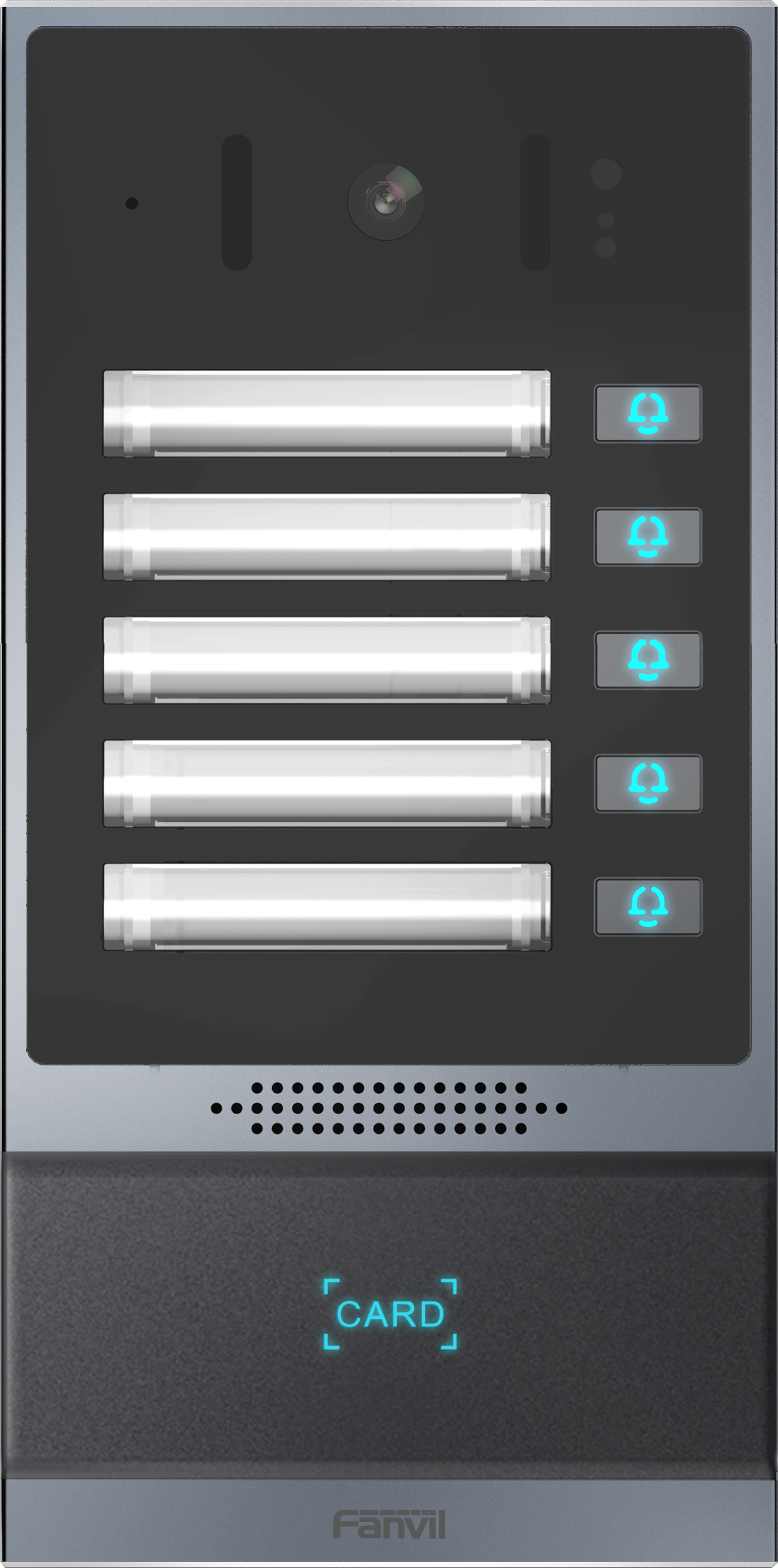
Fanvil i63 SIP Outdoor Audio and Video Door Phone
Frequently Asked Questions
Start by confirming the device has a valid IP address and can reach your SIP server. Check the network cable and PoE status light, then log into the web interface to verify the SIP server address, port, and credentials are entered correctly. If the network is fine and credentials are correct, a firewall or router may be blocking SIP traffic—test from a different subnet or temporarily disable the firewall to isolate the issue.
No audio often points to a network path issue or a codec mismatch. First, ensure the speakerphone is not muted and the volume is turned up. Then verify that both the door phone and your SIP server support the same audio codecs (e.g., G.711 or G.729). If one-way audio occurs, check that your firewall allows RTP traffic on the correct ports, and try switching from STUN to a direct SIP connection if possible.
DTMF failure is usually a setting problem. First, confirm that the DTMF method is set correctly in the door phone’s web interface—try changing from RFC 2833 to SIP INFO or In-band depending on your PBX. Also verify that the door lock wiring is secure and that the output relay is configured to trigger on DTMF digits you specify. Testing with a simple DTMF tone on a softphone can help isolate the issue.
First, check that your Ethernet cable is fully seated at both ends and that the switch port is actually providing PoE (most managed switches have a PoE status LED). Try a different port on the switch or a known working cable. If the device still doesn't power on, confirm that your switch’s total PoE budget is not exceeded—try connecting the door phone alone. If the issue persists, the device may need inspection by a technician or replacement.
Start by checking that the card is compatible with the reader (most use 13.56 MHz or 125 kHz—check the datasheet). Clean the card and the reader surface. Then log into the web interface and confirm that RFID is enabled and that you’ve added the card’s unique ID to the access list. If the reader still fails, try a different known-working card; if that doesn’t work, the reader hardware may be faulty.
The i63 uses an ambient light sensor to activate night vision. If it’s not working, first check that the camera’s night vision setting is enabled in the web interface. Ensure the sensor isn't blocked by dirt or debris—clean gently with a soft cloth. If the environment is artificially lit, the sensor may stay daytime; try covering the sensor to test. If the IR LEDs still don’t light, the camera module may need replacement.
You can add RFID cards through the device’s web interface or, if supported, by scanning them at the keypad. Log in, go to the RFID section under Access Control, and enter the card number manually or scan the card when prompted. Each card can be assigned to a specific user and expiration date. Remember that the i63 stores up to 10,000 cards, so this is suitable for growing access lists.
Yes, the i63 is a standard SIP device and will work with most PBX systems that support SIP, such as FreePBX, 3CX, or cloud platforms like RingCentral. You need to create a SIP extension for the door phone on your PBX, then enter that extension’s credentials into the i63’s web interface. Some PBX setups may require special configuration for DTMF relay to open the door, but this is usually straightforward with basic SIP knowledge.
Door Phones
Fanvil i63 SIP Outdoor Audio and Video Door Phone
• Stylish and elegant access control doorphone with built-in HD camera and night vision. • Easy to install and use, ideal for smaller-scale installations such as homes, small businesses, and building entryways. Key features: • 2 SIP lines • PoE enabled • IP address announcement in English • Programmable DSS key • Switch signal input and output • Support TF card • Open the door operation: DTMF, RFID card, push-button, WEBpage, 3rd party API • Remote access list, RFID cards (support 10,000) • Door open records (support 200,000) • Full-duplex hands-free speakerphone with AEC For a full list of specifications, please refer to the product datasheet.
About This Product
The Fanvil i63 is a SIP-based outdoor video door phone designed for environments where access control and visitor communication need to be integrated into a VoIP phone system. It fits well in small to medium-sized deployments such as single-family homes, small offices, or building entryways in the Greater Toronto Area, where PoE simplifies installation by using a single Ethernet cable for both power and network connectivity. The device pairs naturally with a cloud or on-premise SIP PBX, replacing a standalone intercom or a basic buzzer system with full-duplex audio and video capabilities.
For a small business or multi-tenant building, the i63 offers practical tradeoffs: it supports only two SIP lines, which limits concurrent calls but is sufficient for a single door or a small lobby. The built-in RFID reader and web management allow managing up to 10,000 cards and 200,000 door-open records, making it more capable than typical residential models. However, for a large enterprise with dozens of entry points and complex access policies, the single-device limit and lack of multi-door cascading could make it underpowered; a dedicated access control system would be a better fit. Conversely, for a one-door setup with moderate traffic, the i63 is a feature-rich, cost-effective choice that avoids the complexity of standalone access controllers.
Canadian buyers should note that the i63 is a standard SIP device and generally compatible with any SIP trunk provider or IP-PBX. Its weather-resistant design (implied by outdoor use) is suitable for Toronto's climate, though extreme cold may affect RFID performance if the scanner is exposed. Installation by a qualified low-voltage technician is recommended to ensure proper door strike wiring and network security.
For a small business or multi-tenant building, the i63 offers practical tradeoffs: it supports only two SIP lines, which limits concurrent calls but is sufficient for a single door or a small lobby. The built-in RFID reader and web management allow managing up to 10,000 cards and 200,000 door-open records, making it more capable than typical residential models. However, for a large enterprise with dozens of entry points and complex access policies, the single-device limit and lack of multi-door cascading could make it underpowered; a dedicated access control system would be a better fit. Conversely, for a one-door setup with moderate traffic, the i63 is a feature-rich, cost-effective choice that avoids the complexity of standalone access controllers.
Canadian buyers should note that the i63 is a standard SIP device and generally compatible with any SIP trunk provider or IP-PBX. Its weather-resistant design (implied by outdoor use) is suitable for Toronto's climate, though extreme cold may affect RFID performance if the scanner is exposed. Installation by a qualified low-voltage technician is recommended to ensure proper door strike wiring and network security.
Services We Provide
- Professional Installation & Configuration
- Ongoing Maintenance & Support
- Troubleshooting & Repairs
- System Upgrades & Updates



