
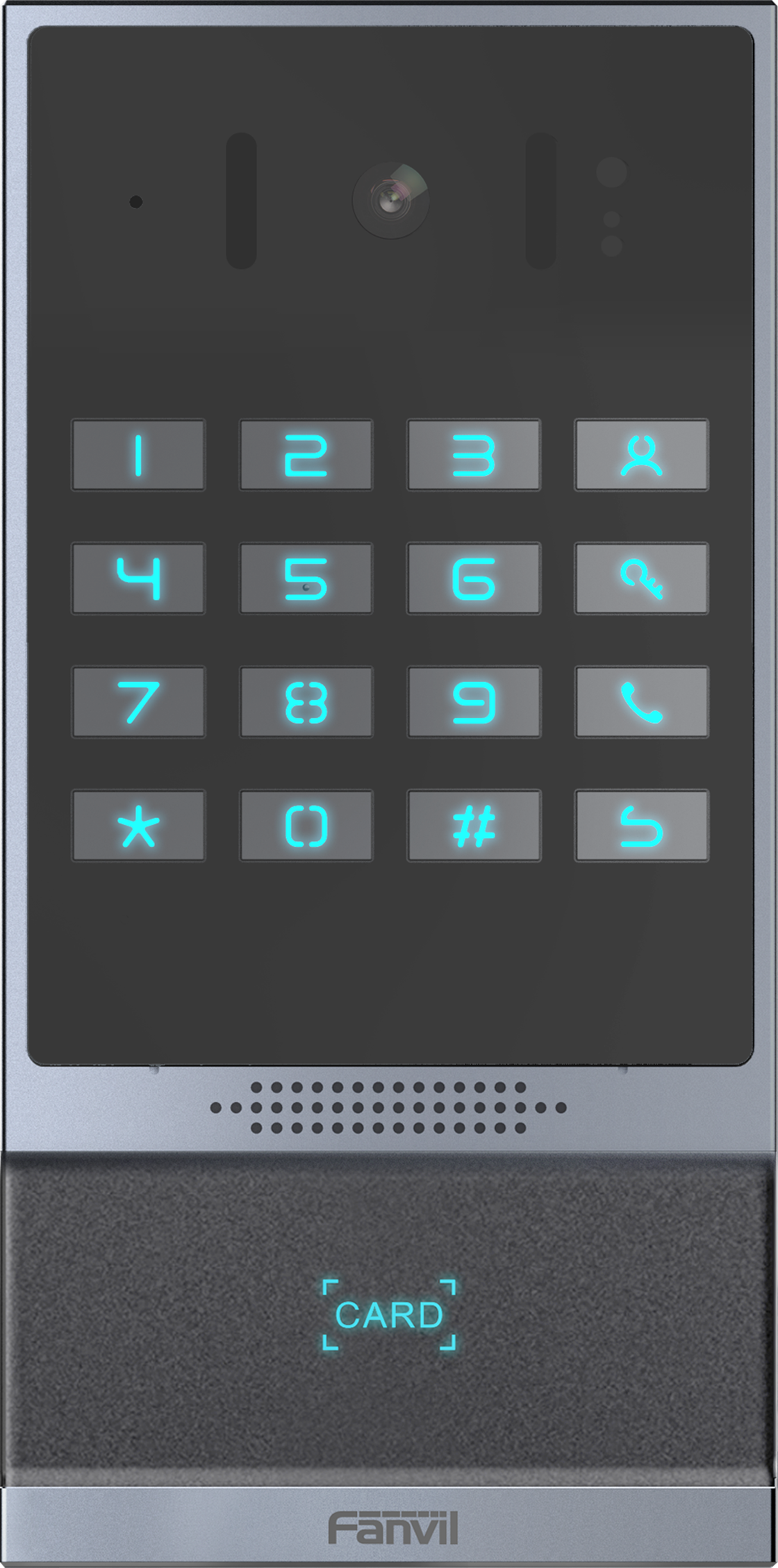
Fanvil i64 SIP Outdoor Video and Audio Door Phone
Frequently Asked Questions
First, confirm the device is getting power and has network connectivity—check the PoE switch port LED and verify the phone’s IP address via the voice announcement. Then log into the web interface and double-check the SIP server address, username, and password. A common issue is a typo in the domain or authentication ID; also ensure your firewall allows SIP and RTP traffic to and from the door phone’s IP.
Video may be disabled by default in the SIP account settings; log into the i64’s web interface and ensure video codec (H.264) is enabled and assigned to the line. Also verify your receiving device supports video calls and that the PBX isn’t transcoding the stream in a way that strips video. On some systems, you need to explicitly press a ‘Video’ softkey during the call.
Check the microphone hole on the front panel for debris or ice blockage—outdoor units can get clogged. In the web interface, confirm the speaker volume is not set to zero and that the audio codec (like G.711) is supported by both ends. If using a headset or handset on the answering phone, try switching to speakerphone; sometimes the audio path gets misrouted.
First, test with a known working card that was recently added. If none work, reboot the door phone via the web interface or by briefly disconnecting PoE. If cards still fail, log in and check the RFID module status—sometimes a firmware glitch disables it. Do not factory reset yet; instead, re-sync the card list from your management system and verify the reader’s antenna area isn’t blocked by metal.
During an active call with the door phone, the receptionist can send a DTMF code (default is often * or a configured digit) to trigger the relay. You’ll need to enable ‘DTMF unlock’ in the i64’s settings and set a secure code. Alternatively, you can use the web interface or a third-party API to trigger the door relay from a computer. Test the DTMF method first—it’s the simplest and works with any SIP phone.
Check the Ethernet cable and connectors for corrosion or water ingress, especially if the outdoor run isn’t properly sealed. On the switch side, verify the port isn’t flapping and that PoE power budget isn’t being exceeded. Try a different cable and a known-good switch port. If the issue persists, a Toronto-based VoIP support provider can usually resolve this remotely by analyzing switch logs and the phone’s network statistics.
Yes, as long as the cloud PBX supports standard SIP registration. You’ll need to point the i64 to the provider’s SIP domain and ensure your firewall allows outbound SIP and RTP. Some cloud services require STUN or a session border controller if the door phone is behind NAT; check your provider’s documentation. The i64 works with most hosted VoIP platforms used by Canadian businesses.
That usually means the device isn’t getting a DHCP lease. Confirm the Ethernet link is up and that a DHCP server is reachable on that VLAN. If you’re using a static IP, log into the web interface and verify the network settings haven’t reverted. A quick test is to connect the door phone directly to a laptop with a PoE injector and a known-good DHCP server to isolate the network path.
Door Phones
Fanvil i64 SIP Outdoor Video and Audio Door Phone
• The Fanvil i64 features high-definition video and voice with advanced acoustic noise cancellation, ensuring clear speech. Its elegant design enhances any entranceway. • IP66 and IK07 rated for security, broadcasting, and access control capabilities in one unit. Key Features: • 2 SIP lines • PoE enabled • IP address announcement in English • Programmable DSS key • Switch signal input and output • Support TF card • Open the door operation: DTMF, RFID card, push-button, WEBpage, 3rd party API • Remote access list and RFID cards (support 10,000) • Door open records (support 200,000) • Full-duplex hands-free speakerphone with AEC
About This Product
The Fanvil i64 is built for outdoor entry points where reliability and clear communication matter—think commercial building entrances, gated residential communities, or warehouse loading bays. Its IP66 and IK07 ratings mean it stands up to rain, dust, and physical impact, making it a solid choice for Canadian winters and high-traffic areas. It’s not just an intercom; the integrated access control (RFID, DTMF, push-button, and API) lets you manage entry without separate hardware, which simplifies wiring and day-to-day administration.
This door phone fits naturally into any SIP-based phone system. If your office already runs a VoIP PBX, the i64 registers as a standard SIP endpoint, so calls ring through to reception or a ring group just like any desk phone. For small to mid-sized deployments—say, a single entrance or a handful of doors—it works straight out of the box with PoE and local card management. Larger multi-site rollouts might need a centralized access control platform, but the device’s generous capacity (10,000 cards, 200,000 event logs) holds its own in many enterprise scenarios.
Keep in mind that the i64 relies entirely on your network infrastructure. PoE is convenient, but if the switch goes down or the LAN segment loses connectivity, the door phone loses power and function. There’s no backup cellular or battery option, so plan for a UPS on your network gear if uptime is critical. Also, while the noise cancellation is effective, extremely loud environments like a busy street right beside the unit can still challenge audio clarity—positioning and a weather hood can help.
For a Toronto office or property manager, the i64 covers the essentials without overcomplicating things. It’s overkill for a purely indoor, low-traffic door where a simple analog buzzer would do, but it’s a practical step up when you need video verification and remote door control tied into your existing VoIP system.
This door phone fits naturally into any SIP-based phone system. If your office already runs a VoIP PBX, the i64 registers as a standard SIP endpoint, so calls ring through to reception or a ring group just like any desk phone. For small to mid-sized deployments—say, a single entrance or a handful of doors—it works straight out of the box with PoE and local card management. Larger multi-site rollouts might need a centralized access control platform, but the device’s generous capacity (10,000 cards, 200,000 event logs) holds its own in many enterprise scenarios.
Keep in mind that the i64 relies entirely on your network infrastructure. PoE is convenient, but if the switch goes down or the LAN segment loses connectivity, the door phone loses power and function. There’s no backup cellular or battery option, so plan for a UPS on your network gear if uptime is critical. Also, while the noise cancellation is effective, extremely loud environments like a busy street right beside the unit can still challenge audio clarity—positioning and a weather hood can help.
For a Toronto office or property manager, the i64 covers the essentials without overcomplicating things. It’s overkill for a purely indoor, low-traffic door where a simple analog buzzer would do, but it’s a practical step up when you need video verification and remote door control tied into your existing VoIP system.
Services We Provide
- Professional Installation & Configuration
- Ongoing Maintenance & Support
- Troubleshooting & Repairs
- System Upgrades & Updates



