
Fanvil i66 Face Recognition Door Phone

Frequently Asked Questions

First, check that the camera lens is clean and not obstructed, and that the area around the door has adequate lighting—direct backlight or shadows can confuse the sensor. Also confirm that the user has been properly enrolled with multiple angles, and that the stored template hasn't been corrupted. If the issue persists, a Toronto-based VoIP support provider can usually diagnose face recognition settings remotely.
Verify that the network cable is providing PoE (or that the 12V adapter is connected), then check that the i66 has obtained an IP address. Next, confirm that the SIP server address and credentials entered in the device's web interface exactly match what your PBX expects—common mistakes are extra spaces or wrong port numbers. If registration still fails, try a different VLAN or switch port to rule out network segmentation issues.
This is often a microphone or audio path problem. Start by reseating the RJ45 cable and power-cycling the unit, as transient PoE negotiation can mute audio. Then log into the i66's web interface and check the audio codec settings—ensure your PBX and the door phone both support the same codecs (e.g., G.711 or G.722). If the issue remains, test with a different handset to isolate whether the problem is on the door phone side or inside the building.
First, check that the fob operates at the same frequency as the reader (125KHz or 13.56MHz); many cards look similar but use different bands. Make sure the reader surface is clean and free of metal obstructions, and try holding the fob within 2-3 cm for at least two seconds. If still no detection, verify in the device settings that RFID access is enabled for that user group and that the card has been registered correctly.
Yes, this depends on how your PBX routes the call. The door phone itself places a SIP call to an internal extension; you need to set up call forwarding or a ring group on your PBX that points to your mobile number. For security, avoid forwarding directly unless you trust your PBX's authentication—some sites prefer to use a mobile app that receives the door phone's video and audio over data instead.
The unit may be drawing power but failing to boot correctly. Perform a safe power cycle by unplugging the Ethernet cable for 30 seconds, then reconnecting. If the screen stays dark, the power draw from the PoE switch might be insufficient—check that the switch port supplies at least 802.3af (15.4W) and that the cable run is under 100 metres. A simple reseat of the power adapter (if using 12V) can also bring the screen back.
Access the i66's web GUI (by entering its IP address in a browser), then navigate to the face management section. You can enrol each person by having them stand in front of the camera and following the on-screen alignment guide. For large groups, some dealers offer bulk import via a CSV file—check the latest firmware manual for this feature. Always capture multiple angles to improve recognition under different lighting.
Start by checking the ambient temperature around the unit; if it's outside in direct sun or extreme cold, the display may act slowly. A power cycle over the PoE switch (disable/enable the port) often clears temporary glitches. If the problem recurs, update to the latest firmware from Fanvil, as memory-leak fixes are common in door phone updates. If the unit is in a Toronto office with heavy traffic, ensure it's not being overwhelmed by simultaneous requests—limit parallel streams in the settings.
Yes, because it uses standard SIP, it can communicate with any SIP-compatible indoor station, softphone, or app. The i66 supports ONVIF video streaming, so apps like a generic VLC player can view the camera feed if the network allows. For mobile push notifications, you may need an additional middleware platform—check with your VoIP provider whether they support Fanvil's native door phone integration.
Robotic audio usually indicates network congestion or jitter. First, confirm your LAN uses quality of service (QoS) markings for SIP traffic—prioritise the door phone's VLAN if possible. Reduce the audio codec to a lower bandwidth codec (e.g., G.729 instead of G.722) if your PBX supports it. Also, check that the jitter buffer on the i66 is set to 'adaptive' in its web interface; this helps smooth out packet delay variations.
Door Phones

Fanvil i66 Face Recognition Door Phone
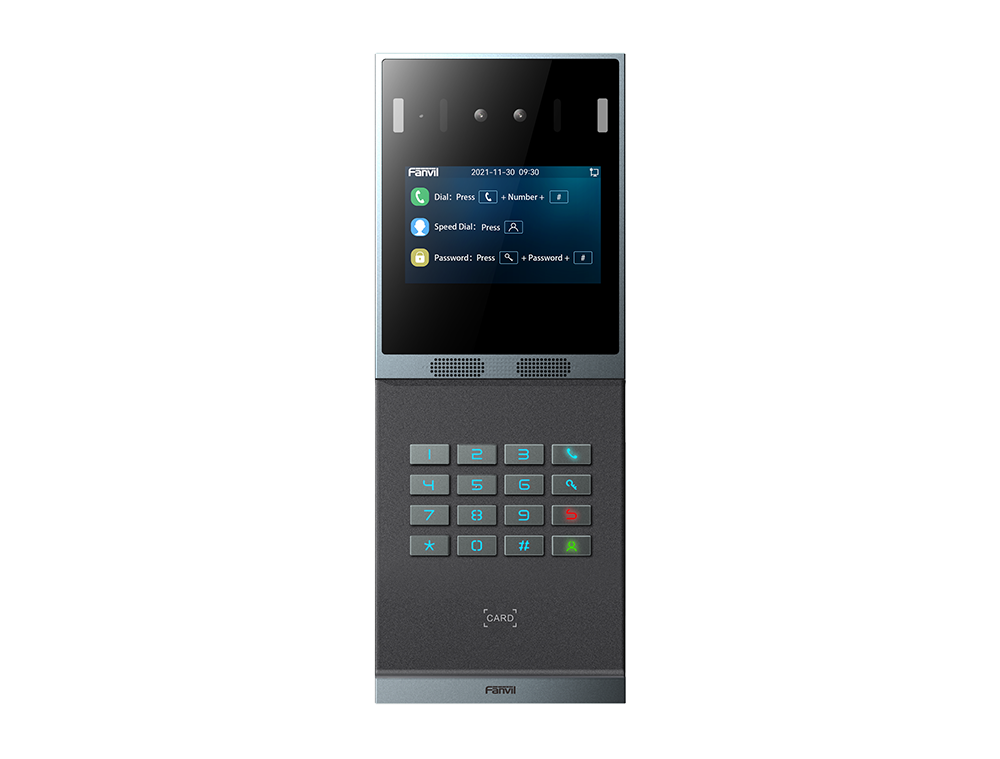
The Fanvil i66 Face Recognition Door Phone supports audio and video communication with IP phones, indoor stations, or mobile apps, accelerating response times for visitors, delivery personnel, and service staff. It features high-precision face recognition technology that conducts liveness detection on images, videos, masks, and more to maximize community security. • Supports audio and video communication • High-precision face recognition technology with liveness detection capabilities • Accelerated response times through advanced visitor verification Key Features: • Screen: 4-inch 480 x 800 Color LCD • Operating System: Linux • Panel: Aluminum Alloy • Camera: 2 Mega-pixel • Key: Numeric keypad with blue backlight • RF Card Reader: 125KHz & 13.56MHz • Light Sensor: Yes • Speaker: Dual Speaker 4Ω/ 3W • Power Supply: 12V-1.5A/PoE • Storage Capacity: 10000 • Protection Level: IP66 & IK07 For a full list of specifications, please refer to the product datasheet.

About This Product

The Fanvil i66 is a face-recognition door phone designed for commercial and multi-tenant residential buildings where secure, hands-free entry control adds both convenience and safety. It suits environments like Toronto office towers, gated apartment blocks, or co-working spaces—anywhere you want to verify visitors quickly without them fumbling for keys or codes. The liveness detection helps prevent spoofing with photos or masks, which is a real concern in high-security deployments. Because it integrates with existing IP phone systems and indoor stations, it can work alongside analog or SIP-based intercom setups you already own. The IP66 and IK07 ratings mean it can handle Ontario winters and potential vandalism, so it's a practical choice for exterior entrances that see heavy use. However, buyers should be aware that face recognition requires proper lighting and enrolment of each user to work reliably; in a small home or very low-traffic setting, a simpler video doorbell might be more cost-effective. Likewise, if your network doesn't support PoE or you lack an existing SIP server, the initial setup may require additional investment, making it better suited for a planned deployment rather than a quick single-door upgrade.
Services We Provide
  • Professional Installation & Configuration
  • Ongoing Maintenance & Support
  • Troubleshooting & Repairs
  • System Upgrades & Updates



