
Fanvil i67 Face Recognition Door Phone

Frequently Asked Questions

Confirm that the Ethernet cable is plugged into a PoE port on the switch, not a regular data port, and that the switch can supply 802.3af or better. Try a known-working patch cable and a different switch port; a midspan injector is a safe way to test if the switch is underpowered. If the unit powers on with the 12 V DC adapter, the issue is on the PoE supply side.
The door phone likely has a SIP registration failure or an incorrect dial string. Log into the web interface and verify that the SIP server address, extension, and password match what the PBX expects. If the status page shows ‘Unregistered,’ double-check that UDP port 5060 is not blocked by a firewall between the door phone’s VLAN and the PBX.
The built-in light sensor adjusts the screen and camera settings, but the camera still needs some ambient illumination on the visitor’s face. Add a low-intensity LED floodlight aimed at the standing area, not directly into the lens. Also check that the lens is clean and free of condensation; a dirty or fogged lens will reduce recognition accuracy in low light.
One-way audio on a SIP door phone is often a NAT or firewall issue. Ensure that the door phone and the indoor station use the same RTP port range and that your router or SIP Application Layer Gateway is not rewriting the SDP. As a quick test, place the door phone and the indoor station on the same flat VLAN with no firewall between them; if audio works both ways, the network boundary is the cause.
Before assuming a hardware fault, power-cycle the door phone and wipe the screen with a dry microfiber cloth. Moisture, heavy dust, or a stuck protective film can confuse the capacitive touch layer. If the issue persists only during or after rain, check that the gasket around the faceplate is seated correctly and that no water has entered the housing.
Yes, the i67 reads both frequencies simultaneously, so you can continue using existing HID or EM4100 cards while gradually enrolling newer MIFARE-based credentials. There is no need to switch reader modes; simply present either card type to the reader area.
The onboard Wiegand port outputs standard 26-bit or 34-bit data after a successful card read or face authentication. Wire the D0, D1, and ground terminals to the corresponding inputs on your access controller, then set the Wiegand format in the door phone’s web interface to match what the panel expects.
Check the switch port’s PoE power budget and error counters; a port that is flapping or exceeding its power allocation will drop the link. Swap to a different switch port with a short factory-made patch cable. If the drop pattern follows a regular interval, look for a DHCP lease time that is too short or an IP conflict with another device on the same subnet.
Door Phones

Fanvil i67 Face Recognition Door Phone
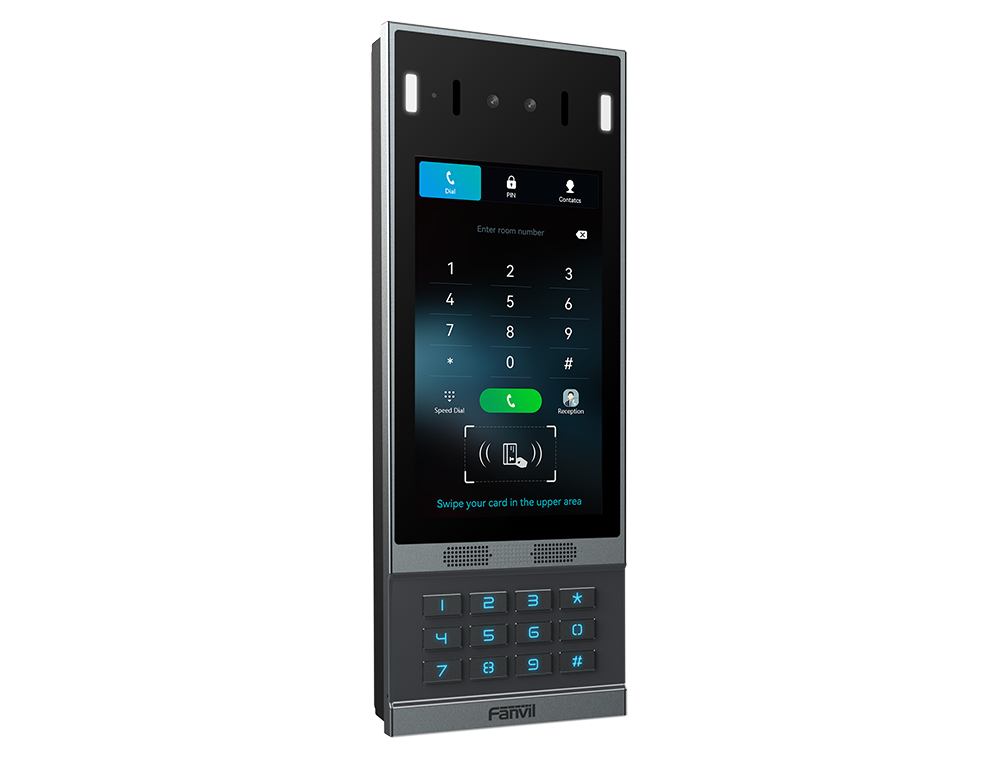
• The Fanvil i67 Face Recognition Door Phone offers advanced security features, including high-precision face recognition technology and liveness detection for enhanced community security. • This phone supports audio and video communication with IP phones, indoor stations, or mobile apps, enabling faster response times for visitors, delivery personnel, and service staff. Key Features: • 7-inch 1024x600 Color LCD touchscreen • Operating System: Linux • Panel: Aluminum Alloy • Camera: 2 Mega-pixel • Key: Numeric keypad with blue backlight • RF Card Reader: 125KHz & 13.56MHz • Light Sensor: Yes • Speaker: Dual Speaker 4Ω/ 3W • Power Supply: 12V-1.5A/PoE • Storage: Card Capacity: 10000 • Short Circuit Input and Output: 3 and 2 respectively • Wiegand Port: Yes • Protection Level: IP66 & IK07 • Working Temperature: -40℃~ 70℃ • Working Humidity: 10~90%

About This Product

The Fanvil i67 is built for multi-tenant residential buildings, gated communities, and commercial properties that need a robust, all-weather access point with modern credential options. Its IP66 and IK07 ratings mean it can live outdoors year-round across Canadian seasons, from a damp Vancouver winter to a dusty Calgary summer, without needing a protective hood. The combination of a 7-inch touchscreen, numeric keypad, and dual-frequency RFID reader lets residents use face recognition, PIN codes, or existing 125 kHz and 13.56 MHz cards, so a site can phase in biometrics without replacing everyone’s fobs overnight.

In a typical GTA condo or Ottawa office retrofit, this door phone pairs naturally with a SIP-based PBX or a Fanvil indoor station ecosystem. The PoE option simplifies cabling when you are already pulling Ethernet for cameras or access points, though you will need a midspan injector or PoE switch if the existing network closet does not provide it. The 12 V DC fallback is handy for older buildings where PoE is not available at the door frame. Keep in mind that face recognition accuracy depends heavily on mounting height and ambient light; the onboard light sensor helps, but a poorly lit alcove may still need a supplementary illuminator.

The i67 is not a lightweight apartment intercom. It stores up to 10,000 cards, has three short-circuit inputs and two relay outputs, and includes a Wiegand port, so it can tie into a larger access control system. That makes it overkill for a single-family home or a small office with a handful of users who only need a ring-and-talk function. Conversely, in a high-rise with hundreds of units, the face database and call routing need to be managed carefully; the unit itself handles the edge, but the back-end directory and SIP registration are what determine whether a visitor can actually reach a suite.

For Canadian integrators, the wide -40 °C to 70 °C operating range removes the need for a heated enclosure in most of the country, though direct exposure to freezing rain can still ice over the camera lens and touchscreen. The aluminum alloy faceplate and IK07 impact rating hold up against casual vandalism in publicly accessible entryways. If your deployment requires cellular failover or direct mobile app calling without a local SIP server, you will need to pair the i67 with a compatible cloud service or on-premise PBX; the door phone itself is a wired SIP endpoint and does not contain a 4G modem.
Services We Provide
  • Professional Installation & Configuration
  • Ongoing Maintenance & Support
  • Troubleshooting & Repairs
  • System Upgrades & Updates



