
Fanvil PA2-KIT Accessory Package
Frequently Asked Questions
First, check that the camera module is firmly connected to the PA2/PA2S unit and that the ribbon cable is fully inserted. Also verify that the PA2/PA2S firmware supports the camera module (check your firmware version against Fanvil's release notes). If the issue persists, a Toronto-based VoIP support provider can usually resolve this remotely.
Ensure the microphone module is properly seated in the enclosure and that there is no debris covering the pickup hole. Check the audio input gain settings in the PA2/PA2S web interface under the intercom configuration; you may need to increase the mic gain slightly.
The camera module's lens height and angle can be adjusted by loosening the mounting screws and repositioning the module. Power cycle the unit after adjusting to ensure the camera recalibrates. If the camera still doesn't provide a usable view, check that the enclosure is mounted at the correct height relative to the intended visitor.
Yes, the kit is compatible with both the PA2 and PA2S models. The PA2S supports the same accessory port, so you can attach the camera and microphone without additional adapters.
Verify that the PA2/PA2S is configured to enable video on the intercom call. In the device web UI, ensure the 'Enable Video' option is checked for the doorbell extension. Also confirm that your VoIP SIP server or PBX supports video calls—some services strip video metadata.
Adjust the noise suppression and mic sensitivity settings in the PA2/PA2S audio configuration. The kit's microphone is high-sensitivity by design, so for noisy environments you may want to enable a noise gate or reduce the gain level.
The kit's camera and microphone connect via short ribbon cables included in the package. They are designed to be mounted inside the same enclosure as the base unit. For remote mounting, you would need to extend wiring—consult Fanvil's installation guide for maximum recommended distances; generally, avoid runs longer than 1–2 metres to maintain signal quality.
Check the network connection to the PA2/PA2S; poor bandwidth or Wi-Fi interference can cause video issues. Ensure the device is connected via Ethernet with a stable connection. Also, verify that your network's Quality of Service (QoS) is prioritising SIP/RTP traffic.
Power down the PA2 unit completely, then reseat the microphone module connection on the accessory board. After powering back on, check the device status page in the web interface to see if the microphone is listed as detected. If not, the module may be defective.
Yes, the included camera module and microphone are rated for outdoor use with IP (Ingress Protection) standards—check the datasheet for exact ratings. The kit components are designed to withstand dust and rain. However, ensure the final enclosure is also sealed properly to prevent moisture ingress at connection points.
IP Paging
Fanvil PA2-KIT Accessory Package
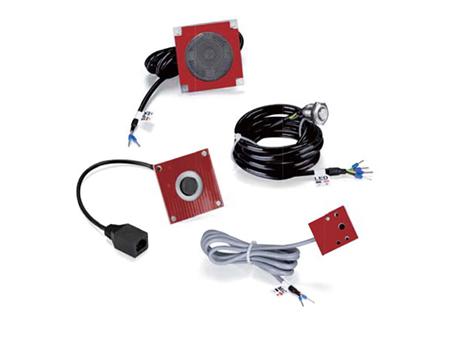
• The PA2-KIT Accessory Package enables rapid assembly of a high-quality audio/video intercom, eliminating the need for component selection and testing. • Key features: • High-quality components for reliable performance • 720P camera module for HD video calls with adjustable lens height and angle • High sensitivity pickup with waterproof and dust-proof microphone module suitable for harsh environments • The kit does not include the PA2 or PA2S, allowing customers to purchase additional units separately. • For detailed specifications, refer to the product datasheet available for download.
About This Product
The Fanvil PA2-KIT is designed for businesses that already own a Fanvil PA2 or PA2S base unit and want to expand their paging system with video intercom functionality. This accessory package includes a 720P HD camera module and a high-sensitivity, weather-resistant microphone pickup, making it suitable for outdoor or harsh indoor environments where reliable two-way communication is essential. The kit requires assembly and is intended for use with the separately sold PA2 or PA2S—it is not a standalone intercom station. For a simple audio-only paging deployment, adding this kit would be overkill; conversely, if you need multi-site paging with video, the PA2-KIT provides a cost-effective upgrade without replacing existing hardware. Canadian businesses deploying in the GTA, for example, will find the weatherproof components well-suited for building entrances or loading docks exposed to the elements.
Services We Provide
- Professional Installation & Configuration
- Ongoing Maintenance & Support
- Troubleshooting & Repairs
- System Upgrades & Updates



