
Fanvil PA3 IP Paging Gateway
Frequently Asked Questions
First, verify that the SIP server address, extension number, and password are entered correctly in the PA3's web interface. Check that your network allows SIP traffic and that the PA3 has a valid IP address. If the registration still fails, confirm that your phone system supports SIP paging devices and that no firewall is blocking port 5060.
Ensure the external amplified speaker is properly connected to the PA3's speaker interface and that the speaker itself is powered on and its volume is turned up. Next, verify that the PA3's audio output level is not muted in its web settings. If using PoE, confirm your switch provides enough power (Class 4, up to 25.5W) for both the PA3 and any connected accessories.
Insert a TF card (up to 32 GB) formatted as FAT32 with your MP3 files in the root directory. Log into the PA3's web interface, go to the 'Multicast' or 'Music' settings, and configure a scheduled or triggered announcement to play the desired file. The PA3 will broadcast the audio through the connected speaker.
Start by checking the Ethernet cable—reseat it at both ends and try a known-good cable. If using PoE, ensure your switch port is not oversubscribed and that the cable run is under 100 meters. A flapping link may indicate a failing switch port or a power supply issue; try a different PoE port or use the included power adapter if available.
Yes, the PA3 supports one-touch intercom via its programmable keys. Configure a key to dial a specific SIP extension or a paging group. The PA3 will establish a two-way audio call to that destination, but note that the device is primarily a paging gateway—audio quality for full-duplex conversation may be limited by the external microphone and speaker setup.
Access the PA3's web interface and look for the 'Schedule' or 'Timer' section. You can create a recurring schedule (e.g., daily at 8 AM) to trigger a pre-recorded MP3 from the TF card or USB drive. Ensure the PA3's time is synced via NTP so the schedule runs correctly.
A red LED typically indicates a registration or network error. Check the PA3's web interface for registration status—if it shows 'Unregistered', verify SIP credentials. If the LED stays red after power-up, try a power cycle. If the issue persists, a Toronto-based VoIP support provider can usually resolve this remotely.
First, adjust the PA3's audio output volume—if it's set too high, it can clip the signal. Check the external speaker's volume as well. Also ensure the microphone or audio source isn't too close to the speaker to avoid feedback. If using a line-level input, confirm the source volume is appropriate for the PA3's input sensitivity.
Yes, the PA3 has an audio out interface that can feed an analog amplifier or paging controller. Simply connect the audio out to the line input of your analog system. Note that the PA3's speaker interface is designed for a direct amplified speaker, so use the audio out for integration with existing equipment.
The PA3 supports auto-provisioning via a TFTP or HTTP server. Upload a configuration file to your provisioning server and point the PA3 to that server in its network settings. For a small deployment, you can manually configure each unit via its web interface. For larger rollouts, consider using a central management platform compatible with Fanvil devices.
IP Paging
Fanvil PA3 IP Paging Gateway
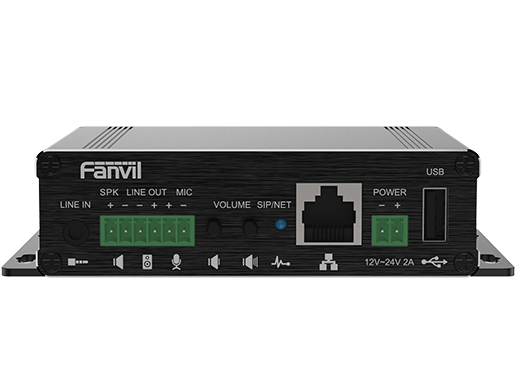
The Fanvil PA3 is a versatile public broadcasting device that offers HD Audio and rich features through an easy-to-use interface. It can send real-time public announcements, as well as configure fixed MP3 announcements. The one-touch intercom feature allows seamless connectivity to external devices. Key Features: • 2 SIP Lines • 1 Speaker Interface and 1 Microphone Interface • 1 Audio in and 1 Audio out Interface • Support for up to 32G TF card Connectivity • 1 USB 2.0 Interface for up to 32G • 2 Programmable Keys with Indicator Light • 1 Blue LED Status Indicator Light • Support for PoE (Class 4) • Compatible in Desktop and Wall-mounted Mode
About This Product
The Fanvil PA3 is an IP paging gateway designed for small to medium-sized businesses that need a straightforward way to broadcast live announcements or scheduled MP3 messages over a VoIP network. It fits naturally in environments like retail stores, warehouses, school offices, or multi-room office suites where a single paging zone is sufficient. The PA3 pairs well with any SIP-based phone system, replacing older analog paging adapters with a compact, PoE-powered unit that can be mounted on a wall or placed on a desk.
A key practical tradeoff is the device's two SIP lines—this limits it to one active paging call at a time, so it is not suited for simultaneous multi-zone paging across a large campus. The built-in speaker interface requires an external amplified speaker, meaning you will need to budget for that separately. The TF card and USB ports are useful for storing pre-recorded announcements, but the 32 GB maximum capacity is more than enough for typical use. For a Toronto office deployment, the PA3 works well with major Canadian VoIP providers and can be provisioned remotely, but you should confirm your provider supports SIP paging features (like multicast or broadcast) if you plan to integrate with a larger phone system.
Where this device shines is in a single-location setup with a handful of users who need quick, reliable paging—think a receptionist calling overhead to a warehouse or a school office making daily announcements. It would be overkill for a home office or a tiny retail space where a simple analog bell or a smartphone app could do the job. Conversely, it is underpowered for a multi-building enterprise that requires zone-specific paging, multiple simultaneous broadcasts, or integration with emergency notification systems—those scenarios call for a more advanced paging server or a dedicated IP paging controller.
A key practical tradeoff is the device's two SIP lines—this limits it to one active paging call at a time, so it is not suited for simultaneous multi-zone paging across a large campus. The built-in speaker interface requires an external amplified speaker, meaning you will need to budget for that separately. The TF card and USB ports are useful for storing pre-recorded announcements, but the 32 GB maximum capacity is more than enough for typical use. For a Toronto office deployment, the PA3 works well with major Canadian VoIP providers and can be provisioned remotely, but you should confirm your provider supports SIP paging features (like multicast or broadcast) if you plan to integrate with a larger phone system.
Where this device shines is in a single-location setup with a handful of users who need quick, reliable paging—think a receptionist calling overhead to a warehouse or a school office making daily announcements. It would be overkill for a home office or a tiny retail space where a simple analog bell or a smartphone app could do the job. Conversely, it is underpowered for a multi-building enterprise that requires zone-specific paging, multiple simultaneous broadcasts, or integration with emergency notification systems—those scenarios call for a more advanced paging server or a dedicated IP paging controller.
Services We Provide
- Professional Installation & Configuration
- Ongoing Maintenance & Support
- Troubleshooting & Repairs
- System Upgrades & Updates



