
Fanvil SIP PA2S Video Intercom & Paging Gateway

Frequently Asked Questions

Start by verifying the SIP server address, extension credentials, and port settings in the device's web interface. Confirm that the network allows outbound SIP traffic on the usual ports (5060/5061) and that there is no firewall blocking registration. If the issue persists, a Toronto-based VoIP support provider can usually resolve this remotely.
Check that the speaker wires are securely connected to the amplifier output terminals and that the external active speaker (if used) is powered on. Ensure the audio source—such as a page from your PBX or the MP3 player—is actually being sent to the PA2S by testing with a simple call to the device's SIP extension. Also verify the volume level in the web interface is not set to zero.
First, confirm that your network switch or injector provides PoE (802.3af) and that the Ethernet cable is fully seated at both ends. Try a different known-working PoE port or cable, and if you have the optional power adapter, use that to isolate the issue. If PoE still fails, the device may need a direct power supply.
Verify that the button is properly wired to the alarm input terminals and that the input's polarity is correct. In the PA2S web interface, ensure the emergency call feature is enabled and configured with the correct SIP extension to dial. Test the button without pressing it for long—some models require a sustained press to register.
Confirm that a 3.5mm cable is plugged into the recording output jack and that the recording device is set to line-level input. In the PA2S settings, check that the recording output is enabled and not muted. A simple test is to play a pre-recorded MP3 through the device and see if audio appears on the output.
Ensure the relay is wired correctly to the external lock and that you are using the normally open or normally closed contacts as needed. In the PA2S configuration, verify that the relay action (e.g., open door) is triggered by the correct event, such as receiving a DTMF code. Finally, test the relay independently by activating it manually from the web interface.
You will need to configure multicast paging on your SIP PBX, then set each PA2S to join the same multicast group address. Alternatively, use the PBX's intercom or broadcast feature to dial a hunt group that rings all PA2S extensions. The exact steps depend on your PBX; Fanvil provides a guide for common platforms like 3CX and Asterisk.
Yes, the PA2S is a standard SIP device, so it should register with any SIP-based provider. However, if your provider restricts certain codecs or uses a proprietary protocol, you may need to adjust the codec preference in the device to G.711 or Opus. For most Canadian business VoIP services, basic paging and intercom features will work out of the box.
Yes, you can connect 8 ohm speakers to the amplifier output terminals, but be mindful of the 30W maximum power and mono output. If your speakers are distributed across multiple zones, you may need a separate impedance-matching transformer or a more powerful amplifier. The device also has a line out for feeding an external active speaker if needed.
Download the latest firmware from the Fanvil support site, log into the PA2S web interface, and navigate to the upgrade section. Upload the file and wait for the device to reboot—do not power off during the process. Before updating, back up your current configuration in case you need to restore it. If the issue persists, a Toronto-based VoIP support provider can usually resolve this remotely.
IP Paging

Fanvil SIP PA2S Video Intercom & Paging Gateway
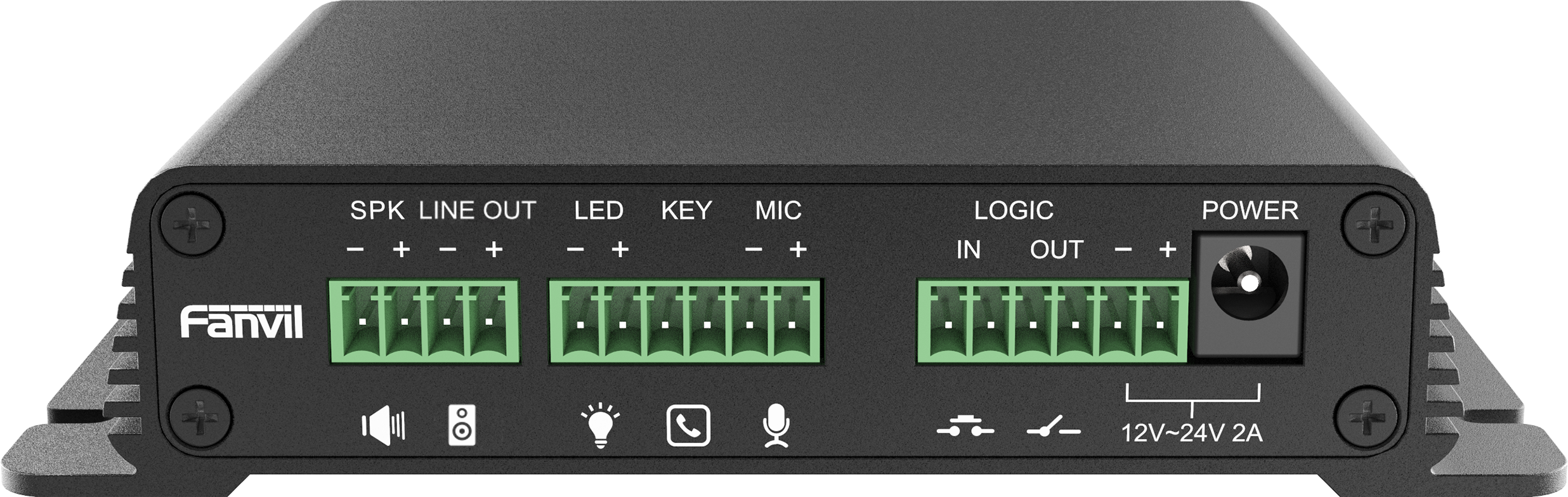
• The Fanvil PA2S SIP paging gateway is a versatile device that can be connected to external devices such as mobile phones, microphones, and speakers to support MP3 broadcasts in various settings. • It is easy to install and small in size, making it ideal for DIY applications. • The PA2S can be deployed in both LAN and WAN scenarios, serving as a flexible investment. • Key features include: • Supports Opus Codec for HD Audio, providing crystal-clear sound even in large public areas. • Emergency call button interface with active call functionality. • NVR video recording with standard RJ45 interface. • Recording output with 3.5mm standard audio interface. • Audio line out port with expandable external active speaker. • 1 switch signal input and output port with built-in relay. • 10W ~ 30W mono channel power amplifier output. • Adaptive 10/100 Mbps network port with integrated PoE. For a full list of specifications, please refer to the product datasheet.

About This Product

The Fanvil PA2S is a practical choice for small to medium-sized businesses that need to add IP-based paging and intercom capabilities without replacing their existing speaker infrastructure. It fits naturally in retail stores, warehouses, or office environments where overhead announcements or door answering are required. The unit pairs well with a SIP PBX and can be integrated alongside desk phones or softphones, making it a straightforward replacement for older analog paging systems. Its compact size and PoE support simplify installation, but buyers should note that the built-in amplifier is limited to 30W mono, so it is not suitable for large public-address zones or outdoor use. For a small office or a retail floor, however, it provides a cost-effective way to bring paging into a VoIP network. In the GTA, this device works reliably with most Canadian hosted PBX providers, though you should confirm that your provider supports the Opus codec if you need high-quality audio in a noisy space. Deployments requiring extensive speaker coverage or multi-zone paging will likely need a more powerful gateway.
Services We Provide
  • Professional Installation & Configuration
  • Ongoing Maintenance & Support
  • Troubleshooting & Repairs
  • System Upgrades & Updates



