
Fanvil Y501W Healthcare Intercom
Frequently Asked Questions
First, check that the Ethernet cable is securely connected and the device is showing a valid IP address on your network. Log into the web interface and confirm the SIP server address, extension, and authentication credentials exactly match what your VoIP provider or PBX expects. A typo in the password or server port is a common culprit; also ensure your firewall allows SIP traffic to and from the intercom’s IP.
Reposition the intercom and pendant to eliminate any large metal obstructions or electronic equipment between them, as the 433MHz signal can be affected. Verify the pendant battery is fresh and that the pendant is correctly paired by following the registration procedure in the device’s web settings. If the short-circuit output still doesn’t trigger, test the lock wiring by temporarily bridging the output terminals safely to rule out a mechanical fault.
Echo typically originates from the far end of the call, so check the audio settings on the SIP phone or speaker system that is communicating with the intercom. Lowering the speaker volume slightly on the Y501W itself and enabling acoustic echo cancellation (AEC) in the device’s audio configuration can help. Also confirm that the intercom’s microphone is not positioned where it picks up its own speaker output directly.
Move the intercom closer to the access point or try switching between the 2.4GHz and 5GHz bands—2.4GHz offers better range through walls, while 5GHz is less congested. Check for sources of interference like medical monitors or microwave equipment nearby. If possible, test with a wired Ethernet connection; if that is stable, the wireless environment likely needs adjustment.
First, confirm that the connected sensor (like a pull cord or pressure mat) sends a proper dry-contact closure. Using a multimeter, verify the alarm input terminals show a short when the sensor is activated. In the Y501W’s web interface, ensure the alarm action is set to dial a valid SIP number and that the call target extension is reachable from the intercom.
Yes, the Y501W supports Wi-Fi connectivity, so you can skip the Ethernet cable entirely after initial Wi-Fi setup. Just be aware that if the Wi-Fi network becomes unstable, the intercom may miss calls or alarm triggers, so in a high-reliability healthcare setting a wired PoE connection is often preferred. For initial configuration you still need a temporary wired connection or a way to access the Wi-Fi settings via the web interface.
Access the intercom’s web management page, navigate to the pendant or remote control settings section, and put the pendant into pairing mode (usually by pressing and holding its button). The interface will detect the pendant, and you can assign its button to a specific action like calling an extension or triggering the output relay. If it doesn’t pair, check the pendant battery and ensure no other 433MHz devices are broadcasting nearby.
Under the audio settings, select the Opus codec for the best voice quality at lower bandwidth, and enable high-definition audio if available. Reduce the microphone sensitivity slightly to avoid picking up excessive background noise, and increase the speaker volume enough to be heard clearly without feeding back. If the remote side complains of noise, enable the noise reduction feature on the intercom.
First, check that the Ethernet cable is plugged into a PoE-enabled switch port that provides 802.3af power—this intercom needs standard PoE, not passive. Try a different known-working PoE port and a different cable to rule out a faulty line. If the switch port is fine but the Y501W still doesn’t light up, you can test with the optional PSU power adapter to see if the device itself is functional; if it powers on with PSU but not PoE, a technician may need to inspect the PoE module. If the issue persists, a Toronto-based VoIP support provider can usually resolve this remotely.
Yes, each button can be programmed via the web interface to dial a different SIP extension or perform an action like triggering the relay. You might set one for a nurse station, another for emergency, and the third for a help desk. The pendant key’s action can also be assigned independently, giving you four distinct trigger options.
IP Paging
Fanvil Y501W Healthcare Intercom
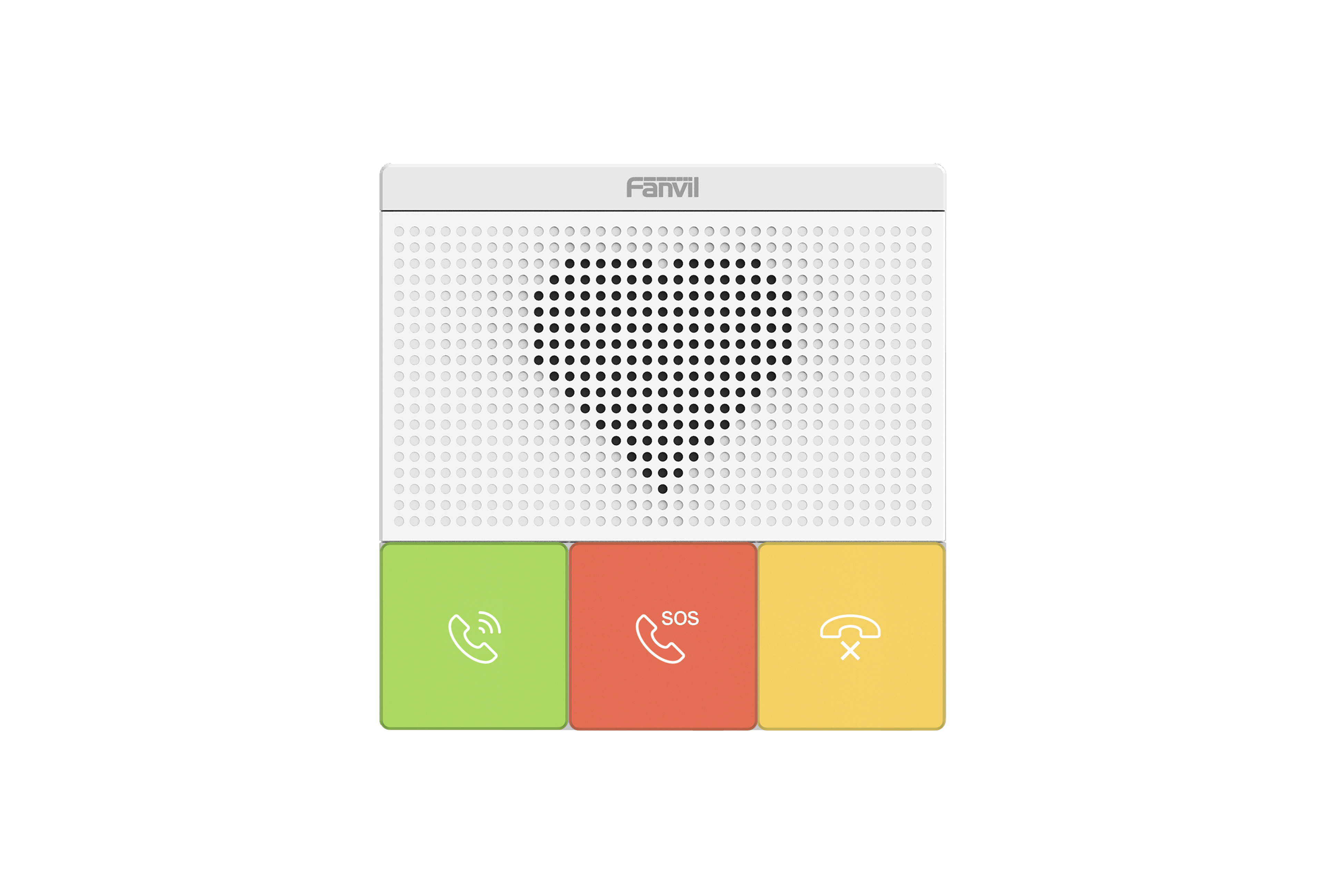
• Operating System: Linux • Alarm Input: 1 • Short Circuit Output: 1 • HD Audio: Features a high-definition audio system with advanced noise reduction technologies, including G.722, Opus, and acoustic echo cancellation. • Buttons: Equipped with three buttons for easy operation. • Wi-Fi: Supports dual-band 2.4GHz and 5GHz Wi-Fi connectivity. • Network: Offers a single 10/100 Mbps network port. • Wireless Pendant Key: Includes wireless pendant key support via 433MHz remote control technology. • Power Supply Mode: Available in both PSU and PoE modes. • Color: Available in white.
About This Product
The Fanvil Y501W is designed for healthcare environments where reliable, hands-free intercom communication is critical—think nurse call stations, patient room doors, or secure entry points in clinics and long-term care homes. It fits into a modern SIP-based voice infrastructure, offering an IP-connected alternative to older analog intercom panels without the need for complex wiring upgrades. Its compact, three-button design and 433MHz wireless pendant key support make it suitable for controlled access scenarios where patients or staff need a simple way to trigger a call or release a door.
This device shines in small to mid-sized facilities that already have a SIP server on-premises or use a compatible hosted VoIP service. It pairs well with dedicated IP paging servers or nurse call middleware, but it can also function as a standalone intercom endpoint registered directly to a PBX. Because it includes alarm input and short-circuit output, it can integrate with basic door strikes or existing wired sensor systems, reducing the need for additional interface hardware.
Practical tradeoffs include the single 10/100 Mbps Ethernet port—there is no pass-through for daisy-chaining, so each unit requires its own cable run or nearby switch port. The dual-band Wi-Fi is convenient for retrofits, but in medical settings thick walls, metal studs, and electromagnetic interference from equipment can degrade wireless performance. For mission-critical applications, a wired PoE connection remains the safer bet. Also note that the wireless pendant is tied to 433MHz technology, which has decent range but can be affected by nearby radio-frequency sources sometimes found in hospital environments.
For a large GTA hospital deployment with hundreds of endpoints, the Y501W might be underpowered compared to multi-button, full-color-screen nurse terminals; it is best suited to simpler use cases where three physical buttons and clear audio are enough. Canadian facilities considering the device should verify that their SIP provider supports the codecs it uses (G.722 and Opus are widely accepted) and that PoE switches meet the power budget if they plan to avoid individual power supplies.
This device shines in small to mid-sized facilities that already have a SIP server on-premises or use a compatible hosted VoIP service. It pairs well with dedicated IP paging servers or nurse call middleware, but it can also function as a standalone intercom endpoint registered directly to a PBX. Because it includes alarm input and short-circuit output, it can integrate with basic door strikes or existing wired sensor systems, reducing the need for additional interface hardware.
Practical tradeoffs include the single 10/100 Mbps Ethernet port—there is no pass-through for daisy-chaining, so each unit requires its own cable run or nearby switch port. The dual-band Wi-Fi is convenient for retrofits, but in medical settings thick walls, metal studs, and electromagnetic interference from equipment can degrade wireless performance. For mission-critical applications, a wired PoE connection remains the safer bet. Also note that the wireless pendant is tied to 433MHz technology, which has decent range but can be affected by nearby radio-frequency sources sometimes found in hospital environments.
For a large GTA hospital deployment with hundreds of endpoints, the Y501W might be underpowered compared to multi-button, full-color-screen nurse terminals; it is best suited to simpler use cases where three physical buttons and clear audio are enough. Canadian facilities considering the device should verify that their SIP provider supports the codecs it uses (G.722 and Opus are widely accepted) and that PoE switches meet the power budget if they plan to avoid individual power supplies.
Services We Provide
- Professional Installation & Configuration
- Ongoing Maintenance & Support
- Troubleshooting & Repairs
- System Upgrades & Updates



