
Grandstream GAC2500 Android Enterprise Conference Phone
AIM Telecom provides troubleshooting and configuration support for this product to businesses across Toronto and the GTA. Contact us to confirm whether the issue can be handled by phone or requires on-site service.
Get Support Call 416-312-4819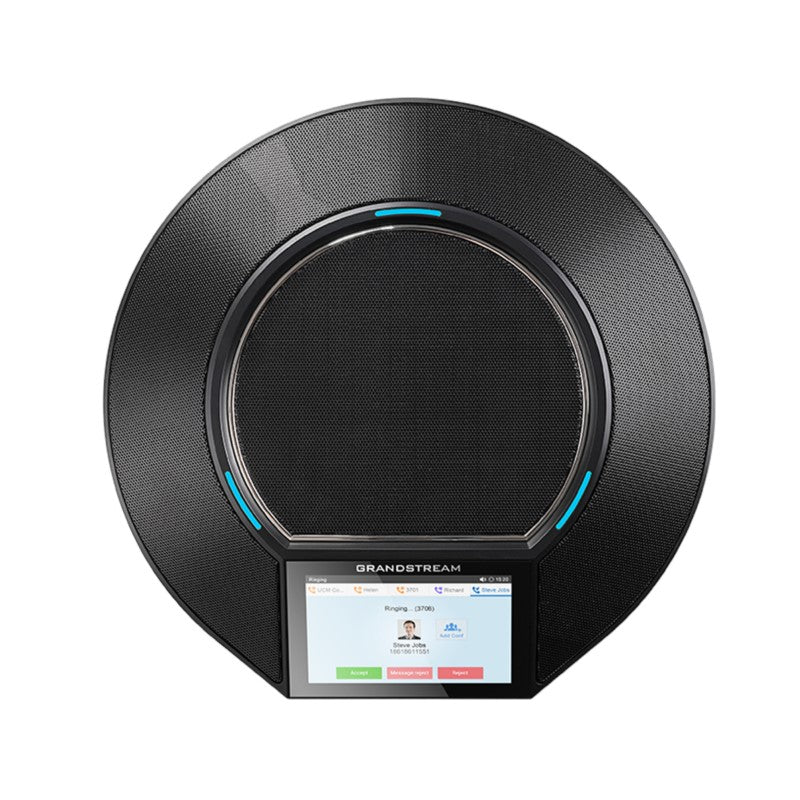
Common issues and fixes
Reviewed troubleshooting steps are not yet available for this model.
Ask AIM Telecom about this productAbout this product
*The Grandstream GAC2500 is an Android-based business conference phone that redefines flexibility, mobility, and choices in the workplace. It supports up to 6 lines and 6 SIP accounts, allowing businesses to easily hold conferences and manage multiple calls at once.
Key features include:
• Runs Android 4.4 and offers access to the Google Play Store for customizable conferencing experiences
• Bluetooth support for syncing headsets and mobile devices
• Built-in 7-way conference bridge for seamless collaboration
• 4.3″ capacitive touch screen with easy-to-use interface
• Auto-sensing Gigabit port, built-in PoE support, and full HD audio for high-quality voice calls
• Daisy-chain support to combine two phones together for more flexibility
• TLS and SRTP security encryption for secure connections
Additional features include:
• Weight: 4.8 lbs
• Dimensions: 16 × 13 × 4 in
• Brand: Grandstream
• Phone Type: Conference
Technical specifications:
• Network Interface: Auto-sensing Gigabit Ethernet port with integrated PoE+ (IEEE 802.3at Class4)
• Graphic Display: 4.3” IPS LCD with 800×480 resolution
• Mic: 3 cardioid microphones; 12 ft. pickup distance, 360° capture
• Speakerphone: Frequency: 220-18,000 Hz, Volume: Up to 86 dB at 0.5 meter, Audio full duplex
• Auxiliary Ports: 3.5mm audio port, USB Micro-B, RJ48 daisy chain port
• Voice Codecs: Support for G.711µ/a, G.722, G.726, iLBC, Opus, G.722.1 and G.722.1c (pending), in-band and out-of-band DTMF (In audio, RFC2833, SIP INFO), G.729A/B, VAD, CNG, AEC, PLC, AJB, AGC
• Telephony Features: 6 SIP accounts, hold, transfer, forward, 7-way conference, call park, call pickup, downloadable phonebook (XML, LDAP, up to 2000 items), call waiting, call log (up to 2000 records), XML customization of screen, auto answer, click-to-dial, flexible dial plan, hot desking, personalized music ringtones and music on hold, server redundancy and fail-over
For a full list of specifications, please refer to the product datasheet.
Key features include:
• Runs Android 4.4 and offers access to the Google Play Store for customizable conferencing experiences
• Bluetooth support for syncing headsets and mobile devices
• Built-in 7-way conference bridge for seamless collaboration
• 4.3″ capacitive touch screen with easy-to-use interface
• Auto-sensing Gigabit port, built-in PoE support, and full HD audio for high-quality voice calls
• Daisy-chain support to combine two phones together for more flexibility
• TLS and SRTP security encryption for secure connections
Additional features include:
• Weight: 4.8 lbs
• Dimensions: 16 × 13 × 4 in
• Brand: Grandstream
• Phone Type: Conference
Technical specifications:
• Network Interface: Auto-sensing Gigabit Ethernet port with integrated PoE+ (IEEE 802.3at Class4)
• Graphic Display: 4.3” IPS LCD with 800×480 resolution
• Mic: 3 cardioid microphones; 12 ft. pickup distance, 360° capture
• Speakerphone: Frequency: 220-18,000 Hz, Volume: Up to 86 dB at 0.5 meter, Audio full duplex
• Auxiliary Ports: 3.5mm audio port, USB Micro-B, RJ48 daisy chain port
• Voice Codecs: Support for G.711µ/a, G.722, G.726, iLBC, Opus, G.722.1 and G.722.1c (pending), in-band and out-of-band DTMF (In audio, RFC2833, SIP INFO), G.729A/B, VAD, CNG, AEC, PLC, AJB, AGC
• Telephony Features: 6 SIP accounts, hold, transfer, forward, 7-way conference, call park, call pickup, downloadable phonebook (XML, LDAP, up to 2000 items), call waiting, call log (up to 2000 records), XML customization of screen, auto answer, click-to-dial, flexible dial plan, hot desking, personalized music ringtones and music on hold, server redundancy and fail-over
For a full list of specifications, please refer to the product datasheet.
More product details
The Grandstream GAC2500 is an Android-based conference phone designed for meeting rooms and huddle spaces where flexibility and app integration matter. It runs Android 4.4 and gives you access to the Google Play Store, so you can install third-party collaboration apps like Zoom, Microsoft Teams, or your own custom UC client directly on the device. This makes it a good fit for businesses that want a single device for both SIP telephony and softphone-style conferencing, without needing a separate PC or tablet in the room.
It supports up to 6 SIP accounts and includes a built-in 7-way audio conference bridge, which is practical for small to mid-sized teams that run frequent internal calls or client meetings. The 4.3-inch touchscreen and Bluetooth support for headsets or mobile syncing add convenience, but the device is best suited for rooms where participants sit within about 12 feet of the unit—its three cardioid microphones cover 360 degrees but won't fill a large boardroom. For bigger spaces, you might need to daisy-chain two units or look at a ceiling-mic array system.
On the networking side, the GAC2500 has a Gigabit port with PoE+ support, so it can be powered over Ethernet without a separate power brick—handy for clean desk setups. It also includes TLS and SRTP encryption, which is important for Canadian businesses handling sensitive client data. However, note that it runs an older Android version (4.4), so some newer apps may not be compatible or may lack security updates. If your organization requires the latest Android security patches or needs to run modern UC apps that demand a newer OS, this device may feel limited. It's a solid choice for a dedicated conference room phone that doubles as an Android endpoint, but not for environments that need cutting-edge app support or very large room coverage.
It supports up to 6 SIP accounts and includes a built-in 7-way audio conference bridge, which is practical for small to mid-sized teams that run frequent internal calls or client meetings. The 4.3-inch touchscreen and Bluetooth support for headsets or mobile syncing add convenience, but the device is best suited for rooms where participants sit within about 12 feet of the unit—its three cardioid microphones cover 360 degrees but won't fill a large boardroom. For bigger spaces, you might need to daisy-chain two units or look at a ceiling-mic array system.
On the networking side, the GAC2500 has a Gigabit port with PoE+ support, so it can be powered over Ethernet without a separate power brick—handy for clean desk setups. It also includes TLS and SRTP encryption, which is important for Canadian businesses handling sensitive client data. However, note that it runs an older Android version (4.4), so some newer apps may not be compatible or may lack security updates. If your organization requires the latest Android security patches or needs to run modern UC apps that demand a newer OS, this device may feel limited. It's a solid choice for a dedicated conference room phone that doubles as an Android endpoint, but not for environments that need cutting-edge app support or very large room coverage.