
Grandstream GCC6010W Built-in IPPBX (10 Users, 4 Concurrent Calls) + enterprise-grade firewall + VPN Router + 2 x 2.5 Gb, 5 x GigE Network Switch + WiFi 6 AP
AIM Telecom provides troubleshooting and configuration support for this product to businesses across Toronto and the GTA. Contact us to confirm whether the issue can be handled by phone or requires on-site service.
Get Support Call 416-312-4819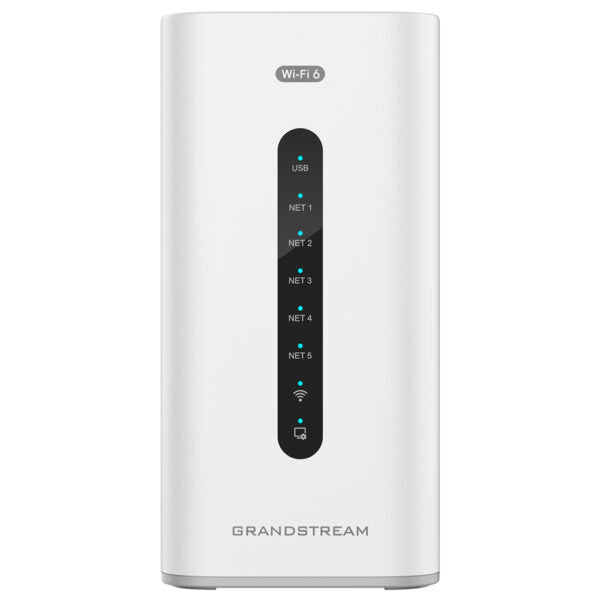
Common issues and fixes
Reviewed troubleshooting steps are not yet available for this model.
Ask AIM Telecom about this productAbout this product
*The GCC6010 Series offers a comprehensive all-in-one solution for unified communications and networking, combining the features of a VPN router, next-generation firewall, IP PBX, and network switch or Wi-Fi access point into one device. This allows for centralized management of wired, wireless, and VPN networks, providing bank-grade network security and utilizing a market-leading communication and collaboration platform.
• Built-in IPPBX with 10 users and 4 concurrent calls
• Enterprise-grade firewall and VPN Router
• Network switch with 2 x 2.5 Gb and 5 x GigE ports
• Easy configuration, deployment, and management of Grandstream endpoint solutions from one central location
• Supports SD-WAN for improved network performance and security
The GCC6010W model includes a dual-band Wi-Fi 6 AP with 2×2 MIMO technology.
Additional Information:
• Weight: 2.61 lb
• Dimensions: 11.26 × 4.98 × 4.13 in
• WiFi Standard: Wi-Fi 6 (802.11ax)
• Network Band: Dual Band
• Frequency Band: 2.4 Ghz, 5 Ghz
• Business Routers: VPN Routers
• Network Type: Wired, Wireless
Technical Specifications:
• Model: GCC6010W
• Wi-Fi Standards: IEEE 802.11 a/b/g/n/ac/ax
• Antennas: 3 individual internal antennas with maximum gain 4.5dBi and 5dBi
• Wi-Fi and System Security: WPA/WPA2-PSK, WPA/WPA2 Enterprise, WPA3, anti-hacking secure boot, critical data/control lockdown via digital signatures
• Memory: 2GB RAM, 32GB eMMC Flash
• External Storage: N/A
• Box Contents: GCC6010W, Universal Power Supply, Network Cable, Quick Installation Guide
• Built-in IPPBX with 10 users and 4 concurrent calls
• Enterprise-grade firewall and VPN Router
• Network switch with 2 x 2.5 Gb and 5 x GigE ports
• Easy configuration, deployment, and management of Grandstream endpoint solutions from one central location
• Supports SD-WAN for improved network performance and security
The GCC6010W model includes a dual-band Wi-Fi 6 AP with 2×2 MIMO technology.
Additional Information:
• Weight: 2.61 lb
• Dimensions: 11.26 × 4.98 × 4.13 in
• WiFi Standard: Wi-Fi 6 (802.11ax)
• Network Band: Dual Band
• Frequency Band: 2.4 Ghz, 5 Ghz
• Business Routers: VPN Routers
• Network Type: Wired, Wireless
Technical Specifications:
• Model: GCC6010W
• Wi-Fi Standards: IEEE 802.11 a/b/g/n/ac/ax
• Antennas: 3 individual internal antennas with maximum gain 4.5dBi and 5dBi
• Wi-Fi and System Security: WPA/WPA2-PSK, WPA/WPA2 Enterprise, WPA3, anti-hacking secure boot, critical data/control lockdown via digital signatures
• Memory: 2GB RAM, 32GB eMMC Flash
• External Storage: N/A
• Box Contents: GCC6010W, Universal Power Supply, Network Cable, Quick Installation Guide
More product details
The Grandstream GCC6010W is an all-in-one appliance aimed at very small businesses or home offices that need a phone system, secure networking, and Wi‑Fi without juggling separate devices. It caters to teams of up to ten people who want professional call handling—like a boutique agency, a medical practice, or a retail location—while also getting a router, VPN, firewall, and Wi‑Fi 6 access point in a single compact box. For a Toronto startup operating out of a shared workspace or a small GTA office, this simplifies both the tech stack and the monthly support burden.
The trade-off is a fixed ceiling. The built-in IP PBX tops out at ten users and four concurrent calls; if your team grows beyond that, you’ll need a standalone phone system. Likewise, the switch offers only two multi‑gigabit ports, so bandwidth‑hungry wired devices might eventually feel constrained. It’s a turnkey fit for a stable headcount, not a platform that scales with expansion.
Where the GCC6010W makes sense is as a replacement for a hodgepodge of entry‑level gear. Instead of a consumer router, a basic switch, a separate Wi‑Fi access point, and a cloud‑hosted PBX subscription, you get everything in one device with a single management interface. For a non‑technical owner, that means fewer things to troubleshoot and a predictable upfront cost. On the other hand, a lone professional who only needs a router and a cordless phone will find it over‑engineered, and a rapidly growing office will outgrow it within a year.
The trade-off is a fixed ceiling. The built-in IP PBX tops out at ten users and four concurrent calls; if your team grows beyond that, you’ll need a standalone phone system. Likewise, the switch offers only two multi‑gigabit ports, so bandwidth‑hungry wired devices might eventually feel constrained. It’s a turnkey fit for a stable headcount, not a platform that scales with expansion.
Where the GCC6010W makes sense is as a replacement for a hodgepodge of entry‑level gear. Instead of a consumer router, a basic switch, a separate Wi‑Fi access point, and a cloud‑hosted PBX subscription, you get everything in one device with a single management interface. For a non‑technical owner, that means fewer things to troubleshoot and a predictable upfront cost. On the other hand, a lone professional who only needs a router and a cordless phone will find it over‑engineered, and a rapidly growing office will outgrow it within a year.