
Grandstream UCM6301 IP PBX
AIM Telecom provides troubleshooting and configuration support for this product to businesses across Toronto and the GTA. Contact us to confirm whether the issue can be handled by phone or requires on-site service.
Get Support Call 416-312-4819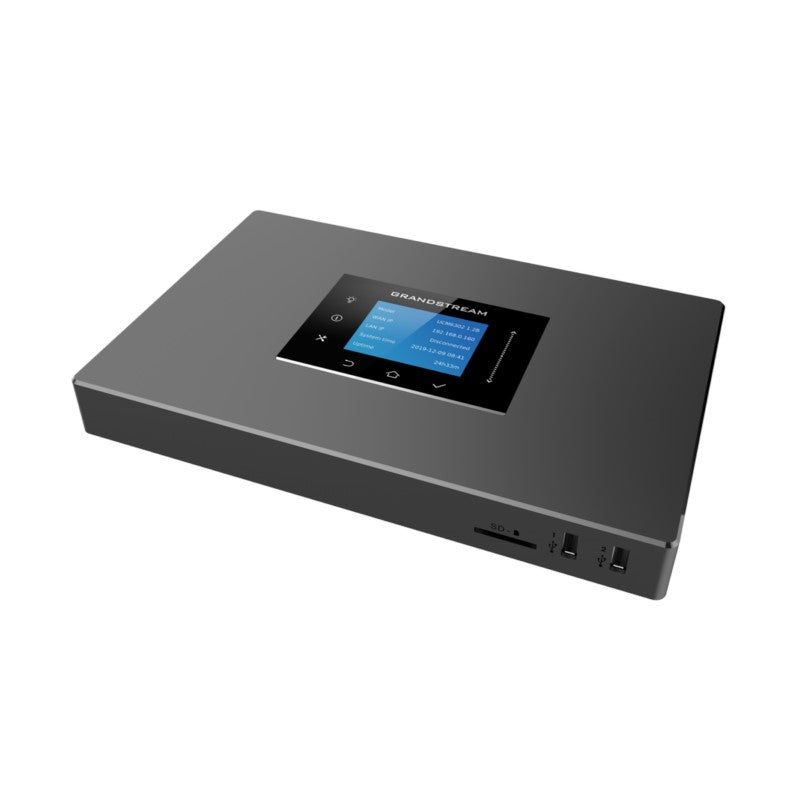
Common issues and fixes
Reviewed troubleshooting steps are not yet available for this model.
Ask AIM Telecom about this productAbout this product
The UCM6301 allows businesses to build powerful and scalable unified communication and collaboration solutions. This series of IP PBXs provide a platform that unifies all business communication on one centralized network, including voice, video calling, video conferencing, video surveillance, web meetings, data, analytics, mobility, facility access, intercoms and more.
Key Features:
• Supports up to 3000 users and up to 450 concurrent calls
• Zero configuration provisioning of Grandstream SIP endpoints
• Built-in conferencing & meetings platform; supports desktop, Wave app, and SIP endpoints
• Wave for Android, iOS, Chrome and Firefox browsers allows communication with all UCM6300 users & solutions
• API available for third-party integrations, including CRM and PMS platforms
• Advanced security protection with secure boot, unique certificate and random default password to protect calls and accounts
• Three Gigabit auto-sensing RJ45 network ports with integrated PoE+ and support NAT router
• Automated NAT firewall traversal service facilitates secure remote connections
• Supports Full-Band Opus voice codec and H.264/H.263/ H.263+/H.265/VP8 video codec, jitter resilience up to 50% packet loss
• Compatible with GDMS for cloud setup, management and monitoring
• Based on Asterisk* version 16 open-source telephony operating system
Weight: 2.2 lbs
Dimensions: 15 × 8 × 3 in
Phone System Call Capacity: 101-500 Concurrent Calls
Device Ports: FXO, FXS
Technical Specifications:
• Analog Telephone FXS Ports: 1 RJ11 Port (All ports have lifeline capability in case of power outage; number of ports can be expanded by peering with an FXS gateway)
• PSTN Line FXO Ports: 1 RJ11 Port (All ports have lifeline capability in case of power outage; number of ports can be expanded by peering with an FXO gateway)
• Network Interfaces: Three self-adaptive Gigabit ports (switched, routed or dual mode) with PoE+
• NAT Router: Yes (supports router mode and switch mode)
• Peripheral Ports: 1*USB 3.0, 1*SD card interface
Key Features:
• Supports up to 3000 users and up to 450 concurrent calls
• Zero configuration provisioning of Grandstream SIP endpoints
• Built-in conferencing & meetings platform; supports desktop, Wave app, and SIP endpoints
• Wave for Android, iOS, Chrome and Firefox browsers allows communication with all UCM6300 users & solutions
• API available for third-party integrations, including CRM and PMS platforms
• Advanced security protection with secure boot, unique certificate and random default password to protect calls and accounts
• Three Gigabit auto-sensing RJ45 network ports with integrated PoE+ and support NAT router
• Automated NAT firewall traversal service facilitates secure remote connections
• Supports Full-Band Opus voice codec and H.264/H.263/ H.263+/H.265/VP8 video codec, jitter resilience up to 50% packet loss
• Compatible with GDMS for cloud setup, management and monitoring
• Based on Asterisk* version 16 open-source telephony operating system
Weight: 2.2 lbs
Dimensions: 15 × 8 × 3 in
Phone System Call Capacity: 101-500 Concurrent Calls
Device Ports: FXO, FXS
Technical Specifications:
• Analog Telephone FXS Ports: 1 RJ11 Port (All ports have lifeline capability in case of power outage; number of ports can be expanded by peering with an FXS gateway)
• PSTN Line FXO Ports: 1 RJ11 Port (All ports have lifeline capability in case of power outage; number of ports can be expanded by peering with an FXO gateway)
• Network Interfaces: Three self-adaptive Gigabit ports (switched, routed or dual mode) with PoE+
• NAT Router: Yes (supports router mode and switch mode)
• Peripheral Ports: 1*USB 3.0, 1*SD card interface
More product details
The Grandstream UCM6301 is designed for small to mid-sized organizations that need a single, on-premises appliance to unify voice, video, and other communication tools. It sits at the heart of a network, connecting SIP endpoints, analog lines, and PSTN trunks. For a growing business in the GTA, this can mean pulling together desk phones, a conference room system, and remote staff using the Wave app under one managed platform, without stitching together multiple services.
The UCM6301 works well when paired with Grandstream SIP phones and gateways, especially where zero-touch provisioning will save hours of manual configuration. It can also serve as a replacement for a legacy digital key system or an aging first-generation VoIP PBX that struggles with remote workers. Keep in mind the built-in analog ports are limited to a single FXS and a single FXO port; any office with several analog devices or PSTN lines will need an external FXS or FXO gateway to expand that capacity. The three Gigabit network ports with PoE+ and NAT routing give you flexible deployment options, but the unit itself is not a full-featured enterprise router, so it usually sits behind a dedicated firewall.
For a business evaluating this against higher-end UCM models, the main tradeoff is user scale and onboard analog connectivity. With support for 3000 users and 450 concurrent calls, the UCM6301 comfortably serves mid-market deployments, but a company nearing the top of that range should plan for expansion carefully. The integrated conferencing and remote Wave client support are genuine productivity features, not afterthoughts, so distributed teams and hybrid workplaces will see immediate value.
Where this device is overkill is in a very small office that only needs basic call routing for a handful of phones, where a simpler appliance or even a cloud-hosted solution may be more cost-effective. Where it is underpowered is in a large contact center with heavy analog trunking requirements, unless paired with appropriate gateways. Canadian businesses considering SIP trunking with local carriers like Bell or Rogers will find the automated NAT traversal helpful, but should still verify interoperability with their chosen provider before committing.
The UCM6301 works well when paired with Grandstream SIP phones and gateways, especially where zero-touch provisioning will save hours of manual configuration. It can also serve as a replacement for a legacy digital key system or an aging first-generation VoIP PBX that struggles with remote workers. Keep in mind the built-in analog ports are limited to a single FXS and a single FXO port; any office with several analog devices or PSTN lines will need an external FXS or FXO gateway to expand that capacity. The three Gigabit network ports with PoE+ and NAT routing give you flexible deployment options, but the unit itself is not a full-featured enterprise router, so it usually sits behind a dedicated firewall.
For a business evaluating this against higher-end UCM models, the main tradeoff is user scale and onboard analog connectivity. With support for 3000 users and 450 concurrent calls, the UCM6301 comfortably serves mid-market deployments, but a company nearing the top of that range should plan for expansion carefully. The integrated conferencing and remote Wave client support are genuine productivity features, not afterthoughts, so distributed teams and hybrid workplaces will see immediate value.
Where this device is overkill is in a very small office that only needs basic call routing for a handful of phones, where a simpler appliance or even a cloud-hosted solution may be more cost-effective. Where it is underpowered is in a large contact center with heavy analog trunking requirements, unless paired with appropriate gateways. Canadian businesses considering SIP trunking with local carriers like Bell or Rogers will find the automated NAT traversal helpful, but should still verify interoperability with their chosen provider before committing.