
Grandstream UCM6308 IP PBX
AIM Telecom provides troubleshooting and configuration support for this product to businesses across Toronto and the GTA. Contact us to confirm whether the issue can be handled by phone or requires on-site service.
Get Support Call 416-312-4819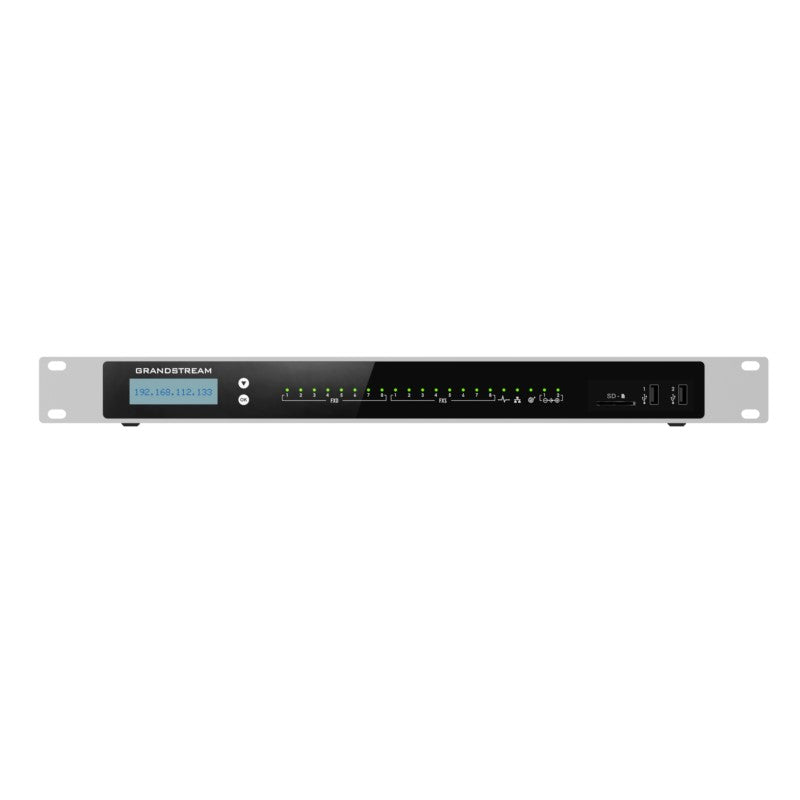
Common issues and fixes
Reviewed troubleshooting steps are not yet available for this model.
Ask AIM Telecom about this productAbout this product
The Grandstream UCM6300 series provides a powerful and scalable unified communication and collaboration solution, unifying all business communication on one centralized network. The platform supports up to 3000 users and includes a built-in web meetings and video conferencing solution that allows employees to connect from the desktop, mobile, GVC series devices and IP phones.
Key features include:
• Supports up to 3000 users and up to 450 concurrent calls
• Zero configuration provisioning of Grandstream SIP endpoints
• Built-in conferencing & meetings platform; supports desktop, Wave app, and SIP endpoints
• API available for third-party integrations, including CRM and PMS platforms
• Advanced security protection with secure boot, unique certificate and random default password to protect calls and accounts
• Three Gigabit auto-sensing RJ45 network ports with integrated PoE+ and support NAT router
• Automated NAT firewall traversal service facilitates secure remote connections
• Supports Full-Band Opus voice codec and H.264/H.263/ H.263+/H.265/VP8 video codec, jitter resilience up to 50% packet loss
• Compatible with GDMS for cloud setup, management and monitoring
• Based on Asterisk* version 16 open-source telephony operating system
Weight: 7.2 lbs
Dimensions: 22 × 13 × 4 in
Brand: Grandstream
Phone System Call Capacity: 101-500 Concurrent Calls
Device Ports: FXO, FXS
Key features include:
• Supports up to 3000 users and up to 450 concurrent calls
• Zero configuration provisioning of Grandstream SIP endpoints
• Built-in conferencing & meetings platform; supports desktop, Wave app, and SIP endpoints
• API available for third-party integrations, including CRM and PMS platforms
• Advanced security protection with secure boot, unique certificate and random default password to protect calls and accounts
• Three Gigabit auto-sensing RJ45 network ports with integrated PoE+ and support NAT router
• Automated NAT firewall traversal service facilitates secure remote connections
• Supports Full-Band Opus voice codec and H.264/H.263/ H.263+/H.265/VP8 video codec, jitter resilience up to 50% packet loss
• Compatible with GDMS for cloud setup, management and monitoring
• Based on Asterisk* version 16 open-source telephony operating system
Weight: 7.2 lbs
Dimensions: 22 × 13 × 4 in
Brand: Grandstream
Phone System Call Capacity: 101-500 Concurrent Calls
Device Ports: FXO, FXS
More product details
The Grandstream UCM6308 is built for mid-sized to large organizations that need to bring voice, video, and messaging under one roof without stitching together services from multiple vendors. It fits well in a multi-site Canadian business where a central office in the GTA manages communication for branch locations, or in a single campus that has outgrown a smaller appliance. The built-in meeting platform means employees can join a video call from a desk phone, a laptop, or the Wave mobile app, which simplifies adoption when staff are split between in-office and remote work.
This unit pairs naturally with Grandstream’s own SIP endpoints—desk phones, cordless handsets, and conference stations—because zero-touch provisioning cuts hours out of a large deployment. It also plays nicely with third-party SIP hardware, but the auto-provisioning magic is strongest inside the Grandstream ecosystem. For a business already running a legacy on-premise PBX, the UCM6308 can serve as a direct replacement, provided the team is ready to manage a Linux-based appliance and map out a migration plan for existing analog lines through the onboard FXO/FXS ports.
There are practical limits to keep in mind. The 450 concurrent call ceiling is generous, but if your organization routinely pushes heavy video conferencing across many simultaneous sessions, you will want to model bandwidth and processor load carefully. The three gigabit ports with integrated PoE+ and NAT router support are handy for small wiring closets, yet in a larger deployment you will still want dedicated switching and routing infrastructure. This is not a plug-and-play device for a five-person shop; a smaller UCM model or a cloud-based service would be a better fit there.
Canadian businesses that value data sovereignty and low-latency internal calling will appreciate that everything stays on-site. The automated NAT traversal facility simplifies secure remote connections for home workers, which has become a baseline expectation in the current work climate. Just be prepared to invest time in initial setup and ongoing firmware maintenance, or to lean on a local VoIP partner who knows the Grandstream platform well.
This unit pairs naturally with Grandstream’s own SIP endpoints—desk phones, cordless handsets, and conference stations—because zero-touch provisioning cuts hours out of a large deployment. It also plays nicely with third-party SIP hardware, but the auto-provisioning magic is strongest inside the Grandstream ecosystem. For a business already running a legacy on-premise PBX, the UCM6308 can serve as a direct replacement, provided the team is ready to manage a Linux-based appliance and map out a migration plan for existing analog lines through the onboard FXO/FXS ports.
There are practical limits to keep in mind. The 450 concurrent call ceiling is generous, but if your organization routinely pushes heavy video conferencing across many simultaneous sessions, you will want to model bandwidth and processor load carefully. The three gigabit ports with integrated PoE+ and NAT router support are handy for small wiring closets, yet in a larger deployment you will still want dedicated switching and routing infrastructure. This is not a plug-and-play device for a five-person shop; a smaller UCM model or a cloud-based service would be a better fit there.
Canadian businesses that value data sovereignty and low-latency internal calling will appreciate that everything stays on-site. The automated NAT traversal facility simplifies secure remote connections for home workers, which has become a baseline expectation in the current work climate. Just be prepared to invest time in initial setup and ongoing firmware maintenance, or to lean on a local VoIP partner who knows the Grandstream platform well.