
Grandstream UCM6308A audio IP PBX
AIM Telecom provides troubleshooting and configuration support for this product to businesses across Toronto and the GTA. Contact us to confirm whether the issue can be handled by phone or requires on-site service.
Get Support Call 416-312-4819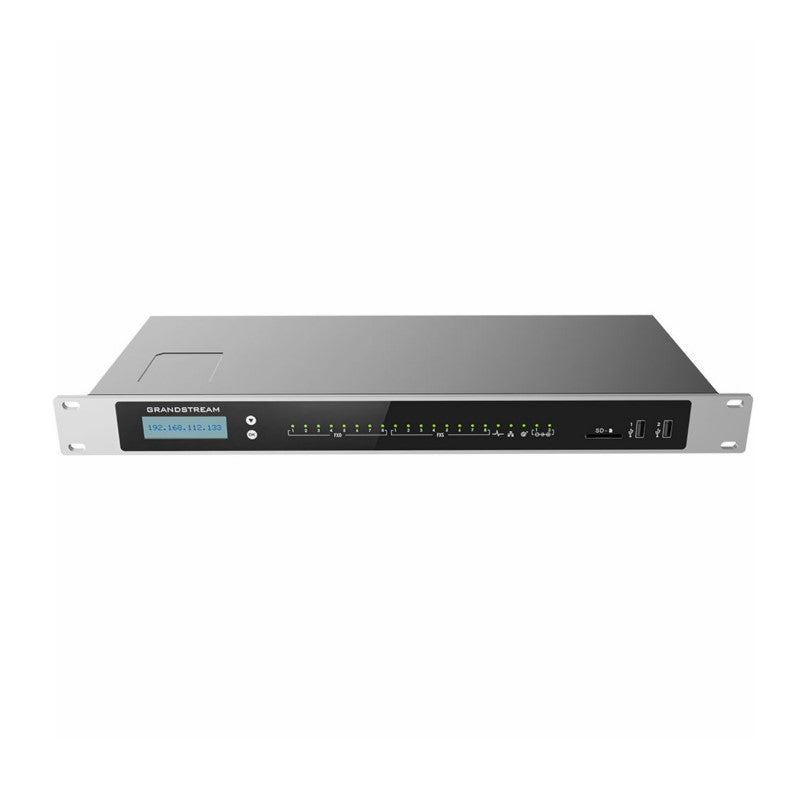
Common issues and fixes
Reviewed troubleshooting steps are not yet available for this model.
Ask AIM Telecom about this productAbout this product
*The Grandstream UCM6308A Audio series is a powerful unified communication and collaboration solution for businesses. This IP PBX supports up to 1500 users and includes a built-in instant messaging, voice/web conferencing platform, and the free Wave App.*
Key Features:
• Supports up to 1500 users
• Built-in Instant Messaging (IM), Audio Conferencing & Web Meetings platform with access from computers, mobile devices, and SIP endpoints
• Free Wave App for easy voice and Instant Messaging communications using desktops, Web, and Android/iOS devices
• API available for third-party integrations
• Advanced security protection with secure boot, unique certificate, and random default password
• Three Gigabit auto-sensing RJ45 network ports with integrated PoE+ and support NAT router
• Automated NAT firewall traversal service for secure remote connections
• Enhanced reliability with Hot Standby High-Availability and local dual deployment
• Supports Full-Band Opus voice codec and jitter resilience up to 50% packet loss
• Compatible with GDMS for cloud setup, management, and monitoring
• Based on Asterisk* version 16 open-source telephony operating system
Additional Information:
• Weight: 7.7 lb
• Dimensions: 22 × 13 × 4 in
• Number of Ports: 8 FXS, 8 FXO
Key Features:
• Supports up to 1500 users
• Built-in Instant Messaging (IM), Audio Conferencing & Web Meetings platform with access from computers, mobile devices, and SIP endpoints
• Free Wave App for easy voice and Instant Messaging communications using desktops, Web, and Android/iOS devices
• API available for third-party integrations
• Advanced security protection with secure boot, unique certificate, and random default password
• Three Gigabit auto-sensing RJ45 network ports with integrated PoE+ and support NAT router
• Automated NAT firewall traversal service for secure remote connections
• Enhanced reliability with Hot Standby High-Availability and local dual deployment
• Supports Full-Band Opus voice codec and jitter resilience up to 50% packet loss
• Compatible with GDMS for cloud setup, management, and monitoring
• Based on Asterisk* version 16 open-source telephony operating system
Additional Information:
• Weight: 7.7 lb
• Dimensions: 22 × 13 × 4 in
• Number of Ports: 8 FXS, 8 FXO
More product details
The UCM6308A is intended for mid-sized organizations that need a unified communications core without building a separate infrastructure for voice, meetings, and messaging. With capacity for up to 1500 users and the built-in conferencing platform, it fits professional offices, multi-branch retailers, or schools that want a single on-premise hub to tie together desk phones, softphones, and mobile apps. The included FXO and FXS ports suggest it can bridge traditional PSTN lines and analog devices while serving a primarily IP-based user base.
This model pairs naturally with Grandstream endpoints and the free Wave app, creating an environment where staff move between a desk phone, a desktop soft client, and a mobile device under one extension. For organizations migrating from a basic analog system or a hosted VoIP service they have outgrown, the UCM6308A places call control, conferencing, and messaging on premises, which can lower monthly per-seat costs and keep internal traffic local.
Organizations considering the UCM6308A should weigh its practical limits. A 1500-user rating assumes typical call patterns; heavy auto-attendant usage, intense conferencing, or extensive recording will consume resources faster. The analog port count is fixed at eight FXO and eight FXS, so a deployment with many fax machines, overhead pagers, or legacy lines may require external gateways. It is overkill for a sub‑50‑seat office that could be served by a smaller UCM appliance, and it is underpowered for an enterprise that expects thousands of simultaneous transcoded calls or carrier‑grade redundancy beyond the built‑in hot‑standby pair.
In a Canadian context, the UCM6308A can anchor a GTA professional services firm or a regional school board office that values on‑site control of communications and predictable operating costs. Because it carries its own NAT traversal and secure remote connection features, it suits organizations with remote or hybrid workers who need the same feature set they have at the office. The cost model shifts from per‑seat hosted fees to an up‑front hardware purchase, which tends to favour organizations planning a multi‑year deployment with stable staffing levels.
This model pairs naturally with Grandstream endpoints and the free Wave app, creating an environment where staff move between a desk phone, a desktop soft client, and a mobile device under one extension. For organizations migrating from a basic analog system or a hosted VoIP service they have outgrown, the UCM6308A places call control, conferencing, and messaging on premises, which can lower monthly per-seat costs and keep internal traffic local.
Organizations considering the UCM6308A should weigh its practical limits. A 1500-user rating assumes typical call patterns; heavy auto-attendant usage, intense conferencing, or extensive recording will consume resources faster. The analog port count is fixed at eight FXO and eight FXS, so a deployment with many fax machines, overhead pagers, or legacy lines may require external gateways. It is overkill for a sub‑50‑seat office that could be served by a smaller UCM appliance, and it is underpowered for an enterprise that expects thousands of simultaneous transcoded calls or carrier‑grade redundancy beyond the built‑in hot‑standby pair.
In a Canadian context, the UCM6308A can anchor a GTA professional services firm or a regional school board office that values on‑site control of communications and predictable operating costs. Because it carries its own NAT traversal and secure remote connection features, it suits organizations with remote or hybrid workers who need the same feature set they have at the office. The cost model shifts from per‑seat hosted fees to an up‑front hardware purchase, which tends to favour organizations planning a multi‑year deployment with stable staffing levels.