
Grandstream GCC6011 Built-in IPPBX (10 Users, 4 Concurrent Calls) + enterprise-grade firewall + VPN Router + 2 x 2.5 Gb, 10 x GigE Network Switch
AIM Telecom provides troubleshooting and configuration support for this product to businesses across Toronto and the GTA. Contact us to confirm whether the issue can be handled by phone or requires on-site service.
Get Support Call 416-312-4819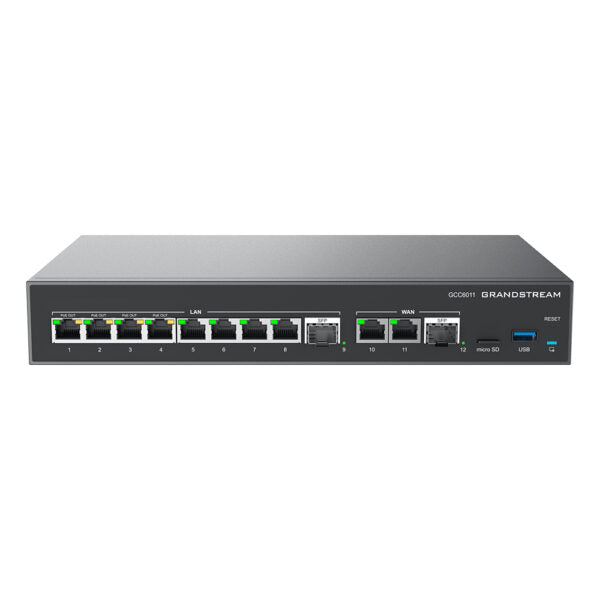
Common issues and fixes
Reviewed troubleshooting steps are not yet available for this model.
Ask AIM Telecom about this productAbout this product
• Introducing the GCC6011, an all-in-one solution that combines unified communications and networking into one powerful platform. This state-of-the-art device offers a comprehensive suite of features, including:
• A built-in IP PBX supporting up to 10 users and 4 concurrent calls
• Enterprise-grade firewall for enhanced security
• VPN Router for secure and reliable connectivity
• Gigabit network switch or Wi-Fi access point for flexible network management
• Managed through the cloud (GDMS), mobile app, local Web UI, SSH, and SNMP for centralized control
• Ideal for small-to-medium sized businesses, the GCC6011 provides a streamlined solution that combines all business data, security, communication, and collaboration needs into one device.
• Key specifications:
• Weight: 3.53 lb
• Dimensions: 14.41 × 8.31 × 2.10 in
• Ports: Gigabit
• Model: GCC6011
• Package content includes GCC6011, universal power supply, rack mount kit, and quick installation guide
• Additional features:
• Multiple WAN ports with load balancing and failover for maximum connection reliability
• Optional external storage up to 1T M.2 SSD
• Metal construction and 12x single LEDs for device tracking and status indication
• A built-in IP PBX supporting up to 10 users and 4 concurrent calls
• Enterprise-grade firewall for enhanced security
• VPN Router for secure and reliable connectivity
• Gigabit network switch or Wi-Fi access point for flexible network management
• Managed through the cloud (GDMS), mobile app, local Web UI, SSH, and SNMP for centralized control
• Ideal for small-to-medium sized businesses, the GCC6011 provides a streamlined solution that combines all business data, security, communication, and collaboration needs into one device.
• Key specifications:
• Weight: 3.53 lb
• Dimensions: 14.41 × 8.31 × 2.10 in
• Ports: Gigabit
• Model: GCC6011
• Package content includes GCC6011, universal power supply, rack mount kit, and quick installation guide
• Additional features:
• Multiple WAN ports with load balancing and failover for maximum connection reliability
• Optional external storage up to 1T M.2 SSD
• Metal construction and 12x single LEDs for device tracking and status indication
More product details
The Grandstream GCC6011 is a convergence appliance built for small offices that want to collapse voice, routing, security, and switching into a single box. It suits a professional services firm, a boutique retailer, or a satellite office of a larger Canadian organization where space and IT simplicity matter more than raw throughput. The built-in IP PBX handles up to 10 users and 4 simultaneous calls, which fits a tight team that does not need a separate server or a cloud-hosted phone system. Because the device also provides an enterprise-grade firewall, VPN router, and a 12-port switch (two of which are 2.5 GbE), it can serve as the sole network core for a small footprint.
The GCC6011 pairs naturally with Grandstream SIP endpoints—desk phones, cordless handsets, or ATAs—and its centralized management through GDMS means a Toronto-based IT provider can monitor and configure the unit remotely. The multiple WAN ports with load balancing and failover are a practical advantage for a business that cannot afford internet downtime, such as a dental clinic relying on VoIP for appointment confirmations or a legal office where every call is billable.
A buyer should recognize the tradeoffs. The 10-user, 4-call PBX ceiling is firm; a growing team that regularly exceeds four concurrent outside calls will quickly outgrow the voice portion even though the networking side may still have headroom. The integrated switch is non-PoE, so IP phones will need separate power injectors or a PoE switch downstream, which adds clutter the all-in-one design tries to avoid. The optional M.2 SSD slot is useful for local recording or logs, but it is not a NAS replacement, and storage is limited to a single drive.
This device is overkill for a two-person home office that only needs a basic router and a couple of phone lines—a simpler ATA or a cloud PBX with a consumer router would cost less and be easier to manage. It is underpowered for a busy 15-person office that expects more than four simultaneous calls or needs PoE on every port. In the right 5-to-10-person sweet spot, however, the GCC6011 eliminates several boxes and their associated cabling, which is genuinely useful in a compact GTA office where every square foot counts.
The GCC6011 pairs naturally with Grandstream SIP endpoints—desk phones, cordless handsets, or ATAs—and its centralized management through GDMS means a Toronto-based IT provider can monitor and configure the unit remotely. The multiple WAN ports with load balancing and failover are a practical advantage for a business that cannot afford internet downtime, such as a dental clinic relying on VoIP for appointment confirmations or a legal office where every call is billable.
A buyer should recognize the tradeoffs. The 10-user, 4-call PBX ceiling is firm; a growing team that regularly exceeds four concurrent outside calls will quickly outgrow the voice portion even though the networking side may still have headroom. The integrated switch is non-PoE, so IP phones will need separate power injectors or a PoE switch downstream, which adds clutter the all-in-one design tries to avoid. The optional M.2 SSD slot is useful for local recording or logs, but it is not a NAS replacement, and storage is limited to a single drive.
This device is overkill for a two-person home office that only needs a basic router and a couple of phone lines—a simpler ATA or a cloud PBX with a consumer router would cost less and be easier to manage. It is underpowered for a busy 15-person office that expects more than four simultaneous calls or needs PoE on every port. In the right 5-to-10-person sweet spot, however, the GCC6011 eliminates several boxes and their associated cabling, which is genuinely useful in a compact GTA office where every square foot counts.