
Grandstream GDS3702 HD Audio IP Intercom System

Frequently Asked Questions

First, confirm that the intercom is receiving a valid IP address and can reach your PBX by checking the network settings in the web interface. Then verify that the SIP account credentials (username, password, and server address) are entered exactly as configured on your PBX. If the issue persists, a Toronto-based VoIP support provider can usually resolve this remotely.
Ensure the electric lock is wired to the correct relay (Relay 1 or Relay 2) and that the relay is configured as Normally Open or Normally Closed to match your lock type. Test the relay by toggling it manually from the web interface; if the lock still doesn't click, check the lock's power supply and wiring connections.
Check that the microphone and speaker grilles are free of dirt, ice, or debris, especially after weather changes. In the web interface, adjust the microphone gain and speaker volume; if the unit is mounted in a windy location, consider adding a wind baffle or repositioning the unit.
Verify that the PoE switch or injector supplies at least 802.3af Class 3 power (around 6.5W minimum). A marginal PoE source can cause intermittent resets. Also check the Ethernet cable for damage and that it is securely seated; try a known-good cable if possible.
Connect the exit button's normally open contacts to one of the optocoupler inputs (Input 1 or Input 2) and the common ground. In the web interface, configure that input as "Exit Button" so pressing it triggers the door relay. For a door sensor, wire it the same way and set the input to "Door Sensor" to monitor open/close status.
Yes, the GDS3702 is SIP-compatible and will register to any standard SIP trunk or PBX. Ensure your carrier allows SIP registration from a device on a static or reserved IP if your network uses NAT; you may need to configure the intercom's SIP port and STUN settings in the web interface.
This often points to a NAT or firewall issue blocking the RTP audio stream. Check that SIP ALG is disabled on your router and that the correct audio ports (typically 5004–5012) are forwarded to the intercom if it's on a different subnet. Also confirm that both devices are using the same codec (e.g., G.711).
The GDS3702 supports auto-provisioning via TFTP, HTTP, or HTTPS. Upload a configuration file to your provisioning server, then point the intercom to that server by entering the URL in the web interface or via a DHCP option (e.g., option 66). This is especially useful if you are deploying multiple units across a Toronto office campus.
Feedback is usually caused by the speaker volume being too high relative to the microphone sensitivity. Lower the speaker volume in the web interface or move the unit away from reflective surfaces. If the hum is constant (not feedback), check that the ground wiring is not shared with high-current devices like an electric lock.
Door Phones

Grandstream GDS3702 HD Audio IP Intercom System
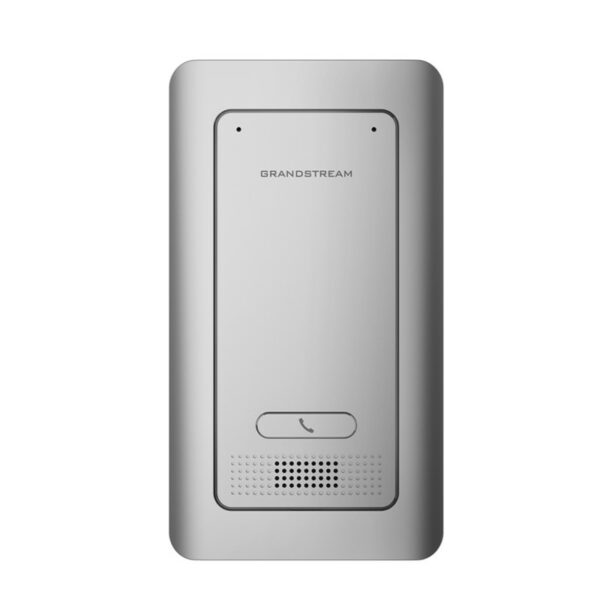
• The GDS3702 is an HD Audio IP Intercom System designed for remote facility access control, featuring a built-in microphone and speaker for intercom functionality. • Supports integration with electric locks, alarm-in, and alarm-out support for existing security systems. • SIP/VoIP technology with 2-way HD audio, IP66 level weatherproof casing, and vandal resistance. • Features include: • Up to 1.5m of audio input and 3m of audio output • Supports SIP calls to IP phones for communication • Built with a metal casing for weatherproofing and vandalism resistance • 2 relays for electric locks and 2 alarm-in for exit button and door sensor • Integrated PoE for powering the device and providing a network connection • Built-in microphone and speaker for voice options and intercom functionality • Additional information: • Weight: 1.48 lbs • Dimensions: 8.54 × 4.72 × 0.46 in • Brand: Grandstream • Paging Unit Type: Indoor, Intercom, Outdoor, Speakers • Technical Specifications: • Network: 10M/100M Auto-sensing • PoE: PoE IEEE 802.3af Class3 • Supply Voltage: 12VDC /1A (AC power adapter not included) • SIP/VoIP Support: Yes, broad interoperability • Voice Codecs: G.711μ/a, G.722, DTMF(RFC2833, SIP INFO), AEC, ANC • Audio Input: Built-in microphones up to 1.5m • Audio Output: HD loudspeaker 2W, up to 3m • Input: 2 Optocoupler Input, Vin<15V, for door sensor or other low voltage device • Output: • 2 Relay, 125VAC/0.5A or 30VDC/2A, Normal Open or Normal Close, for electric lock, light switch or other relative high voltage device • Waterproof Certificate: IP66 (EN60529)

About This Product

The Grandstream GDS3702 is an IP intercom designed for managing access at a single door or gate, making it a practical fit for small offices, warehouse side entrances, or multi-tenant buildings in the GTA where a receptionist needs to screen and release visitors remotely. Its weatherproof metal housing and built-in PoE mean it can be mounted outdoors without running a separate power cable, and the two relay outputs let you control an electric lock and a secondary device like a magnetic door release or a light. The device works well as a direct companion to any standard SIP phone or PBX, so a desk phone or softphone can receive the intercom call and trigger the door release—no proprietary controller needed.

Keep in mind that the GDS3702 is a single-call-point unit; it does not replace a multi-unit video doorbell system or a full access control panel with card readers and scheduling. The built-in speaker is rated for up to three metres, which is fine for a typical doorway but may not cover a noisy loading bay. If you need to manage multiple entrances from one panel or require PoE+ for longer cable runs, this model may be underpowered. Conversely, for a straightforward front-door release scenario, it avoids the expense and complexity of a full access-control server.
Services We Provide
  • Professional Installation & Configuration
  • Ongoing Maintenance & Support
  • Troubleshooting & Repairs
  • System Upgrades & Updates



