Grandstream GDS3710 HD IP Video Door System

Frequently Asked Questions

First, verify that the device has a valid IP address and can reach your SIP server. Check that the SIP server address, port, and credentials are correctly entered in the web interface under Account settings. If the device is behind a firewall, ensure that the necessary SIP ports (typically 5060 for UDP/TCP) are forwarded or that the device is on the same VLAN as the PBX.
Start by confirming that the device is receiving sufficient PoE power. A power-starved unit may not be able to drive the camera. Also, check the video stream settings in the web interface to ensure the codec and resolution are compatible with your SIP endpoint (e.g., a smartphone or desk phone). If the issue persists, try accessing the camera stream directly via the web interface to see if it works independently of the call.
The GDS3710 has alarm-in and alarm-out terminals on the back. You can wire these to your alarm panel's dry-contact inputs or outputs. Configure the alarm settings in the web interface under the Alarm tab, specifying whether the input is normally open or normally closed. For the alarm-out, you can set it to trigger on events like a door unlock request.
First, verify that the door strike is properly wired to the relay output on the GDS3710 and that the relay is configured correctly in the device settings. Ensure that the SIP endpoint (phone) is sending the correct DTMF code for unlocking. By default, the GDS3710 expects the DTMF digit '5' to trigger the door open, but this can be changed in the configuration.
Check the audio settings in the web interface, particularly the speaker and microphone gain levels. If the volume is too high, acoustic echo can occur. Also, confirm that the device is not placed too close to a reflective surface like glass or metal, which can cause feedback. If using a softphone, ensure your phone's speaker is not pointed toward the GDS3710's microphone.
You need to use the GDS Manager software to add RFID cards. Connect the GDS3710 to the same network as the manager, then in the software, go to the Access Control section and add card IDs by swiping or manually entering the card numbers. The device supports multiple card formats, so ensure your cards are compatible (typically 125 kHz or 13.56 MHz, depending on the model variant).
Start by checking the Ethernet cable and PoE switch port. A faulty cable or a marginal PoE supply can cause intermittent drops. Also, confirm that the device's IP address is set to static if your network does not have a stable DHCP lease. If you are using a managed switch, look at port statistics for errors or CRC failures.
The GDS3710 uses standard SIP and RTSP streams, so it can work with any SIP client that supports video calls. However, for the full feature set (like RFID management or remote unlock from the app), you should use Grandstream's GDS Manager or a compatible SIP softphone that supports DTMF commands. Some third-party apps may not support all features.
The bright LEDs are controlled by the device's ambient light sensor. Check that the sensor is not obstructed by dirt or a sticker. You can also adjust the illumination settings in the web interface under the Camera settings to ensure the LEDs are enabled for low-light conditions. If the sensor is clean and settings are correct, the LEDs should activate automatically when it is dark.
To perform a factory reset, locate the reset pinhole on the back of the device. Press and hold the button for at least 10 seconds while the device is powered on. This will restore all settings to factory defaults, including the IP address (which will revert to DHCP). Note that this will erase all configuration, so only do this if you are certain you cannot recover the password through other means.
IP Door Phones

Grandstream GDS3710 HD IP Video Door System
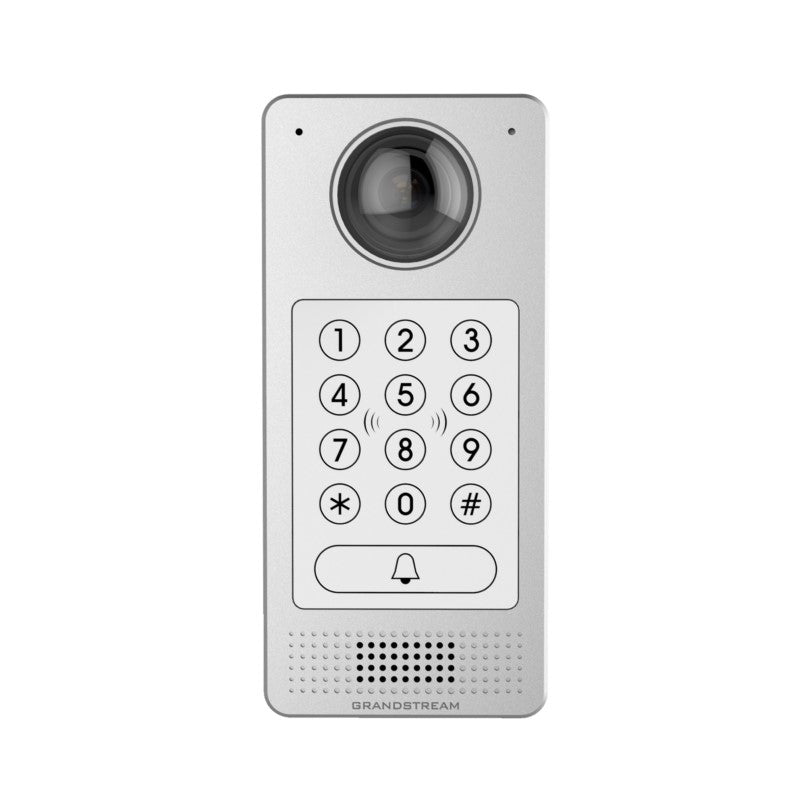
*The GDS3710 is an IP Video Door System that serves as a high-definition IP surveillance camera and IP intercom, offering facility access control and security monitoring for buildings of all sizes. Key features include: • 180-degree video viewing angle for wall-to-wall coverage • Built-in RFID chip reader for secure keyless entry • Built-in microphone and speaker to support intercom functionality • Alarm-in and alarm-out support for integration with existing security devices • Integration with Grandstream's free management utility software, GDS Manager • 1080p FHD video resolutions and exceptional performance with HTTP API for 3rd party redevelopment • SIP/VoIP technology with 2-way audio and video streaming feeds loaded directly to smart phones, SIP endpoints, and the GDS management software • Integrated PoE for seamless installation and bright LEDs for illumination Additional specifications include: • Weight: 2.6 lbs • Dimensions: 10 × 8 × 4 in • Brand: Grandstream

About This Product

The Grandstream GDS3710 is an IP video door system designed for multi-tenant buildings, office complexes, and secure facilities where you need to combine access control with high-definition video monitoring. It replaces the need for separate intercom, camera, and RFID reader hardware, making it a practical choice for property managers or business owners who want to consolidate their entry-point security into a single, network-managed device. The unit's PoE (Power over Ethernet) simplifies installation, as you only need a single Ethernet cable for both power and data, and its 180-degree field of view provides wide coverage of the doorway area.

This device is best suited for environments where you already have a SIP-based phone system or are planning to integrate with Grandstream's GDS Manager software. It works well with most SIP-compatible PBX platforms and can stream video to smartphones or desk phones, which is useful for remote door answering. The built-in RFID reader adds a layer of keyless entry that can be managed centrally, though you should note that the RFID credentials need to be programmed through the management software, and the system's alarm inputs and outputs allow it to tie into existing security panels or triggers.

A practical tradeoff to consider is that the GDS3710 is a flush-mount unit designed for outdoor use, but it requires a standard electrical box and a suitable mounting surface. It is not a surface-mount solution, so retrofitting into an existing door frame may require additional work. For a small business with a single entrance, this device may be overkill if you only need a basic intercom and do not require video or RFID; a simpler audio-only door phone would be more cost-effective. Conversely, in a larger deployment such as a Toronto office tower with multiple floors and remote management needs, the GDS3710 is well-suited, especially when paired with Grandstream's GDS Manager for centralized control.

For Canadian businesses, the GDS3710 operates on standard SIP and does not rely on proprietary carrier protocols, so it should work with any Canadian SIP trunk provider. However, be aware that the device's PoE consumption is within standard 802.3af limits, but if you are running multiple units from a single switch, ensure your PoE budget is adequate. Overall, it is a solid, all-in-one entry solution for those who want video, intercom, and access control without managing separate components.
Services We Provide
  • Professional Installation & Configuration
  • Ongoing Maintenance & Support
  • Troubleshooting & Repairs
  • System Upgrades & Updates