Grandstream GDS3712 IP Video Intercom System

Frequently Asked Questions

You need to configure the SIP account settings on the GDS3712 via its web interface. Ensure your SIP server or PBX is reachable on the same network. If you're using a hosted VoIP service, enter the credentials provided by your carrier. A Toronto-based VoIP support provider can help with complex setups.
Yes, the GDS3712 supports SIP video streaming to smartphones using compatible apps like Grandstream's GDS Manager or any SIP client that accepts video calls. You'll need to configure the SIP extension on your phone and ensure both are on the same network or via a PBX.
First, check that the SIP account on the GDS3712 is registered and the phone number/IP is correctly set as the destination. Verify network connectivity and that the phone can receive calls from other extensions. If the issue persists, review the firewall settings on your router.
Confirm that the video codec settings are compatible between the GDS3712 and your video phone. Ensure both devices are on the same network subnet to avoid routing issues. You can also test by accessing the camera's RTSP stream directly using a tool like VLC.
Log into the GDS3712 web interface and navigate to the event/motion detection settings. Adjust the sensitivity slider and define a detection zone. Motion detection can trigger HTTP notifications or email alerts; check that these are configured if you rely on them.
First, verify the wiring: ensure the electric lock is properly connected to the relay terminals and that the power source is adequate. In the device settings, confirm the relay is configured to activate via DTMF or a scheduled event. Test the relay manually via the web interface.
No, the GDS3712 requires PoE for both power and network. If your switch does not support PoE, you will need a PoE injector or a PoE midspan. Alternatively, you could use a power supply if the device has a DC input, but the spec only mentions integrated PoE.
Check the network connection: poor bandwidth or high latency can cause audio issues. Ensure the GDS3712's echo cancellation and noise reduction settings are enabled in the web interface. Also verify that the built-in microphone and speaker are not obstructed.
Confirm that the Ethernet cable is connected to a PoE-enabled switch or injector that delivers sufficient power (IEEE 802.3af/at). Try a different cable or port. If still no power, the device may need service; contact technical support before attempting any hardware fixes.
Configure the GDS3712 as a SIP endpoint in FreePBX by adding an extension. On the GDS3712, enter the PBX server IP and extension credentials. Ensure SIP registration is successful. For video intercom, set the codec priorities to H.264 for compatibility.
IP Door Phones

Grandstream GDS3712 IP Video Intercom System
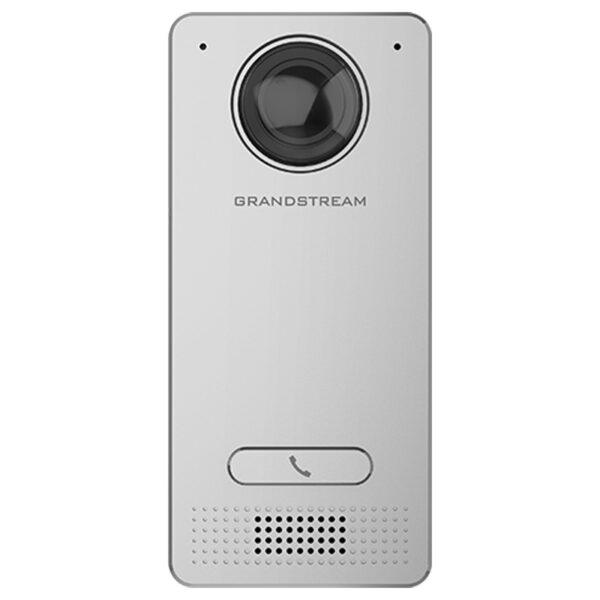
The GDS3712 is a hemispheric IP Video Intercom System that offers facility access control and security monitoring for buildings of all sizes. Powered by an advanced Image Sensor Processor (ISP) and state-of-the-art image algorithms, it delivers exceptional performance without blind spots. • Industry-leading SIP/VoIP for 2-way audio and video streaming to smart phones and SIP phones • Integrated PoE for seamless installation • Motion detection for security protection • Lighting control switch • Built-in microphone and speaker offers voice options and intercom functionality Key Features: • Powerful video resolutions up to 1080p • 2 relay for Electric Lock and Alarm out • 2 alarm in for Exit button • Door sensor • SIP video streaming to video intercom stations • IP phones, or smart phones simultaneously supported • Built with a metal casing to make it weatherproof and vandal resistant • Built-in hemispheric camera allows for 180-degree wall-to-wall coverage • Supports motion detection • Integrated PoE to power the device and provide a network connection Additional Information: Weight: 1.38 lbs Dimensions: 8.54 × 4.72 × 1 in Paging Unit Type: Door Strike Relay, Indoor, Intercom, Outdoor, Speakers Technical Specifications: Video Compression: H.264 High Profile, Main Profile, Baseline Profile, Motion JPEG Image Sensor Resolution: 1/2.7”, 2 Megapixel, 1920H x 1080V Lens Type: 1/2”, F2.5, FOV:180°(W) x 150°(H) Max Video Resolution: 1920×1080 Max Frame Rate: 30 frames per second Wide Dynamic Range: Yes, up to 120dB

About This Product

The Grandstream GDS3712 is designed for property managers, business owners, and building operators who need a secure, all-in-one video intercom and access control solution. It fits naturally in commercial settings such as office buildings, apartment complexes, gated communities, and multi-tenant facilities where controlled entry and security monitoring are priorities. Its hemispheric camera eliminates blind spots, making it ideal for wall-mounted installations at entrances or corridors where full wall-to-wall coverage is desired.

This unit pairs seamlessly with existing SIP phone systems, video intercom stations, and smartphones via the Grandstream GDS Manager app. It can replace older analog intercoms or supplement a VoIP phone system with a direct door-entry endpoint. The integrated PoE simplifies installation by carrying both power and data over a single cable, though this means a PoE switch or injector is required. For Canadian deployments, the weatherproof metal casing is well-suited to harsh winters and frequent temperature swings, and the unit’s PoE flexibility avoids the need for additional electrical wiring at the door.

In terms of tradeoffs, the GDS3712 is a single-unit entry system—it does not support multiple door stations without additional hardware or a separate controller. It may be overkill for a single-family home that already has a simple doorbell, but for any building that needs remote unlock, two-way talk, and video monitoring from a single device, it provides excellent value. Buyers should ensure their network switch can supply PoE (802.3af) and that their SIP server or VoIP provider supports video streaming; otherwise, some features may be limited.
Services We Provide
  • Professional Installation & Configuration
  • Ongoing Maintenance & Support
  • Troubleshooting & Repairs
  • System Upgrades & Updates