
Grandstream GSC3506 V2 Multicast Paging Speaker

Frequently Asked Questions

First, verify that your Ethernet switch or PoE injector supports at least PoE (802.3af). Try connecting the speaker to a known working PoE port or use a different Ethernet cable. If the speaker still doesn't power on, check the cable for damage and ensure the port is enabled. If the issue persists, a Toronto-based VoIP support provider can usually resolve this remotely.
Confirm that the page is reaching the speaker by checking its SIP registration status in your PBX. Also ensure the speaker's volume is turned up using the physical buttons. If the page is a multicast page, verify that your network allows multicast traffic between the paging source and the speaker. Restarting both the speaker and your network switch can clear temporary issues.
Configure multicast paging by assigning the same multicast IP address and port in the settings of each speaker. Your PBX or paging source must also be set to send RTP audio to that same multicast address. If your network has VLANs, ensure multicast traffic is allowed across the necessary VLANs.
Start by checking the SIP server settings on the speaker: the server address, port, and credentials must exactly match your PBX configuration. Make sure the speaker has a stable IP address (a DHCP reservation is recommended). Network congestion or a firewall blocking SIP traffic on your port can also cause intermittent drops.
The GSC3506 V2 is a SIP-based multicast speaker and does not have analog inputs for microphone or line-level audio. To integrate with an analog system, you would need a SIP-to-analog gateway. The line-out port can feed audio to an external amplifier if you need to drive additional speakers.
First, lower the speaker's volume a few steps to see if distortion resolves. Check the audio codec setting—using Opus or G.722 provides better quality but may require sufficient bandwidth. Also verify that the network is not experiencing high jitter or packet loss; a quick traceroute can help identify network congestion.
Grandstream supports mass provisioning via TR-069 or encrypted XML configuration files. You can host the configuration file on a TFTP, HTTP, or HTTPS server and point the speaker to it using DHCP option 66 or by manually setting the firmware server URL. Grandstream's GDMS cloud platform also simplifies this for larger deployments.
A hum is often caused by a ground loop or electrical interference. Try using a shielded Ethernet cable and ensure the PoE switch is properly grounded. If the issue persists, test the speaker on a different electrical circuit or with a different PoE injector to isolate the source.
To reset the speaker safely, press and hold the reset button on the device for about 7 seconds until you hear a confirmation tone. This will clear all settings, including the admin password. Do not attempt this unless you are certain you cannot recover the password through other means and have a backup of your configuration.
Check that the speaker's multicast listening address and port are correctly configured and that they match the source's multicast group. Ensure your network switch is not blocking multicast traffic or IGMP snooping is enabled appropriately. Also verify that the speaker's firmware is up to date, as older versions may have multicast issues.
IP Paging

Grandstream GSC3506 V2 Multicast Paging Speaker
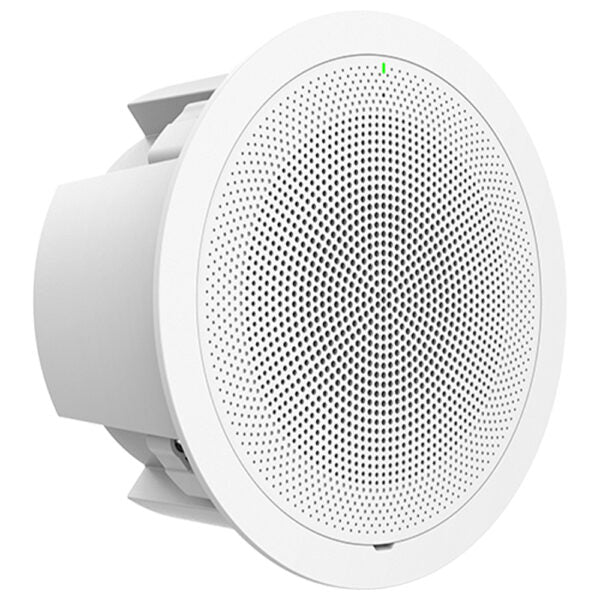
• The GSC3506 V2 is a high-performance multicast paging speaker providing crystal-clear HD audio and advanced security features for offices, schools, hospitals, apartments, and more. • Key Features: • 30W high-fidelity speaker with HD acoustic chamber • Supports SIP paging, multicast paging, call waiting with priority override, and more • Full-band and wide-band audio codecs supported, including Opus and G.722 • 1x 3-pin differential line out port • Ports include 2-pin switch-in input, alarm-in input, DC24V, network, and USB ports • One 10/100Mbps network port with PoE/PoE+/PoE++ • Additional Information: • Weight: 6.17 lb • Dimensions: 12.84 × 12.42 × 5.60 in • Paging Unit Type: Intercoms, Speakers • Technical Specifications: • Model: GSC3506 v2 • Package Contents: GSC3506 V2, mounting hole cut-out template, ceiling mount kit (optional), quick installation guide • Protocols/Standards: SIP RFC3261, TCP/IP/UDP, RTP/RTCP, RTCP-XR, HTTP/HTTPS, ARP, ICMP, DNS, DHCP, PPPoE, SSH, TFTP, NTP, STUN, LLDP-MED, SIMPLE, LDAP, TR-069, 802.1x, TLS, SRTP, IPv6, OpenVPN • Network Interfaces: One 10/100 Mbps port with integrated PoE/PoE+/PoE++ • Auxiliary Ports: 2-pin switch-in input port, alarm-in input port, differential line out port, network port, DC24V port, volume up and down key (+/-), reset • USB Port: USB 2.0, supports external USB storage devices • Telephony Features: SIP paging, Multicast paging, Group paging, Push-to-talk (PTT), Call-waiting with priority override • HD Audio: HD speaker with support for full-band audio • Speaker: 30W high-fidelity HD speaker (coaxial) • Memory: 256MB RAM • Security: User and administrator level passwords, MD5 and MD5-sess based authentication, 256-bit AES encrypted configuration file, TLS, SRTP, HTTPS, 802.1x media access control, secure boot • Upgrade/Provisioning: Firmware upgrade via TFTP / HTTP / HTTPS or local HTTP upload, mass provisioning using GDMS/TR069 or AES encrypted XML configuration file • Temperature and Humidity: Operation: 0°C to 45°C Storage: -10°C to 60°C, Humidity: 10% to 90% non-condensing • Physical: Unit Dimensions: 257.5mm (diameter) x 118mm (depth), Unit Weight: 2.14kg, Box Weight: 2.76kg

About This Product

The Grandstream GSC3506 V2 is a ceiling-mounted multicast paging speaker designed for environments where clear overhead announcements are essential. It fits naturally into office buildings, schools, hospitals, retail spaces, and apartment complexes that already use SIP-based phone systems. The unit delivers 30 watts of audio through a high-fidelity coaxial speaker, which is enough to cover typical indoor areas like open-plan offices, hallways, or waiting rooms. For a standard GTA office deployment with drop ceilings, this speaker can replace or supplement traditional analog paging systems without requiring new cabling, thanks to Power over Ethernet (PoE) support.

This device pairs well with any SIP-compatible PBX or IP phone system and is especially easy to set up alongside Grandstream’s own UCM series PBXs or GDMS cloud management. It supports both unicast SIP paging and multicast paging, meaning you can send announcements to one speaker or a group of speakers simultaneously. A practical tradeoff to consider is power: while the GSC3506 V2 can operate on standard PoE (802.3af), the full 30W output may only be achievable with PoE+ or PoE++ injectors or switches. If you plan to use it in a large warehouse or noisy factory floor, the 30W speaker may feel underpowered for that kind of space; for those environments, multiple units or higher-wattage options would be more appropriate.

The GSC3506 V2 also offers auxiliary connections, including an alarm input and a line-out port, making it usable for integration with doorbells, alarm panels, or external amplifiers. It is not designed for outdoor use, and the operating temperature range (0°C to 45°C) makes it suitable for indoor, climate-controlled environments only. For a Canadian business deploying in a standard office building, this speaker is a solid choice that simplifies cabling and maintenance while providing clear, reliable paging.
Services We Provide
  • Professional Installation & Configuration
  • Ongoing Maintenance & Support
  • Troubleshooting & Repairs
  • System Upgrades & Updates



