
Grandstream GSC3516 two-way Intercom Speaker

Frequently Asked Questions

First, check that the device has a valid IP address and can reach the SIP server. On the web interface under Account settings, verify the server address, port, and credentials are entered exactly as provided by your provider. Ensure your firewall or router isn't blocking SIP traffic (UDP 5060 or TCP 5060). If the issue persists, a Toronto-based VoIP support provider can usually resolve this remotely.
Verify that the speaker volume is turned up in both the web interface (under Settings > Audio) and the physical volume buttons on the unit. Also confirm that the codecs selected are supported by the far end; Opus and G.722 are preferred. If others hear you but you don't hear them, try a different SIP client to isolate if the problem is with your phone system.
First, check the Wi-Fi signal strength in the device's web status page. If it's below -70 dBm, try moving the unit closer to your access point or installing a wireless range extender. Make sure you're using the 5 GHz band if available, as it sees less interference than 2.4 GHz. If drops continue, switch to the wired Ethernet port with PoE+ for a stable connection.
The 2-pin multi-purpose input is designed for momentary contact closures. In the web interface, go to Settings > Peripheral > GPIO and assign the desired function, such as triggering a SIP call to a specific extension. For a standard call button, connect the two wires to the screw terminals (no polarity) and test the action after saving the configuration.
Echo is often caused by the speaker and microphones being too close to reflective surfaces. Mount the GSC3516 away from walls or corners, and ensure the unit's acoustic echo cancellation is enabled in the web interface under Settings > Audio > Acoustic Echo Cancellation. If you have multiple units in the same room, reduce the speaker volume slightly to prevent feedback between them.
No, the GSC3516 is a purely IP-based SIP device and does not have an FXO port for analog lines. It requires a VoIP PBX or SIP trunk to operate. If you need to connect to an analog line, you would need an ATA (analog telephone adapter) that bridges the analog line to a SIP extension, then register the GSC3516 to that extension.
The device likely had its settings saved only in volatile memory or a corrupt configuration file. To recover, reconfigure via the web interface or your provisioning server. To prevent this in the future, enable automatic provisioning (via TFTP/HTTP/HTTPS) so the device re-downloads its config after each reboot. Also ensure the unit's firmware is up to date through the Grandstream support page.
Multicast paging requires IGMP snooping enabled on your managed switches. First, confirm that all paging devices are on the same VLAN and that the multicast address (e.g., 239.x.x.x) is not blocked by network firewalls. On the GSC3516, go to Settings > Multicast and ensure the correct multicast listening address is configured for your paging group.
Before performing a factory reset, note that it will erase all settings including IP configuration. If possible, access the web interface and manually record your network settings. To reset, press and hold the reset button on the back for 10 seconds until the LED flashes red. After reset, the device will try DHCP. If you need to keep a static IP, reconfigure via the web interface after the reset. Only perform this step if you are certain a reset is needed and you have backup access.
Buzzing can be caused by electromagnetic interference from nearby power cables or fluorescent lighting. Move the unit at least 1 meter away from such sources. Also inspect the Ethernet cable for damage; a faulty cable can introduce noise into the audio path. If using PoE+, ensure the switch provides clean power—swap to a different PoE port to test.
Door Phones

Grandstream GSC3516 two-way Intercom Speaker
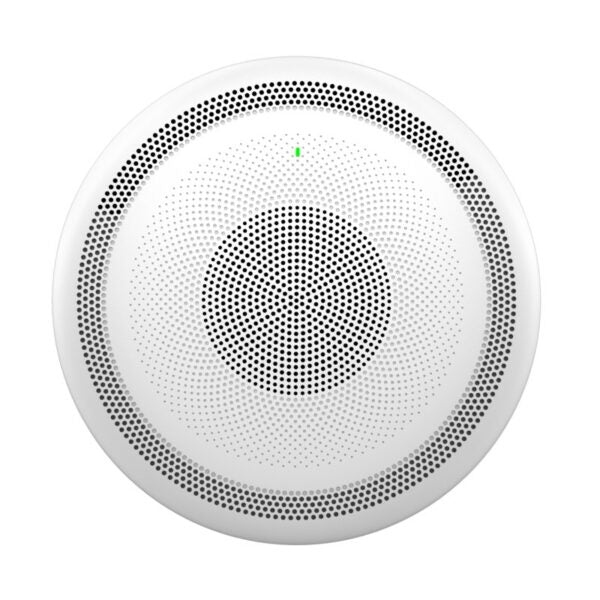
• The GSC3516 is a robust SIP/Multicast Talk-Back Speaker that enables offices, schools, hospitals, and more to create powerful voice intercom solutions enhancing security and communication. • Features: • Full-duplex speakerphone with HD acoustic chamber and advanced acoustic echo cancellation • 3 directional microphones with MMAD & microphone beamforming array and 1 omnidirectional auxiliary microphone • Full-band and wide-band audio codec support, including Opus & G.722 • Integrated dual-band 802.11 a/b/g/n/ac Wi-Fi and Bluetooth • One 10/100Mbps network port with PoE/PoE+ • 2-pin multi-purpose input to support peripherals like call buttons • Additional Information: • Weight: 3.77 lbs • Dimensions: 12.4 × 12.03 × 4 in • Brand: Grandstream • Paging Unit Type: Intercom, Speakers • Technical Specifications: • GENERAL INFO: • Model: GSC3516 • Box Content: Includes the SIP/Multicast Talk-Back Speaker, mounting kits, and quick installation guide • NETWORK INTERFACES: • One 10/100 Mbps port with integrated PoE/PoE+ • Operating System: Linux • Bluetooth: Yes, integrated. Bluetooth 2.1+Enhanced Data Rate (EDR)+ BT4.2 • Wi-Fi: Yes, dual-band 2.4 & 5GHz with 802.11 a/b/g/n/ac • Protocols/Standards: SIP RFC3261, TCP/IP/UDP, RTP/RTCP, RTCP-XR,HTTP/HTTPS, ARP, ICMP, DNS (A record, SRV, NAPTR), DHCP, PPPoE, SSH, TFTP, NTP, STUN, LLDP-MED, SIMPLE, LDAP, TR-069, 802.1x, TLS, SRTP, IPv6, OpenVPN • TELEPHONY FEATURES: • SIP Paging • Multicast Paging • Group Paging • PTT • Call-waiting with priority override • Bluetooth SCO call • HD Audio: Yes, HD speakerphone with support for full band audio with 48KHz voice sampling frequency

About This Product

The Grandstream GSC3516 is built for environments where clear, two-way voice communication over IP is critical. It fits naturally in medium-to-large office floors, school hallways, hospital wings, or warehouse zones where announcements and quick intercom responses matter more than a simple one-way paging speaker. With three directional microphones and beamforming technology, it picks up speech from across a room, making it a practical choice for open-plan areas or corridors where hands-free talk-back is needed.

This speaker pairs well with existing SIP-based phone systems or PBX platforms and can replace analog intercoms in a VoIP migration. It also supports multicast paging, so it works as part of a group announcement network alongside other Grandstream paging devices. However, its single 10/100 PoE port means it should be placed where network drops already exist or where Wi-Fi is reliable—though the integrated dual-band Wi-Fi offers a backup if cabling is tricky. The 2-pin auxiliary input lets you attach a call button or similar peripheral, which can be useful for reception desks or secure entrances.

A buyer should know the tradeoff: this is a large, ceiling- or wall-mountable unit (over 12 inches wide) with an integrated speaker and microphones—not a compact desktop pager. It draws power via PoE+ (not standard PoE), so your switch must supply sufficient power. In a small retail shop or home office, the GSC3516 may be overkill; a simpler SIP speaker with fewer microphones would likely suffice. For a GTA office deployment with multiple zones and a need for clear full-duplex conversations over Wi-Fi or wired networks, this unit provides strong audio without requiring a separate amplifier.

Canadian businesses should verify that their network infrastructure supports PoE+ and that their PBX or SIP trunking provider works with Grandstream’s protocol set. Many Toronto-based managed service providers are familiar with Grandstream hardware and can assist with provisioning over TR-069 or HTTPS-based config files. The unit’s wide-band Opus codec support helps maintain voice quality over bandwidth-constrained links common in mixed office environments.
Services We Provide
  • Professional Installation & Configuration
  • Ongoing Maintenance & Support
  • Troubleshooting & Repairs
  • System Upgrades & Updates



