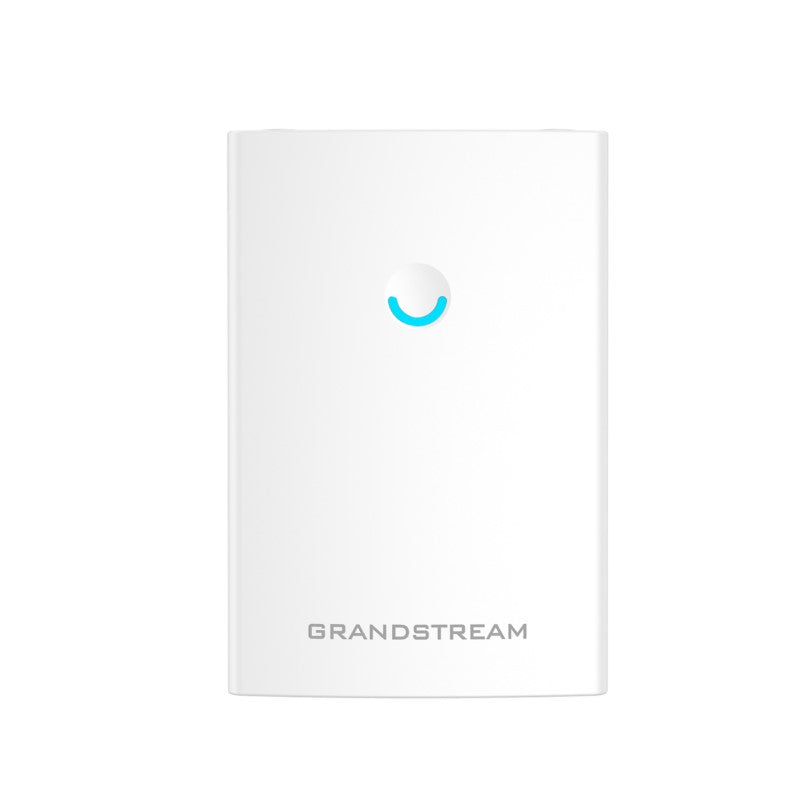
Grandstream GWN7664LR Wi-Fi 6 Long-Range Outdoor Access Point

Frequently Asked Questions

Confirm the AP has a live internet or LAN path to the management platform by checking the switch port status and ensuring the uplink cable is seated. Next, verify the AP is set to the correct management mode (cloud or on-premise) and that the discovery method—such as DHCP option 43 or the Grandstream provisioning server address—is in place. A simple power cycle often clears a stuck adoption state, but if the issue persists, a Toronto-based VoIP support provider can usually resolve this remotely.
Strong signal and clean audio are not the same thing. Start by checking whether the SSID has WMM and the Grandstream QoS profile enabled; without these the AP treats voice packets the same as bulk data. Then look at the channel utilization on both bands—a crowded 2.4 GHz channel will still cause jitter even at close range. If the handset supports band steering, forcing it to 5 GHz can often clean up the call quality immediately.
The GWN7664LR is rated for outdoor heat, but its local environment still matters. Check that the unit is not in direct, unshaded sunlight on a south-facing wall where the metal housing can become much hotter than the ambient air. Also verify that the PoE switch or injector is not overheating and dropping power momentarily. If the mounting location cannot be shaded, a thermal shield or a move to a shaded pole is a practical next step before suspecting the hardware itself.
Antenna gain and pattern are not just higher-is-better; a mismatched antenna can create an uneven radiation pattern or exceed regulatory power limits, causing the radio to back off its output. Confirm the replacement antenna is rated for the same dual-band frequency range and has the correct connector type. Reverting to the original antenna is a safe, reversible test that tells you whether the third-party model is the cause.
The GWN7664LR supports PoE and PoE+, but for full 4×4 performance and to avoid brownouts on long cable runs, PoE+ (802.3at) is strongly recommended. If you are using a standard 802.3af PoE port and the AP is on a short, high-quality cable, it will likely come up and serve clients, though some features may be throttled. Check the switch port’s actual power budget and the cable length before deciding whether an injector upgrade is needed.
On the GWN Cloud or GWN Manager dashboard, look at the client details for the connected device; it will show the PHY rate and the Wi-Fi generation negotiated. If the client shows an 802.11ac or older connection, the device itself may not support Wi-Fi 6, or it may be on a band where Wi-Fi 6 features are not enabled. Check that OFDMA and the 5 GHz radio are active in the SSID settings.
Do not immediately factory reset or re-flash; first, power-cycle the AP once and wait a full five minutes for it to complete any internal recovery routine. If it still does not appear in the management platform, connect a laptop directly to the second Ethernet port and check whether the AP is serving a recovery web page or DHCP address. At that point, contact Grandstream support or your VoIP partner to confirm the correct recovery image and procedure before you overwrite anything.
Outdoor-rated APs often use antennas and housing optimized for open-air propagation; exterior walls, low-E glass, and metal studs will attenuate the signal considerably. Try repositioning the AP so the antennas have a clearer line of sight to the indoor space, or consider adding an indoor mesh node to bridge the coverage gap. The 300-meter range specification assumes an unobstructed outdoor path, not penetration through building materials.
The GWN7664LR supports mesh networking within the Grandstream ecosystem, but mixing it with other brands will not give you a unified mesh; client roaming will rely on standard 802.11 handoff behavior, which may be slower. For a seamless experience, keep the mesh members within the Grandstream GWN family. If you must mix vendors, design the SSID and channel layout so that clients see a consistent security profile across all APs.
Access Points

Grandstream GWN7664LR Wi-Fi 6 Long-Range Outdoor Access Point
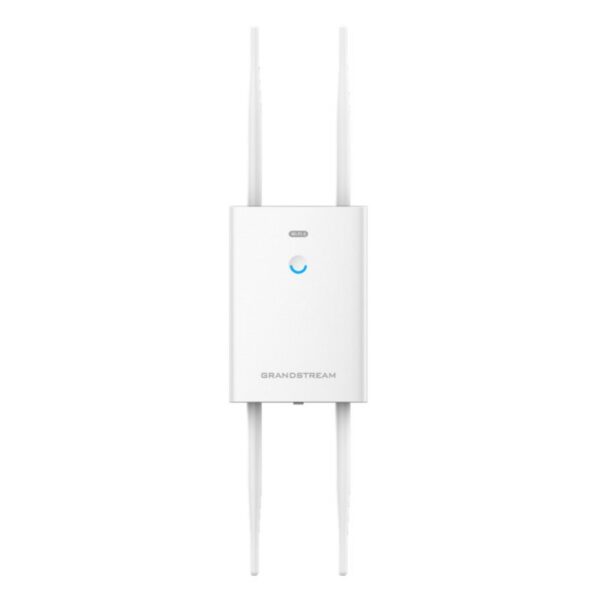
• The GWN7664LR is an outdoor Wi-Fi 6 access point designed for medium-to-large businesses and enterprises that require long-range coverage in both indoor and outdoor spaces. • It features a weatherproof casing, heat-resistant technology, and dual-band 4×4:4 MU-MIMO with DL/UL OFDMA technology. • Key features include: • Up to 512 concurrent Wi-Fi client devices • Up to 300-meter coverage range • Advanced QoS for real-time performance of low-latency applications • Anti-hacking secure boot and critical data/control lockdown via digital signatures • Flexibility of 4 detachable/ changeable antennas for different application scenarios • The access point is supported by GWN.Cloud and GWN Manager, Grandstream's free cloud and on-premise Wi-Fi management platform. • It offers a seamless connection with Grandstream's Wi-Fi capable voice and video IP phones and supports advanced QoS, low-latency real-time applications, mesh networks, captive portals and dual Gigabit networks ports with PoE/PoE+. • The product has the following specifications: • Weight: 2.2 lbs • Dimensions: 10.24 × 8.60 × 4.25 in • Wi-Fi Standard: Wi-Fi 6 (802.11ax) • Network Band: Dual Band • Frequency Band: 2.4 Ghz, 5 Ghz • Mounting Type: Outdoor (Pole), Wall Plate

About This Product

The GWN7664LR is built for organizations that need to push reliable Wi-Fi across a parking lot, a loading dock, or between buildings on a campus. Its weatherproof design and heat-resistant internals make it a realistic option for year-round Canadian outdoor use, from summer humidity to deep-freeze winter nights. The 300-meter coverage figure is for open-air scenarios; in practice, walls, foliage, and metal structures will reduce that range, so site planning still matters.

This access point makes the most sense when paired with other Grandstream infrastructure, especially their Wi-Fi-capable IP phones and the GWN Cloud or on-premise GWN Manager platforms. Together they let you apply QoS rules that keep voice traffic clean even when the same radios are serving a few hundred client devices. The four detachable antennas give you flexibility to swap in higher-gain or directional options if the stock pattern does not fit your layout.

For a small office or a retail shop with only a handful of users, the GWN7664LR is overkill; a simpler indoor AP would cost less and be easier to manage. Conversely, if you need to cover a multi-acre industrial yard or a stadium concourse, a single unit will not be enough—you will be designing a mesh or a multi-AP deployment regardless. The dual Gigabit ports with PoE/PoE+ are practical for installations where you want to backhaul over copper, but you will need a PoE+ switch or injector that can deliver enough power, especially if the cable run is long.

In a GTA business setting, this AP fits well into mid-sized deployments where IT staff are comfortable with cloud-managed networking and where voice-over-Wi-Fi is a real part of the daily workflow. Canadian carriers do not impose any unusual constraints on this device, but if you are using it to extend a carrier-provided managed Wi-Fi service, confirm compatibility with their management layer before buying.
Services We Provide
  • Professional Installation & Configuration
  • Ongoing Maintenance & Support
  • Troubleshooting & Repairs
  • System Upgrades & Updates