
Grandstream GWN7700 Layer 2 Unmanaged Switch, 5 x GigE, Plastic Case

Frequently Asked Questions

First, check that the power adapter is firmly connected to both the switch and a working outlet. If the outlet is controlled by a wall switch, confirm it’s on. Try plugging a known-working device into the same outlet to ensure it provides power. If nothing lights up after that, the adapter or switch may need replacement.
Start by testing with a different Ethernet cable you know works. Move the device to another port on the switch to see if the problem follows the port or the cable. Also make sure the connected device is powered on and that its network adapter is enabled.
This often points to a network loop—an extra cable accidentally connecting two switch ports or linking back to the same network. Unplug one cable at a time to identify if a loop is present, then remove the redundant connection. In a busy Toronto workspace, a stray cable plugged into two wall jacks is an easy mistake to make.
Verify you’re using Cat5e or better cables; a damaged or low-quality cable can force speeds down. Also check that no single device on the switch is saturating the uplink with heavy downloads or streaming. If speeds remain slow, reboot the switch and your router.
Test with a known-good Cat5e or Cat6 cable that isn’t kinked or stretched. Gigabit requires all four wire pairs; a broken pair causes an automatic fallback to 100 Mbps. In the device’s network settings, ensure speed & duplex is set to auto-negotiate.
No, the GWN7700 does not supply Power over Ethernet. Each VoIP phone will need its own power adapter, or you can place a PoE injector inline. For a Toronto small business deploying a handful of phones, this is a manageable extra step, but a PoE switch simplifies a larger rollout.
As an unmanaged switch, it has no configurable QoS or VLAN options. VLAN-tagged frames from a capable router will pass through, but the switch won’t prioritize voice. In a small office with a few phones and no network congestion, this typically doesn’t affect call quality.
Unplug the switch’s power adapter, wait 30 seconds, and plug it back in. If that port remains dead while others work, connect a different device to confirm the port is faulty. A nearby surge may have damaged the port; in that case, contact Grandstream support or replace the unit.
Yes, you can connect the GWN7700 to a managed switch using a standard Ethernet cable on any port. The managed switch will see all devices on the unmanaged switch as members of the access VLAN assigned to the uplink port, unless you’ve configured tagging upstream.
The uplink to your router is a shared Gigabit pipe; many active clients can saturate that link. Additionally, check for an accidental cabling loop—disconnect all cables and reconnect devices one at a time to see if the slowdown returns with a specific connection or cable.
Switches

Grandstream GWN7700 Layer 2 Unmanaged Switch, 5 x GigE, Plastic Case
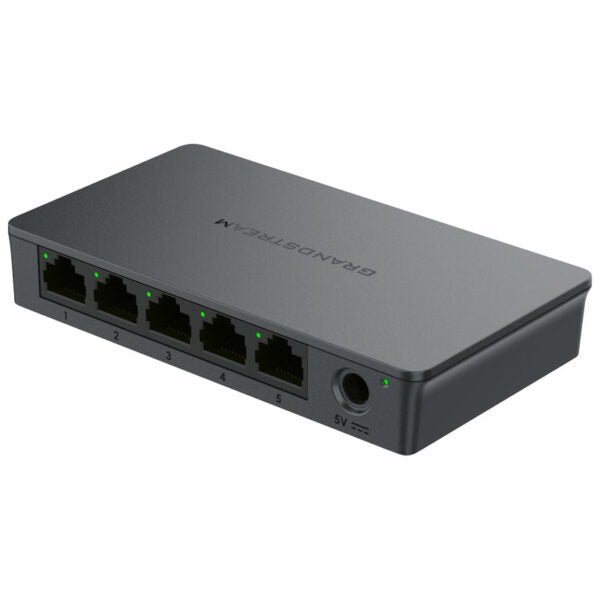
• The GWN7700 series is a line of unmanaged network switches designed for home offices and small/medium businesses. They provide Gigabit connectivity at an affordable price with no configuration or installation required. • Key features include: • Layer 2 Unmanaged Switch • 5 x GigE ports • Auto MDI/MDIX crossover for all ports • Broadcast/Multicast/Unicast Storm Control (fixed to 100Mbps) to monitor traffic levels • QoS – Supports Default Strict Priority when present • LED indicators for link/activity/speed and power on each port • Green technology reduces power consumption • Technical specifications include: • Weight: 0.55 lb • Dimensions: 8.78 × 3.56 × 2.13 in • Switch type: Unmanaged Switches • Number of ports: 5-10 • Main port speed: Gigabit • Uplink ports: Gigabit RJ45 • Layer support: L2 • PoE support: No

About This Product

The GWN7700 is an entry-level unmanaged switch that simply adds five Gigabit Ethernet ports to your network. It’s meant for setups where you need more wired connections without any complexity—a home office or a small retail counter with a couple of computers and a printer.

Because it requires no configuration, you can plug it in and go. It pairs naturally with basic routers that lack enough ports, and it’s reliable for everyday tasks. However, its lack of PoE means VoIP phones and access points will need their own power adapters; the plastic casing is fine for a desk or shelf but wouldn’t suit a factory floor.

For a small business in the GTA that just needs to wire up a few workstations, this switch is ideal. But if your office runs multiple VLANs for voice and data segregation or relies on PoE to clean up cabling, you’ll quickly outgrow this little unit. It’s a straightforward grab when all you need are extra ports—no management, no power‑delivery, just connectivity.
Services We Provide
  • Professional Installation & Configuration
  • Ongoing Maintenance & Support
  • Troubleshooting & Repairs
  • System Upgrades & Updates



